> For the complete documentation index, see [llms.txt](https://help.doraverse.com/llms.txt). Markdown versions of documentation pages are available by appending `.md` to page URLs; this page is available as [Markdown](https://help.doraverse.com/feature-list/ai-notetaker.md).
# AI Notetaker
Capture every meeting with a full transcript, structured notes, and action items.
[What is AI Notetaker?](#what-is-ai-notetaker)
[Plans & limits](#plans-and-limits)
[Get started with AI Notetaker in Doraverse](#get-started-with-ai-notetaker-in-doraverse)
## What is AI Notetaker?
AI Notetaker is your meeting sidekick that handles the boring bits: notes and next steps — so your team stays focused in the conversation and executes faster after.
It captures your meetings, turns them into clear, structured notes, and helps you bridge language gaps with **real-time translation** and easy sharing options.
### What AI Notetaker does
* Turn live meetings or imported recordings into a full transcript and clear, structured notes.
* Translate meetings in real time into your preferred language while the conversation is happening.
* Keep meetings organized and easy to find with tags.
* Generate actionable tasks from the discussion: titles, details, assignees, and due dates — all fully editable.
* Make meetings searchable, shareable, and accountable.
* Share meeting notes via email so you can review and forward them easily.
{% hint style="success" %}
AI Notetaker is currently in beta. Features may evolve as the product develops.
{% endhint %}
***
## Plans & limits
AI Notetaker availability and limits depend on your current Doraverse plan.
**Trial plan**
* Recording duration and recap listening time are limited.
* Real-time translation is available with limited usage.
* Email delivery is available for generated notes.
**Paid plans**
* Higher limits on recording duration and translation usage.
* Additional sharing options within your workspace (depending on your plan).
For the most up-to-date details on which plans include AI Notetaker and their exact limits, please refer to our [Pricing page.](https://doraverse.com/pricing)
## Get started with AI Notetaker in Doraverse
Open AI Notetaker from your workspace’s left navigation. You’ll land on two simple tabs:
* **Meetings:** A clean list of sessions you’ve recorded or uploaded.
* **Action Items:** All tasks generated from meetings.
#### Capture a meeting
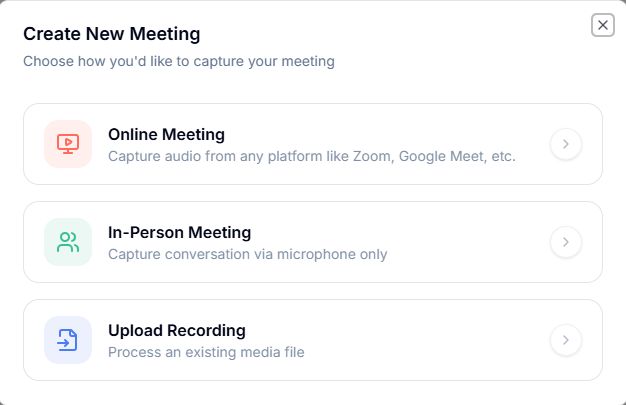
When you’re ready, click **New Meeting**. Choose how you want to capture:
* **Online Meeting:** Let AI Notetaker record a live call from tools like Zoom or Google Meet right from your browser, so you can stay focused on the conversation.
* **In‑Person Meeting:** Use your computer’s microphone to capture a face‑to‑face discussion in the room and turn it into searchable notes.
* **Upload Recording:** Upload an existing audio or video file for processing. Supported formats: mp4, mp3, mov.
After recording or importing, the AI will prepare a full transcript, structure your notes, and suggest action items.
### Use AI Notetaker in an online meeting
1. In the **Online Meeting** dialog:
* Check your **microphone** input.
* Turn on **Also share audio** so Doraverse can hear voices from the meeting.
* Under **Real-time Translation (BETA)**, set **Translate into** to your target language if you want live translation. Leave it **Off** if you only need transcription and notes.
2. Click **Start Record**.
3. Your browser will ask what you want to share:
* Choose the **browser tab**, **window**, or **entire screen** where your online meeting is happening.
* Turn on **Also share system audio** (or similar option) so the meeting sound is captured.
* Click **Share**.
You will be taken to the meeting tab. When you return to Doraverse, you’ll see the recording status and, if enabled, the real-time translation panel.
### Use AI Notetaker in an in-person meeting
1. In the **In-Person Meeting** dialog:
* Select your **microphone**.
* Under **Real-time Translation (BETA)**, choose your target language if you want live translation, or keep it **Off**.
2. Click **Start Record** and place your device where it can clearly capture everyone’s voice.
Doraverse will start recording and, if enabled, translating your conversation in real time.
### Track your recording and real-time translation
While the meeting is being recorded, you’ll see a recording bar at the top of the screen:
* **Recording bar:** Shows that audio is being captured and displays elapsed time.
* **Pause:** Temporarily pause the recording at any time.
If you turned on real-time translation:
* A panel on the right shows:
* The **original transcript** as speakers talk.
* The **translated text** in your chosen language.
* You can switch between **Bilingual**, **Translation only**, and **Original** views to focus on what you need.
If you did not enable real-time translation:
* You will only see the **Recording** bar.
* Translation can still be applied later when you generate notes by choosing an output language.
### Finish a recording and generate meeting notes
1. When the meeting ends, click **Pause** on the recording bar.
2. You’ll see options to:
* **Delete** the recording if you don’t want to keep this session.
* **Generate notes** to create a structured recap from the conversation.
3. Click **Generate notes**. A configuration dialog will appear:
* **Output Language:** Choose the language you want your meeting notes to be written in.
* **Notify me via Email:** Turn this on if you want AI Notetaker to send the meeting note to your inbox.
4. Click **Generate notes** again to confirm.
Doraverse will process the recording and create:
* A full transcript.
* Structured notes of the discussion.
* Suggested action items (if applicable).
If you enabled email notification, a copy of the meeting note will be sent to your registered email automatically.
### Review and refine
* **Add tags** (e.g: team, project, quarter) to keep sessions organized and easy to find later.
* **In Notes:** Edit the meeting notes directly — tighten wording, highlight decisions or add context.
* **In Transcript:** Update speaker to fix any mislabels.
Copy the full transcript or notes when you need to share.
* **In Action Items:** Review the AI’s next steps suggestions, edit titles and details, choose assignees, set deadlines, and add more tasks as needed.
Everything is fully editable, so you can make it work the way your team does.
***
## Share and collaborate
Once your notes are ready, you can share them with others or copy the content for reuse.
You have three ways to share:
* **Share via email**
* **Share with members in your workspace**
* **Copy notes or transcript**
All sharing options are available from the meeting action menu.
***
### Share via Email
Use this when you want to send the meeting note to someone directly — for example, a teammate, manager, or external collaborator.
#### How to share a meeting note by email
1. Open the meeting from the **Meetings** tab.
2. Click **Share via Email** in the top-right of the meeting view.
3. A draft email will open with:
* **From:** AI Notetaker ()
* **Subject:** Notes for \
* **Meeting note content** included in the email body
4. In the **To** field, enter one or more email addresses.
5. Review the content if needed, then click **Send**.
Users receiving the email can read the notes from their inbox without signing in to Doraverse.
> ***Tip:** Use this when sharing with participants outside your workspace, like customers, partners, or vendors.*
***
### Share with workspace members
Use this to share the meeting note **internally**, so your teammates can open and view it inside Doraverse.
#### How to share a meeting note with workspace members
1. Open the meeting from the **Meetings** tab.
2. Click the **••• (More)** menu next to “Share via Email”.
3. Select **Add members**.
4. A **Share Meeting Note** dialog will appear.
5. Search for people by:
* username
* email
* department
6. Select the members you want to share with.
7. Click **Share**.
Those members will immediately have access to the meeting note in Doraverse.
> ***Access note:** Sharing is limited to users already in your workspace. For external recipients, use **Share via Email** instead.*
***
Ready to try? Open AI Notetaker and let the notes write themselves.