# Welcome to Doraverse

Here you will find a great selection of tutorials to help you master your workspace in Doraverse. Take a look at our essential tutorials below to get started today!

<table data-view="cards"><thead><tr><th></th><th></th><th data-hidden data-card-target data-type="content-ref"></th></tr></thead><tbody><tr><td>🚀 <strong>Getting Started</strong></td><td>Everything you need to hit the ground running in Doraverse.</td><td><a href="https://doraverse.gitbook.io/docs/getting-started">https://doraverse.gitbook.io/docs/getting-started</a></td></tr><tr><td>🖇 <strong>Feature List</strong></td><td>All the powerful AI tools and capabilities in Doraverse to help you work smarter and faster.</td><td><a href="https://doraverse.gitbook.io/docs/feature-list">https://doraverse.gitbook.io/docs/feature-list</a></td></tr><tr><td>⛑️ <strong>Help Center</strong></td><td>Find support resources and contact our team when you need help.</td><td><a href="https://doraverse.gitbook.io/docs/help/welcome-to-help-center">https://doraverse.gitbook.io/docs/help/welcome-to-help-center</a></td></tr><tr><td>❔<strong>FAQs</strong></td><td>Quick answers to common questions.</td><td><a href="https://help.doraverse.com/help/faqs">https://help.doraverse.com/help/faqs</a></td></tr><tr><td>✍️ <strong>Feedback</strong> </td><td>Share your ideas and suggestions to help us improve your Doraverse experience.</td><td><a href="https://doraverse.gitbook.io/docs/feeback">https://doraverse.gitbook.io/docs/feeback</a></td></tr></tbody></table>


# Getting Started

<br>


# Doraverse Introduction

An overview of Doraverse and its approach to secure, scalable AI adoption for everyday work.

### Doraverse: The secure All-in-One AI platform for Work

> Doraverse is a secure, business-ready foundation for adopting generative AI—enabling individuals and organizations to use AI with clear governance, strong security, and full operational visibility.

As AI becomes part of daily work, many companies face the same challenges: unmanaged data exposure, fragmented tools, unclear spend, and inconsistent usage. Doraverse addresses this by turning fragmented AI usage into a controlled, scalable capability across teams and the wider organization.

**Doraverse brings governance, unified access to leading AI models, and multi-model orchestration into one secure workspace**, enabling adoption at scale with lower risk, clearer control, and outputs teams can rely on for real business work.

### Why teams and companies choose Doraverse for secure, scalable AI adoption

#### **1. Govern: for enterprise-grade AI governance and security**

Teams choose Doraverse when they need **AI usage that meets business and compliance expectations**, not individual “best effort” rules.

* **Zero-trust, security-first design** to reduce data exposure risk
* **Access control and accountability** across teams and departments
* **Compliance-ready foundation** for organization-wide deployment
* **Operational clarity for leadership** (who uses AI, where, and under what rules)

#### **2. Unify: for centralized access to leading AI models with cost visibility**

Companies choose Doraverse to reduce **subscription fatigue** and regain visibility when AI tools are scattered across teams.

* **Multiple top AI models in one place**, under one workspace
* **One billing and centralized usage management**
* **Transparent cost tracking** by user, team, or purpose
* **Less tool sprawl, fewer “black boxes”**, easier governance

#### **3. Orchestrate: for more accurate, reliable outputs than a single standalone model**

A single LLM can produce strong answers, but its output quality is inherently variable—especially for complex tasks that require cross-checking, multiple perspectives, and consistency.

Doraverse uses an **AI collaboration approach**: it orchestrates multiple top-tier AI models to work together on the same task, producing results that are validated, refined, and more dependable than a single model response.

In practice, this approach helps organizations achieve:

* **Higher accuracy** through cross-model verification and conflict detection
* **More reliable quality** by reducing single-model bias and variability
* **Better robustness on complex work** where one model alone may miss context or make assumptions
* **Greater confidence for business use**, because outputs are produced through a controlled, multi-model process

[*Learn how Doraverse can be applied to supercharge day-to-day team productivity with AI.*](/feature-list)


# Log in to your Workspace

## 1. Sign up & create your workspace

You can sign up and create a workspace for yourself (solo use) or for your team/business here.

Once you sign up, you will receive a welcome email with your login credentials. This email includes **your Doraverse subdomain** (eg, <https://yourcompany.doraverse.com>) and the **email address** you’ll use to log in.

***

## 2. Log in to your workspace

* **Workspace Owner**\
  Log in using the credentials provided in your welcome email.
* **Workspace Members**\
  Each member will receive an **invitation email** with their login credentials. Simply follow the link in the email to access your workspace.

#### What’s Next?

1. Enter your email address on the login page
2. Check your email inbox to get the verification code for login.

That’s it. Welcome to your workspace! You’re ready to chat, collaborate, and unlock the power of Doraverse with your team.


# User Profile

Personalize your profile to make Doraverse truly yours.

## What you **can customize in your account**

* **Avatar:** Upload your photo or an image for your profile.
* **Display Name:** Change the name shown to your team.

To update your avatar or display name, go to **Account** and click on your name section to access **User Profile** tab.

## What you **cannot change in your account**

* **Email Address:** Set by your administrator to ensure workspace security. This cannot be changed.
* **Department:** Set by your administrator for consistency across the workspace. This cannot be chang


# Account Setting

Easily personalize your Doraverse experience and control your workspace environment.

[General Setting](#general-setting)&#x20;

[Chat Setting](#chat-setting)

[Personalization ](#personalization)

[Data Controls Setting](#data-controls)

[Connected Apps](#connected-apps)

Your Doraverse account settings give you full control over how you use your workspace. From customizing your workspace experience to managing privacy and connected apps, everything is designed to help you stay productive and secure.

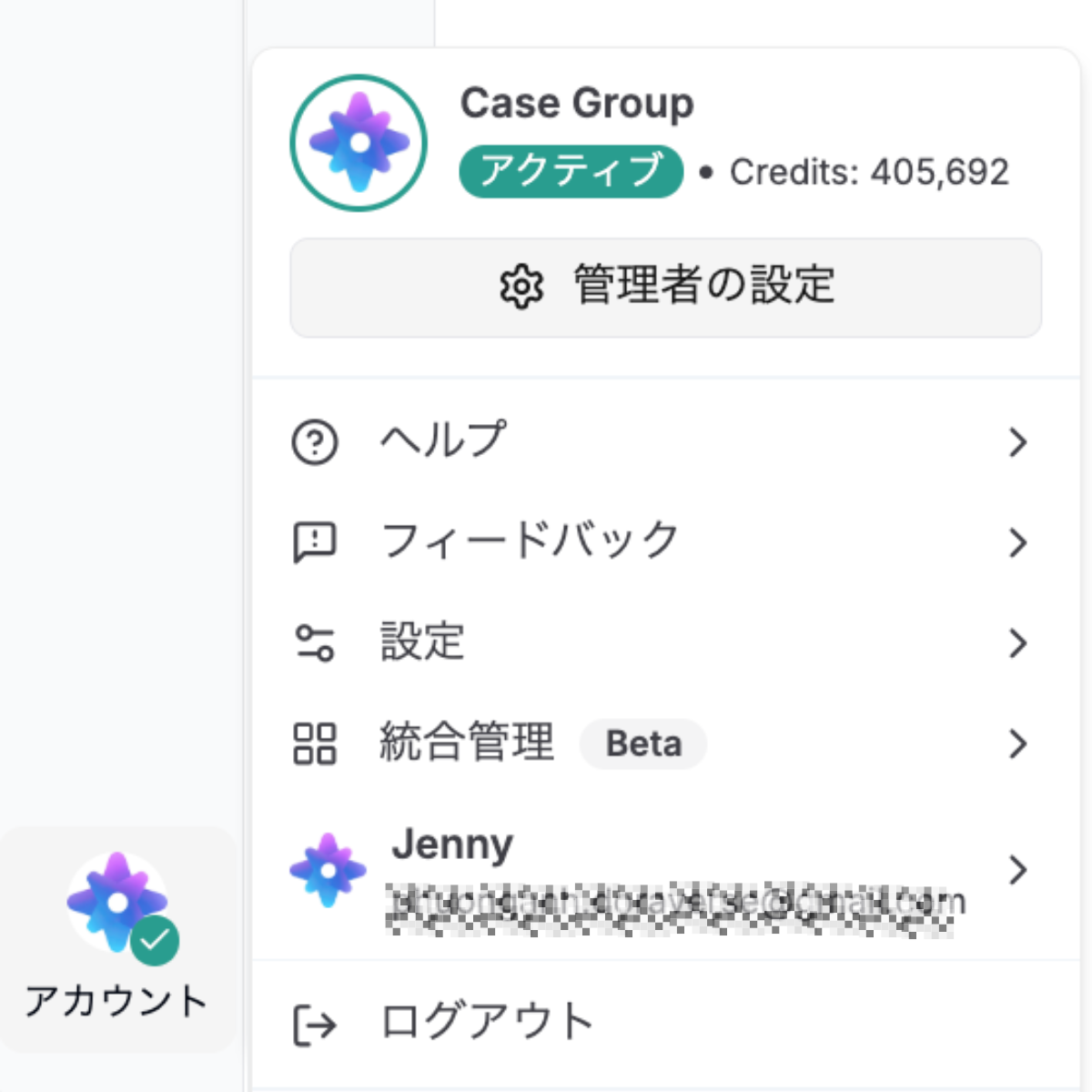
From your home screen, choose **Account -> Setting**.

## General Setting

<figure><img src="https://82687067-files.gitbook.io/~/files/v0/b/gitbook-x-prod.appspot.com/o/spaces%2FbDXFRztwECY7ehfFFQoP%2Fuploads%2FrkQpgRjupwlCYkOv3JKA%2FScreenshot%202025-08-29%20at%2016.35.15.png?alt=media&amp;token=05d53a32-13a0-46ee-a769-f2dad4e32ad9" alt=""><figcaption></figcaption></figure>

* **Theme:** Switch between Light and Dark mode for comfortable viewing based on your environment or preference.
* **Language:** Change the interface language for a more familiar experience.
* **Render user messages as markdown:** Enable to display your messages with markdown formatting (useful for code, lists, and formatting).
* **Auto-Scroll to latest message on chat open:** Turn on to automatically jump to the most recent message each time you open a chat.
* **Hide right-most side panel:** Use this to declutter your screen if you want more focus on the main chat area.
* **Archived chats:** Find and manage your archived conversations for better organization.

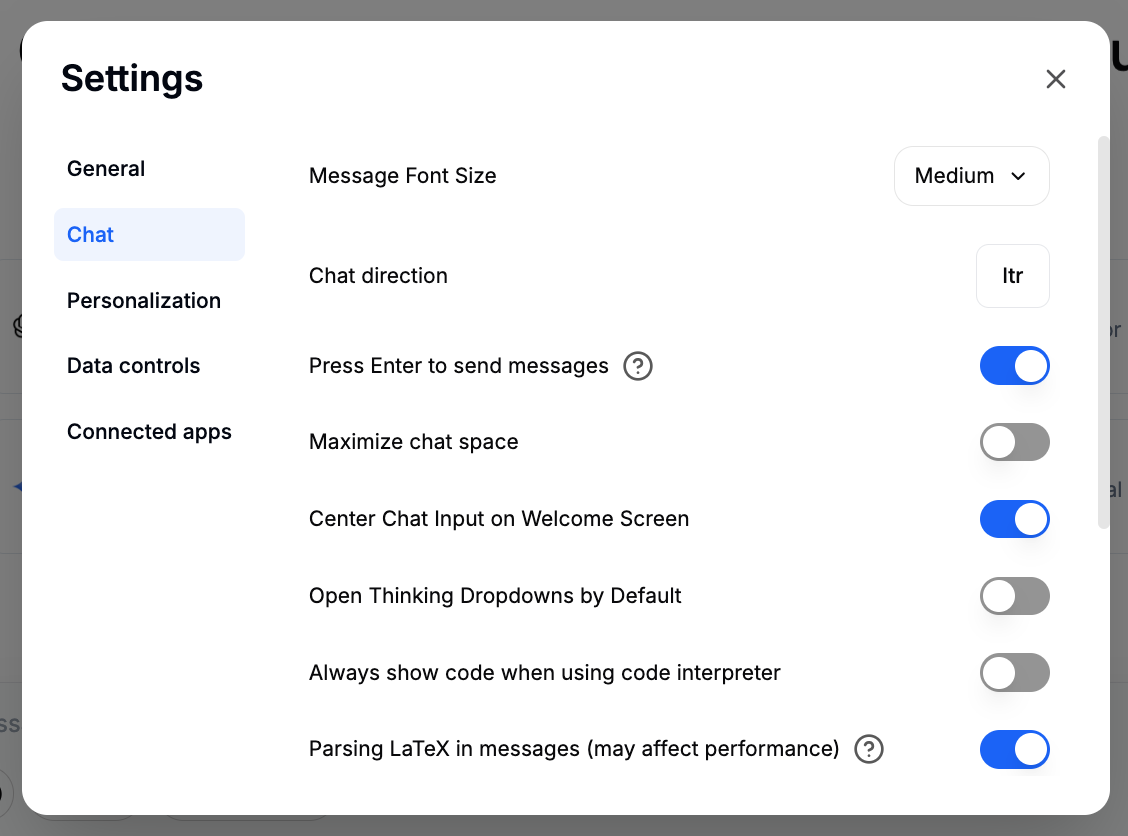
## Chat Setting

<figure><img src="https://82687067-files.gitbook.io/~/files/v0/b/gitbook-x-prod.appspot.com/o/spaces%2FbDXFRztwECY7ehfFFQoP%2Fuploads%2FYV7NlKekcHqmchV9tHg2%2FScreenshot%202025-08-29%20at%2016.52.21.png?alt=media&amp;token=51c4d44d-a74a-4d4a-a2a5-4e3620a9c771" alt=""><figcaption></figcaption></figure>

* **Message Font Size:** Adjust how large the chat text appears for better readability.
* **Chat direction:** Set the direction for your chat input
  * **LTR (Left-to-Right):**

    Most languages, including English, are written from left to right. This is the default chat direction in Doraverse.
  * **RTL (Right-to-Left):**

    Some languages, like Arabic and Hebrew, are written from right to left. Doraverse supports RTL for a seamless, natural reading and writing experience.
* **Press Enter to send messages:** When enabled, pressing `ENTER` will send your message. When disabled, pressing Enter will add a new line, and you’ll need to press `CTRL + ENTER` / `⌘ + ENTER` to send your message.
* **Maximize chat space:** Toggle this to instantly expand your chat box to its maximum size, allowing you to focus fully on your conversation.
* **Center Chat Input on Welcome Screen:** This positions the chat input box in the center when you open Doraverse, create a clean look when you first open Doraverse.
* **Always show code when using Code Interpreter:** Enable this to automatically display the code executed by Code Interpreter for every request—giving you greater visibility and control over each step.
* **Parsing LaTeX in Messages:** Enable Parsing LaTeX in Messages to automatically turn LaTeX code into beautifully rendered mathematical equations within your chats. This helps you write and share complex math and scientific formulas with clarity—perfect for technical discussions or collaborative problem-solving.\
  If you don’t need math formatting or want faster performance, you can disable this option to keep messages simple and speed up loading.
* **Save drafts locally:** When enabled, the text and attachments you enter in the chat form will be automatically saved locally as drafts. These drafts will be available even if you reload the page or switch to a different conversation. \
  Drafts are stored locally on your device and are deleted once the message is sent.
* **Scroll to the end button:** Quickly jump to the bottom of a long conversation.
* **Save Badges State:** Enable Save Badges State to keep your chat badges just as you set them—every new chat will start with the same badge settings as your previous chat. Disable it, and badges will reset to their default each time you start a new conversation.
* **Enable Switching Endpoints Mid-Conversation:** Turn on this to seamlessly change the AI model or Agent you’re using within the current chat—giving you the flexibility to adapt to different needs without starting over.
* **Use Default fork option:** lets you create a separate copy of a chat from any message, so you can continue the conversation in a new direction without changing the original conversation.\
  When choose a fork option, you can choose how Doraverse gathers messages:
  * **Visible messages only:** Includes just the direct path to your selected message. Use this for a focused fork that isolates a specific part of the conversation.
  * **Include related branches:** Adds any branches connected along that path. Great when you want additional context or relevant side discussions alongside your main topic.
  * **Include all to/from here:** Gathers all connected messages and branches in both directions. Ideal for comprehensive forks where you need the full context and all related history.
* **Start fork from target message by default:** When this is enabled, your fork will automatically start from the message you choose and include everything up to the latest message, following the fork option you select.

## Personalization&#x20;

<figure><img src="https://82687067-files.gitbook.io/~/files/v0/b/gitbook-x-prod.appspot.com/o/spaces%2FbDXFRztwECY7ehfFFQoP%2Fuploads%2Fci5yFaERx7DW2WJ4dLUE%2FScreenshot%202025-08-29%20at%2017.05.24.png?alt=media&amp;token=6260a416-6038-4974-8928-43d9b9974f48" alt=""><figcaption></figcaption></figure>

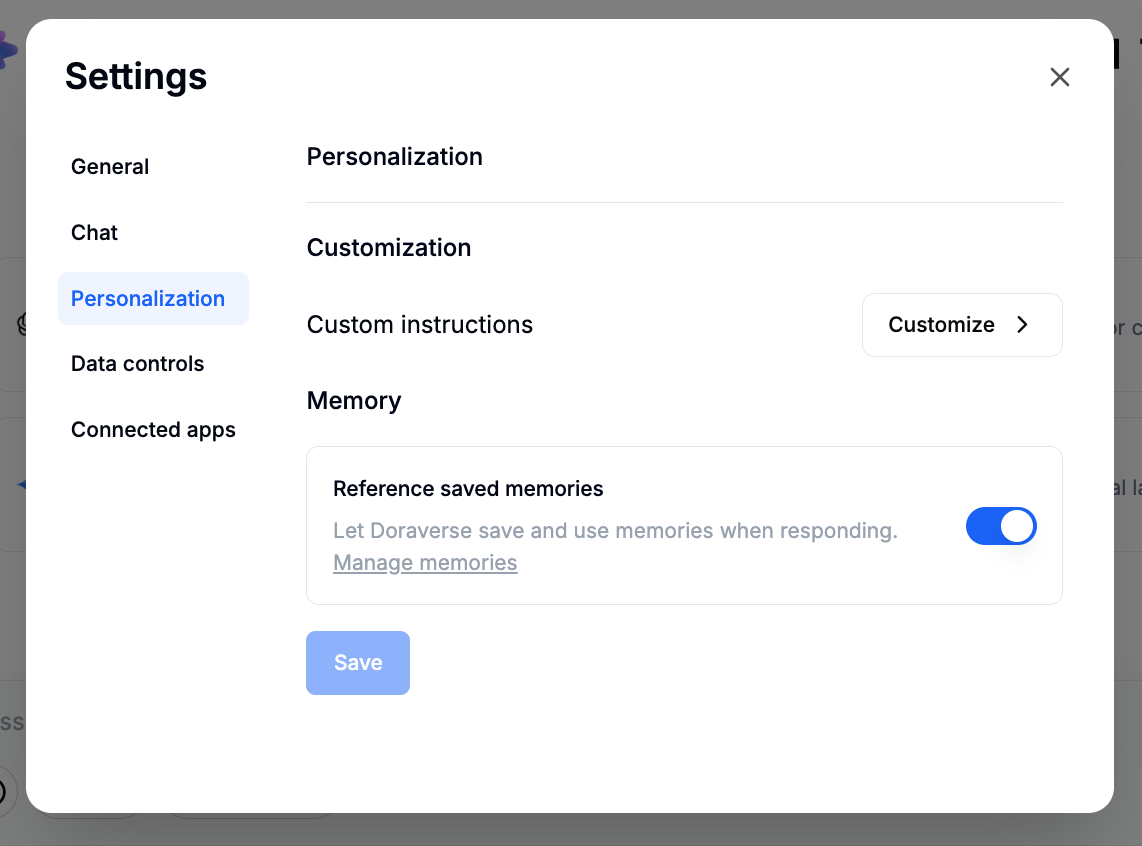
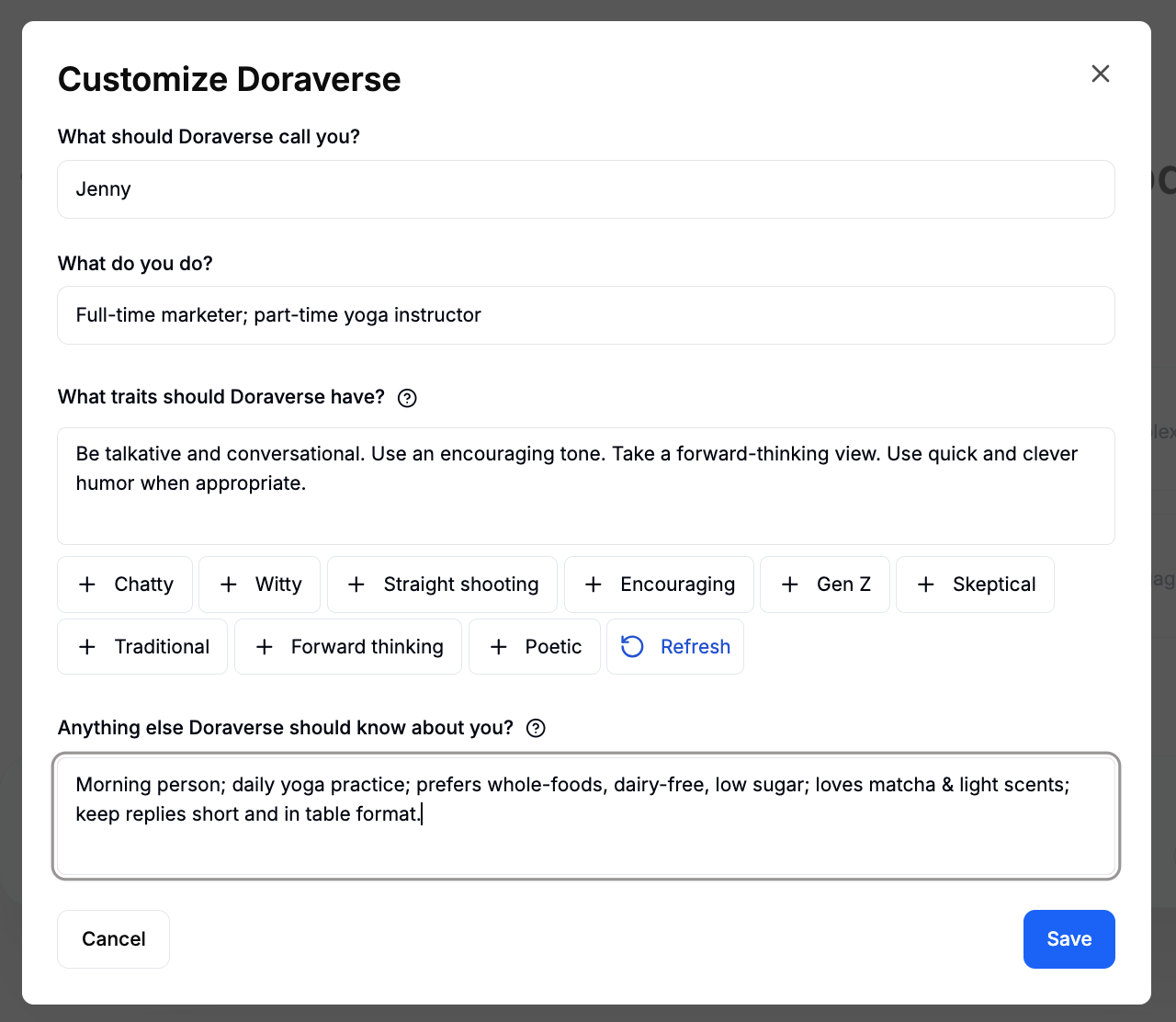
The **Personalization** section allows you to make Doraverse feel more tailored to your way of working. You can set up custom instructions for the AI and enable memory so Doraverse can remember details across sessions.

* **Customization:** This lets you guide how Doraverse should respond to you. By adding custom instructions, you can tell Doraverse your preferred style, context about your work, or specific details it should always keep in mind when assisting you.\
  To set this up, click **Customize**, fill in your instructions, and save them.

<figure><img src="https://82687067-files.gitbook.io/~/files/v0/b/gitbook-x-prod.appspot.com/o/spaces%2FbDXFRztwECY7ehfFFQoP%2Fuploads%2F1FUBEpsnwSYnGUZmu2i3%2FScreenshot%202025-08-29%20at%2017.06.08.png?alt=media&amp;token=5bd1d992-621f-47f4-b4fd-e7e965442dac" alt=""><figcaption></figcaption></figure>

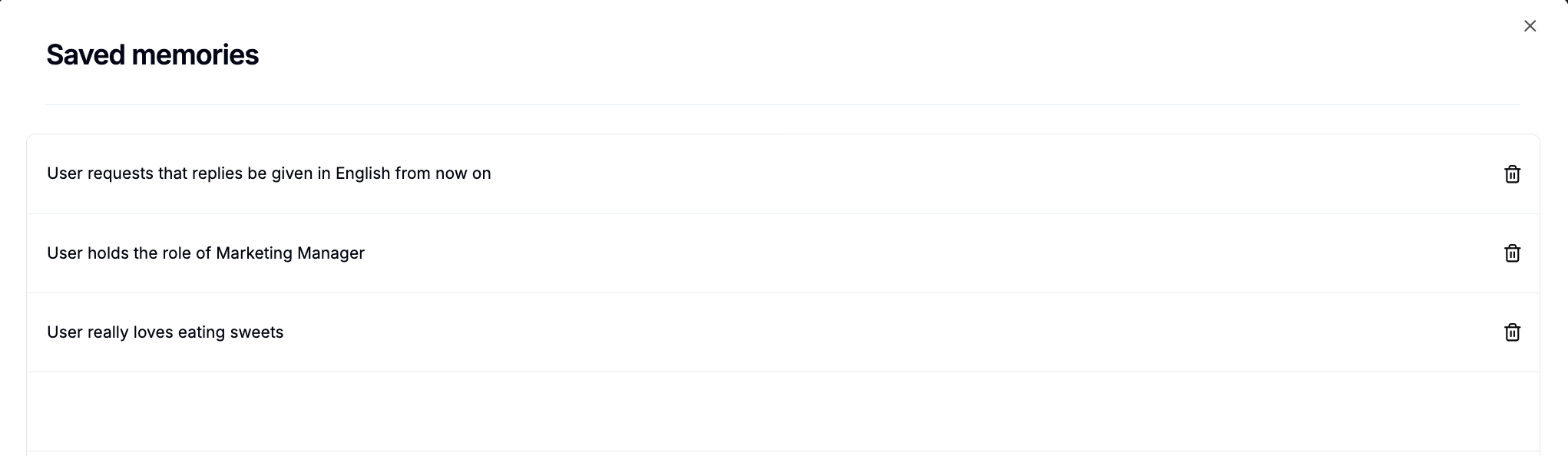
* **Memory:** Doraverse can remember key details—like your name, preferences, or project goals, to make future chats more tailored and helpful. You can tell Doraverse exactly what to remember by saying things like, “Remember that thing I just have said.”\
  Doraverse also references previous messages in your current session for context. To make sure details last for future chats, use saved memories.\
  To use Memory:
  * **Teach:** Just tell the AI what you want it to remember.\
    *For example: “Remember I’m focused on marketing strategies this quarter.”*
  * **See What’s Remembered** \
    *For example, just ask: “What do you remember about me?” to check your saved details.*

**Note:** Turn off saved memories in your settings if you don’t want Doraverse to remember details for future chats, or use **Manage memories** to review, edit, or delete saved information.

<figure><img src="https://82687067-files.gitbook.io/~/files/v0/b/gitbook-x-prod.appspot.com/o/spaces%2FbDXFRztwECY7ehfFFQoP%2Fuploads%2FmZFVBsD4zBHkzUCDKypp%2FScreenshot%202025-08-29%20at%2017.06.50.png?alt=media&amp;token=3e72bf39-5dec-4f84-95df-f4116138e581" alt=""><figcaption></figcaption></figure>

## Data Controls

<figure><img src="https://82687067-files.gitbook.io/~/files/v0/b/gitbook-x-prod.appspot.com/o/spaces%2FbDXFRztwECY7ehfFFQoP%2Fuploads%2FfnOKXeyp8sz1OaFIjQR7%2FScreenshot%202025-08-29%20at%2017.20.30.png?alt=media&amp;token=1d907f4a-b429-4b13-8414-78e21bd4b590" alt=""><figcaption></figcaption></figure>

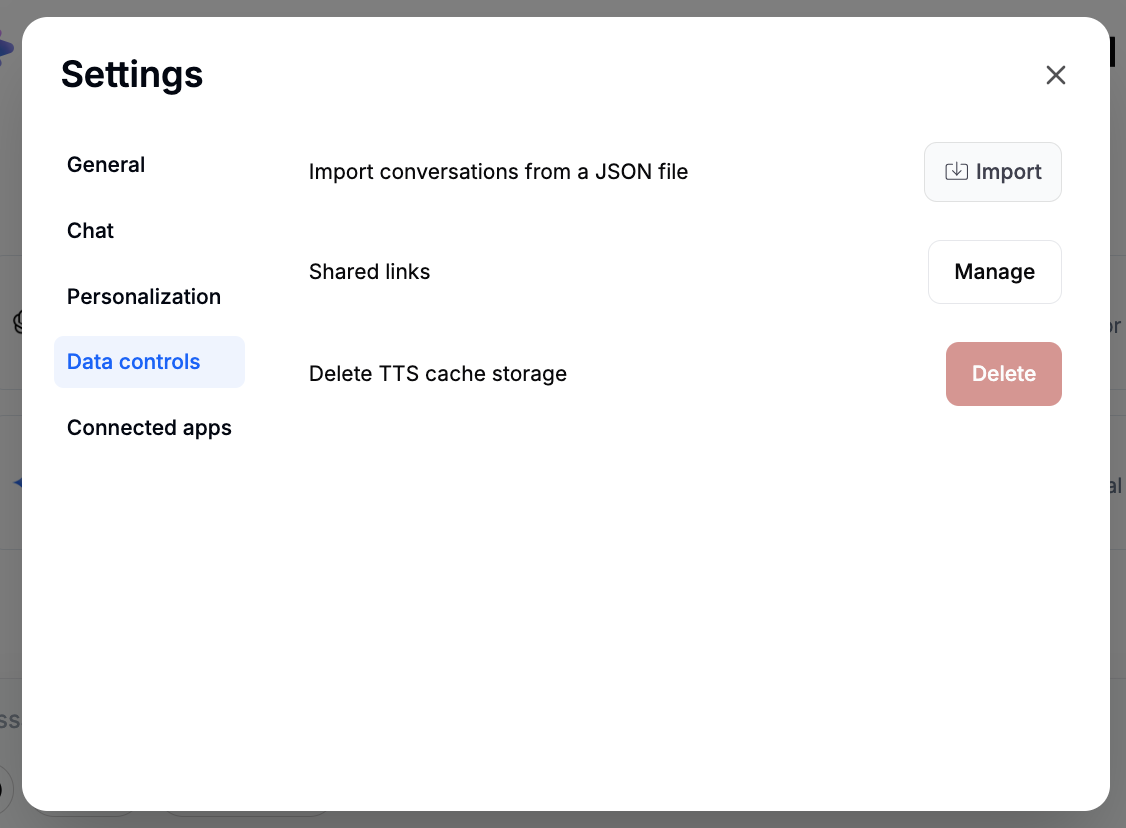
* **Import conversations from a JSON file**: Bring in saved conversations from another file or system.
* **Shared links (Manage)**: View and manage the links you’ve shared with others.
* **Revoke all user provided credentials**: For security, quickly remove any credential you’ve provided for integrations.
* **Delete TTS cache storage**: Clear the stored voice data from your device.

## Connected Apps

<figure><img src="https://82687067-files.gitbook.io/~/files/v0/b/gitbook-x-prod.appspot.com/o/spaces%2FbDXFRztwECY7ehfFFQoP%2Fuploads%2FNtJpbhBDe1tuJjlS4byI%2FScreenshot%202025-08-29%20at%2017.18.10.png?alt=media&amp;token=6418e17e-539d-43d1-9ef5-b82ece365b28" alt=""><figcaption></figcaption></figure>

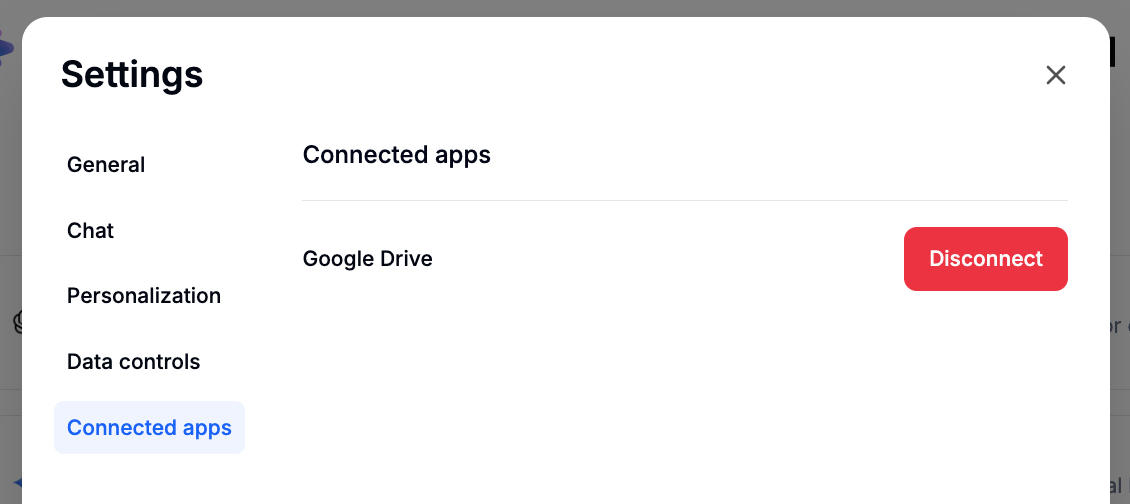
The Connected Apps section is where you find and manage external tools that you have connected to Doraverse.


# Install Doraverse App

Doraverse is available both as a **Progressive Web App (PWA)** that you can install directly from your browser, and as a **native mobile app** you can download from the App Store/Google Play. Choose the option that works best for your device and workflow.

## Desktop Installation (Mac & Windows) <a href="#desktop-installation-mac-and-windows" id="desktop-installation-mac-and-windows"></a>

1. Go to your Doraverse workspace domain on browser.
2. Look for the desktop download icon  or "➕ " on the right side of the address bar.

<figure><img src="https://82687067-files.gitbook.io/~/files/v0/b/gitbook-x-prod.appspot.com/o/spaces%2FbDXFRztwECY7ehfFFQoP%2Fuploads%2FsO0UEnxLuJKOMIl73dfl%2FDoraverse%20app%20on%20desktop_Doraverse.png?alt=media&amp;token=3f62833d-285a-47a8-9f24-1691d6c4cc6a" alt=""><figcaption></figcaption></figure>

3. Confirm by clicking **Install**. Doraverse will now appear in your Start Menu or Applications folder-- just like a native app!

<figure><img src="https://82687067-files.gitbook.io/~/files/v0/b/gitbook-x-prod.appspot.com/o/spaces%2FbDXFRztwECY7ehfFFQoP%2Fuploads%2FgxvzGQWfpuhEqDtbFF0R%2FInstal%20app%20on%20desktop_Doraverse.png?alt=media&amp;token=9da4fee2-2abf-4374-a454-7cae9461969d" alt=""><figcaption></figcaption></figure>

## Mobile Installation (iOS & Android) <a href="#mobile-installation-ios-and-android" id="mobile-installation-ios-and-android"></a>

#### iOS (App Store)

Open the App Store on your device and search for Doraverse, or access it directly from [here](https://apps.apple.com/us/app/doraverse-ai-universe-of-work/id6748024399)

**Android**

Our native Android app is coming soon. In the meantime, you can install Doraverse as a Progressive Web App:

1. Open browser on your device and visit your Doraverse workspace domain.
2. Tap the three-dot menu (︙)  in top-right corner.
3. You **two options** under “**Add to home screen**”:
   1. **Install**\
      ➤ This installs Doraverse as a Progressive Web App (PWA).
   2. **Create shortcut**\
      ➤ This adds a home screen shortcut, but it opens in a browser tab.

<figure><img src="https://82687067-files.gitbook.io/~/files/v0/b/gitbook-x-prod.appspot.com/o/spaces%2FbDXFRztwECY7ehfFFQoP%2Fuploads%2F7fszqwUv9QyXEGXuelz6%2FAndroid%20install_Doraverse.png?alt=media&amp;token=94e0d2e7-a059-4745-a420-616c4751110b" alt=""><figcaption></figcaption></figure>

You’ll now see the Doraverse icon on your home screen. Tap it to use Doraverse on your mobile anytime!


# Feature List

Explore a suite of AI-powered features, designed to supercharge your productivity and workflow.

{% content-ref url="/spaces/bDXFRztwECY7ehfFFQoP/pages/6ovJFD3jMVqF4m5OVS7B" %}
[Available AI Models](/feature-list/available-ai-models)
{% endcontent-ref %}

{% content-ref url="/spaces/bDXFRztwECY7ehfFFQoP/pages/0vBpYkM2k7YbxJnJTD2K" %}
[Chat with AI Models](/feature-list/chat-with-ai-models)
{% endcontent-ref %}

{% content-ref url="/spaces/bDXFRztwECY7ehfFFQoP/pages/0DO9QsB3ZtjO9DJ2qz2H" %}
[Project](/feature-list/project)
{% endcontent-ref %}

{% content-ref url="/spaces/bDXFRztwECY7ehfFFQoP/pages/LH5K9O1rpP94UcEO16Ue" %}
[AI Agents](/feature-list/ai-agents)
{% endcontent-ref %}

{% content-ref url="/spaces/bDXFRztwECY7ehfFFQoP/pages/vozbNWLB8UXPQCWLySmo" %}
[Prompt Library](/feature-list/prompt-library)
{% endcontent-ref %}

{% content-ref url="/spaces/bDXFRztwECY7ehfFFQoP/pages/snRtfhavF9Eqmp5RSSUY" %}
[Create Image](/feature-list/create-image)
{% endcontent-ref %}


# Available AI Models

Doraverse supports a growing collection of top-tier LLMs, allowing you to choose the most suitable model for your task.

## Multimodal LLM

{% tabs %}
{% tab title="ChatGPT Pro" %}

### **GPT-5.2 Instant**

OpenAI's most-used model for daily tasks.

### **GPT-5.2 Thinking**

OpenAI's advanced reasoning model.

### **GPT-5 Mini**

Fast, cost-efficient for well-defined tasks & precise prompts.

### **GPT-5.1 Codex**

Optimized for long-running agentic coding with a steerable style
{% endtab %}

{% tab title="Claude Pro" %}

### **Claude Opus 4.5**

Anthropic best model in the world for coding, agents, and computer use.

### **Claude Sonnet 4.5**

Anthropic's strongest model for building complex agents and coding.

### **Claude Haiku 4.5**

Anthropic fastest and most intelligent Haiku model with near-frontier performance.
{% endtab %}

{% tab title="Gemini Advanced" %}

### **Gemini 3 Pro**

Google’s best agentic & vibe-coding model.

### **Gemini 3 Flash**

A speed-optimized Gemini model, ideal for fast search & Google integration's assistants.

### **Gemini 3 Deep Thinking**

Google’s advanced reasoning model, excelling in deep thought for complex logic, math, and coding tasks.
{% endtab %}

{% tab title="SuperGrok" %}

### **Grok 4.1 Fast**

xAI’s fastest, most cost‑efficient model, optimized for real‑time web & X search.

### **Grok 4.1 Fast Thinking**

xAI’s most creative, emotionally intelligent & capable model, featuring advanced agentic reasoning.
{% endtab %}

{% tab title="DeepSeek" %}

### **Deepseek Chat**

Deepseek's multilingual conversational model designed for efficient standard chat.

### **Deepseek Reasoner**

DeepSeek's reasoning model that delivers faster, transparent multi-step thinking.
{% endtab %}
{% endtabs %}

## Image Generation Model

{% tabs %}
{% tab title="Gemini" %}

### Nano Banana (Gemini 2.5 Flash **Images)**

Google's state-of-the-art image generation and editing model.&#x20;

### **Nano Banana Pro**

Google's state-of-the-art image generation and editing model.
{% endtab %}

{% tab title="ByteDance" %}

### **Seedream 4.0**

ByteDance's newest, most advanced image generator & editor for pro designers with 4K output.
{% endtab %}

{% tab title="Flux.1" %}

### **Flux.1 Kontext Pro**

Flux.1's professional-grade model for precise, context-aware editing.

### **Flux.1 Kontext Max Multi**&#x20;

Flux.1's flagship model, generating consistent images for storytelling.
{% endtab %}

{% tab title="ChatGPT" %}

### **ChatGPT-Image 1**

OpenAI's best AI model for quick, natural image generation.
{% endtab %}
{% endtabs %}

## Video Generation Model

{% tabs %}
{% tab title="Sora 2" %}

### Sora 2

OpenAI's flagship video generation with synced audio.

### Sora 2 Pro

OpenAI's most advanced synced-audio video generation.
{% endtab %}

{% tab title="VEO 3" %}

### Veo 3.1&#x20;

Google DeepMind's state-of-the-art model for generating high-fidelity, 8-second 720p or 1080p videos featuring stunning realism and natively generated audio.&#x20;

### Veo 3.1 Fast

Speed & cost-optimized video generator with near-Google-Veo-3.1 quality.

### Veo 3

Google DeepMind's most advanced AI model for generating high-quality, cinematic videos with integrated, synchronized audio from simple text prompts or images.&#x20;
{% endtab %}

{% tab title="Kling" %}

### **Kling Standard**

Advanced motion synthesis that respects physics & object relationships.

### **Kling Pro**

Full‑HD videos up to 10s with dynamic motion & precise framing

### **Kling Master**

Pro‑grade cinematic videos with scene coherence & realism.
{% endtab %}

{% tab title="ByteDance" %}

### **Seedance Lite**

Fast videos up to 720p with lower resource usage.

### **Seedance Pro**

Pro‑grade cinematic videos with scene coherence & realism.
{% endtab %}
{% endtabs %}

## **📌 Note**

Doraverse continuously updates to support **the latest models** as soon as they are released — ensuring you always have access to the most advanced AI.


# Chat with AI Models

[Create new chat ](#create-new-chat)

[Choose AI Model to chat](#choose-ai-model-to-chat)

[Chat Toolbar](#chat-toolbar)

[Feedback and Action Bar](#feedback-and-action-bar)

[Citations with clickable source links](#citations-with-clickable-source-links)

[Conversation Sidebar](#conversation-sidebar)

[Conversation Options: Move to Project, Rename, Duplicate, Archive, Share](#conversation-actions)

## Create New Chat

From the left navigation bar, click **New chat** to start a new conversation.

* When the conversation sidebar is collapsed, use the left navigation bar and click the **second icon from the bottom** to open a new chat.

<figure><img src="https://82687067-files.gitbook.io/~/files/v0/b/gitbook-x-prod.appspot.com/o/spaces%2FbDXFRztwECY7ehfFFQoP%2Fuploads%2Fmqu87PMHxe5WSWta3Os9%2Fimage.png?alt=media&amp;token=7eb3a1a4-b2c4-466c-99b6-78c0c271fa46" alt=""><figcaption></figcaption></figure>

* When the conversation sidebar is expanded, simply click New chat at the top of the list.

<figure><img src="https://82687067-files.gitbook.io/~/files/v0/b/gitbook-x-prod.appspot.com/o/spaces%2FbDXFRztwECY7ehfFFQoP%2Fuploads%2FdttsUZv6aLuBQ8RjU6cb%2Fimage.png?alt=media&amp;token=d54a539f-f821-420f-a698-b24a59f96e5e" alt=""><figcaption></figcaption></figure>

A new blank chat will open. Choose your model and start typing your message.

***

## Choose AI Model to chat

Instantly switch between powerful AI models to get the best response for every task — writing, coding, searching, and more.

At the bottom-right corner of the prompt input bar, click the model dropdown to view available LLM models and versions. Each model includes a brief description of its strengths and ideal use cases, so you can quickly choose the one that best fits your needs.

<figure><img src="https://82687067-files.gitbook.io/~/files/v0/b/gitbook-x-prod.appspot.com/o/spaces%2FbDXFRztwECY7ehfFFQoP%2Fuploads%2F2uTRYWC3gYNlD967rKJA%2Fimage.png?alt=media&amp;token=b9184f2a-121a-4ed8-ae8d-b3087a71f6a1" alt=""><figcaption></figcaption></figure>

💡 **Tip:**\
Not sure which model to use? Try several for the same question and see which gives you the results you like best.&#x20;

For even more details, visit our [**Available AI Model**](https://doraverse.gitbook.io/docs/feature-list/available-ai-models) for an in-depth comparison.

***

## Chat Toolbar

The Chat Toolbar offers a powerful set of tools and shortcuts to help you interact seamlessly with the AI Models. Here’s a quick overview of each button available in the Doraverse's chat bar:

### Upload File (📎)

Easily upload and share files with AI in chat to support your conversations. Click the  (📎) icon in your chat toolbar to access two options:

* **Upload from computer:** Choose files stored locally on your device.
* **Connect to Google Drive:** Select files directly from your Google Drive for instant integration.<br>

<figure><img src="https://82687067-files.gitbook.io/~/files/v0/b/gitbook-x-prod.appspot.com/o/spaces%2FbDXFRztwECY7ehfFFQoP%2Fuploads%2FBM68uYsX54OkcdyN4Bg5%2Fimage.png?alt=media&amp;token=527386a4-3aa5-4aab-aed1-27a38b66966b" alt=""><figcaption></figcaption></figure>

#### How to connect your Google Drive to Doraverse:

* Option 1: In the chat bar, click on (📎) icon and select **Connect to Google Drive**.
* Option 2: Go to **Account** -> **Settings** -> **Connected apps** -> Find **Google Drive** and click **Connect**.

After selecting Google Drive, you may be prompted to sign in and enable Doraverse access.

<figure><img src="https://82687067-files.gitbook.io/~/files/v0/b/gitbook-x-prod.appspot.com/o/spaces%2FbDXFRztwECY7ehfFFQoP%2Fuploads%2FXcTwG9giGR6Yyz2AlZ0m%2FConnect%20GG%20Drive.png?alt=media&amp;token=845b06b6-e7db-4a34-a4ae-23264fbcb964" alt=""><figcaption></figcaption></figure>

Once access is granted, you’ll be able to browse and pick files directly from your Google Drive within the chat.

<figure><img src="https://82687067-files.gitbook.io/~/files/v0/b/gitbook-x-prod.appspot.com/o/spaces%2FbDXFRztwECY7ehfFFQoP%2Fuploads%2FhRjoA5afmiwoxGoxQNvB%2FConnect%20GG%20Drive_2.png?alt=media&amp;token=b249129f-b43d-4af3-bf40-dd9ba374523b" alt=""><figcaption></figcaption></figure>

***

## **Feedback and Action Bar**

The Feedback and Action Bar provides easy ways to interact with each AI response, helping improve the AI model and making your experience more efficient.&#x20;

#### **1. Provide Feedback**

* **Thumbs-Up (Like):** Click this if the AI’s response is helpful, clear, or accurate. Positive feedback helps the model identify effective responses and reinforce quality answers.
* **Thumbs-Down (Dislike):** Click this if the response is incorrect, incomplete, or confusing. Negative feedback helps the model recognize errors and avoid repeating them in future responses.

#### **2. Suggest Edit**

If the AI’s response could be clearer, more precise, or better phrased, use the pencil icon to suggest improvements. This helps the model learn preferred styles, wording, and information accuracy.

After making your edits, don’t forget to click **Save & Submit** to send your suggestions.&#x20;

#### **3. Copy Response**

Use this to quickly copy the AI’s response for use elsewhere:

* **Copy as Markdown:** Preserves formatting such as headings, lists, and links. Ideal for pasting into markdown-supported platforms.
* **Copy as Plain Text:** Copies the response as simple text without formatting, suitable for plain text editors or emails.

#### **4. Regenerate**

Request a new AI response to the same query. Useful when you want alternative perspectives or refined answers without starting a new conversation.

#### **5. Read Aloud**

Have the AI read the response aloud, convenient for multitasking or accessibility needs.

#### **6. Branch from This**

When you choose **Branch from This**, you’re starting a new conversation path from a specific message, letting you explore new ideas from any point in the chat.

When you branch from a message, a **new conversation** is created that includes **all messages from the beginning of the chat up to the selected message**. Messages after that point are not included in the new conversation, so you can explore a different direction while keeping the original thread unchanged.

This gives you:

* A clean, focused conversation that stops exactly at the message you chose.
* Full context leading up to that point, so no important information is lost.
* The freedom to try alternative prompts, instructions, or ideas from a meaningful checkpoint in the conversation.

***

## Citations with clickable source links

When using search models (including available search AI models and Doraverse’s built-in Search/Deep Research tool), you’ll notice **inline citations** (e.g., \[1], \[2]) at the end of each sentence when a response is informed by external information.&#x20;

To verify or explore information further, simply hover over a citation. This allows you to review the original source—ensuring full transparency and reliability in every answer.

<figure><img src="https://82687067-files.gitbook.io/~/files/v0/b/gitbook-x-prod.appspot.com/o/spaces%2FbDXFRztwECY7ehfFFQoP%2Fuploads%2FkKHclRSeCQagzaAiGS6y%2FSource%20Links%3ACitations.png?alt=media&amp;token=9521e022-2c11-45d9-acec-eb5167838cd6" alt=""><figcaption></figcaption></figure>

***

## Conversation **Sidebar**

The **Conversation Sideba**r is your conversation central navigation hub, helping you seamlessly switch between conversations and projects, stay organized and manage your work more efficiently.

<figure><img src="https://82687067-files.gitbook.io/~/files/v0/b/gitbook-x-prod.appspot.com/o/spaces%2FbDXFRztwECY7ehfFFQoP%2Fuploads%2F2dGBFLqSrcq15f93iNEL%2FConversation%20Sidebar.png?alt=media&amp;token=d4626703-500d-4240-b2b6-c38858b1cfbe" alt=""><figcaption></figcaption></figure>

You can choose to hide or show the Conversation Sidebar at any time by clicking the toggle button.

### What you can find in the Conversation Sidebar?

### 🔍 Search Message Bar

Enter a keyword to instantly see related messages and conversations. Quickly find any information you need.

### 🔁 Automation

Put repetitive work on autopilot with AI‑powered workflows. Use Automation to connect your everyday tools, schedule recurring tasks, and let AI handle them for you in the background — no coding required.

**See** [**AI Automation**](https://help.doraverse.com/feature-list/ai-automation) for a full guide on how to set up and manage your automations.

### 📂 Projects

Easily keep chats, files, and custom instructions in one place. Use Projects to stay on top of ongoing tasks or simply to keep your workspace tidy and efficient.

**See**[ **How to Create a Project**](https://doraverse.gitbook.io/docs/feature-list/project#how-to-create-a-project)

### 📃 Chat History

Your recent conversations are organized by time, so you can effortlessly locate and pick up where you left off.&#x20;

### ⋮ Conversation Options (Three-Dot Menu)

Click the three-dot menu next to a conversation title to access useful actions:

* **Move to Project:** Move a conversation to your Project
* **Share Conversation:** Generate a link or QR code to share the conversation with colleagues.
* **Rename Conversation:** Change the conversation title for better project or topic tracking.
* **Archive Conversation:** Move the chat out of your main view without deleting it, keeping your workspace clutter-free.\
  To find **Archive Conversation:** Go to **Account → Settings → General** **→** **Archived Chats** and click the **Manage** button next to it.
* **Delete Conversation:** Permanently remove the conversation if it’s no longer needed.


# AI Debate

Reduce bias, blind spots, and get a stronger, more trusted answer every time.

## What is Debate in Doraverse?

Debate is a fresh way to work with multiple AI models in Doraverse. Instead of receiving a single response, Debate lets several models challenge each other and refine their viewpoints. This gives you deeper insights, fewer blind spots, and a more reliable final answer.

Debate is designed to support users who want multi-perspective reasoning and clearer decision-making in their day-to-day work.

***

## How Debate works

In Doraverse, Debate is a structured, multi-model discussion. Each model responds in sequence and builds on the previous response, working together like an “AI review team.”\
The first model you choose creates the core answer.\
The following models act as critical reviewers: they look for missing angles, question weak or risky assumptions, and highlight areas that need clarity. Each reviewer adds challenge, depth, and new perspectives to the discussion.

This process transforms a single answer into a richer analysis — more angles explored, fewer blind spots, and a final conclusion you can trust more.

***

## How Debate helps your everyday work

Debate improves clarity and decision-making in many situations:

* Understand complex topics from multiple angles
* Compare solutions and spot risks earlier
* Reduce bias by letting models challenge one another
* Get stronger reasoning instead of one isolated reply
* Save time switching between models manually
* Build more confident proposals, briefs, reports, and documents

***

## How to use Debate in Doraverse

1. **Choose Debate in the chat bar.** \
   Select the AI models in the order you want them to debate. The order you choose decides the order of responses.<br>

   <figure><img src="https://82687067-files.gitbook.io/~/files/v0/b/gitbook-x-prod.appspot.com/o/spaces%2FbDXFRztwECY7ehfFFQoP%2Fuploads%2FEiMguj6LVPvm3v4Wzu5V%2FChoose%20Debate.png?alt=media&amp;token=d489eb74-d75e-4c12-b027-05fb5ded7c56" alt=""><figcaption></figcaption></figure>
2. **Write the topic or problem that needs multi-perspective analysis**\
   This can be a complex question, a decision you need to evaluate, a comparison, or any problem that requires different angles. Or you can start with a suggestions from Doraverse.

   <figure><img src="https://82687067-files.gitbook.io/~/files/v0/b/gitbook-x-prod.appspot.com/o/spaces%2FbDXFRztwECY7ehfFFQoP%2Fuploads%2F9VwZYEgKlNBH2v2uBsJ1%2FDebate%20prompt.png?alt=media&amp;token=9c7b0882-fae8-4f8c-aff4-0f761ba69bd9" alt=""><figcaption></figcaption></figure>
3. **Start the debate**\
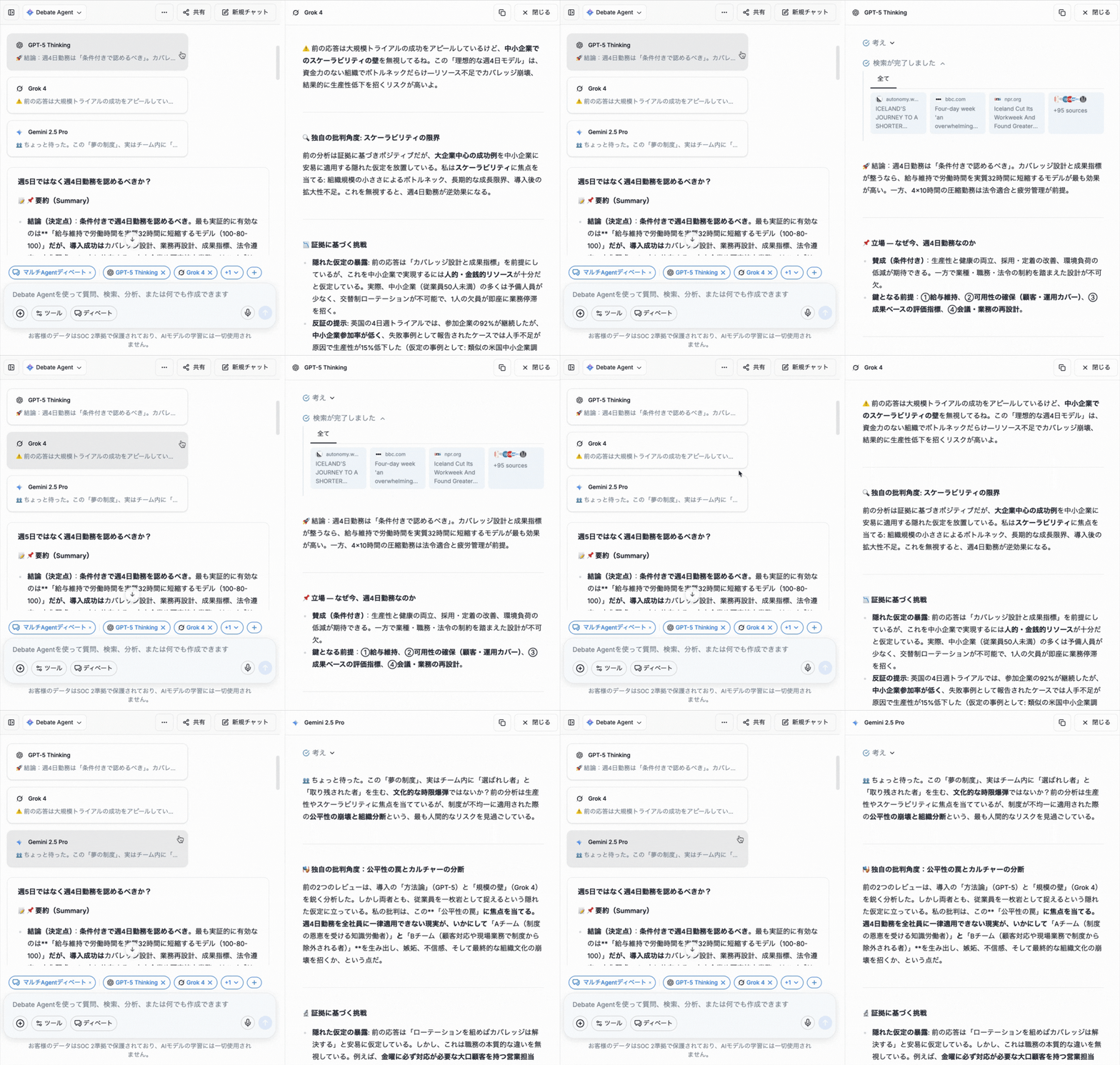
   Each model will take its turn to think and debate. You can click on each model’s card to open a UI window on the right and see its full thinking process: how it analyzes the topic, how it challenges or refines previous claims, where it agrees or disagrees, and how its arguments evolve over time.

<figure><img src="https://82687067-files.gitbook.io/~/files/v0/b/gitbook-x-prod.appspot.com/o/spaces%2FbDXFRztwECY7ehfFFQoP%2Fuploads%2Fh0AlMYvdgD7Gz7moCnVV%2FDebate%20process.gif?alt=media&amp;token=d1728e03-2b6e-4395-9be5-f4d417562df5" alt=""><figcaption></figcaption></figure>

4. **Read the Summary**\
   After all models have finished debating, Doraverse generates a final summary that brings together the strongest points from the discussion. You can save it, continue refining, or use it directly in your work.

<figure><img src="https://82687067-files.gitbook.io/~/files/v0/b/gitbook-x-prod.appspot.com/o/spaces%2FbDXFRztwECY7ehfFFQoP%2Fuploads%2FxoZyYOwjUZLXzuyuZDwj%2FScreenshot%202025-11-15%20at%2015.20.16.png?alt=media&amp;token=447d3ea0-f782-4361-9f81-5e98cd43259f" alt=""><figcaption></figcaption></figure>

<figure><img src="https://82687067-files.gitbook.io/~/files/v0/b/gitbook-x-prod.appspot.com/o/spaces%2FbDXFRztwECY7ehfFFQoP%2Fuploads%2FVZmKX0Jd5Kqoy0fJ7SwG%2FScreenshot%202025-11-15%20at%2015.21.02.png?alt=media&amp;token=bb34c897-8fdd-48cc-a672-9b0cadc11ef2" alt=""><figcaption></figcaption></figure>

***

Try Debate today! Test it with any topic or problem and see how much clearer your work becomes.


# AI Parallel

## What is Parallel in Doraverse?

Parallel is a fast way to work with multiple AI models in Doraverse — all at the same time.

Instead of debating with each other, the models respond **independently** to the same prompt. You get several different answers in one go, without having to ask each model separately.

While **Debate** lets models read, challenge, and refine each other’s answers to reach a stronger conclusion, **Parallel** focuses on giving you **separate, independent responses** from each model. If you want a multi-step discussion between models instead, learn more in [AI Debate](/feature-list/ai-debate).

Parallel is designed for users who want **quick comparison, diverse options, and independent viewpoints** from multiple models in their day-to-day work.

***

## How Parallel works

In Doraverse, all selected models receive the same prompt and generate their own answers independently.

* Each model thinks and responds on its own.
* Models **do not read or react to** each other’s answers.
* There is **no cross‑checking or debating** between models.

You can then scan all responses side by side to compare styles, ideas, and depth of reasoning. It feels like asking the same question to different experts at once — each with their own voice and approach.

This setup is ideal when you want **variety and speed**, rather than a single, refined conclusion.

***

## How Parallel helps your everyday work

Parallel makes it easier and faster to explore options in many scenarios:

* Generate multiple ideas, drafts, or outlines from a single prompt
* Compare how different models interpret your request
* Quickly spot which model fits your task or writing style best
* Save time switching between GPT, Gemini, and other models manually
* Stress‑test a prompt by seeing different responses side by side
* Build alternatives for content, copy, or solutions in one click

With Parallel, you don’t need to manage multiple chats or copy‑paste the same prompt over and over — Doraverse does that work for you.

***

## How to use Parallel in Doraverse

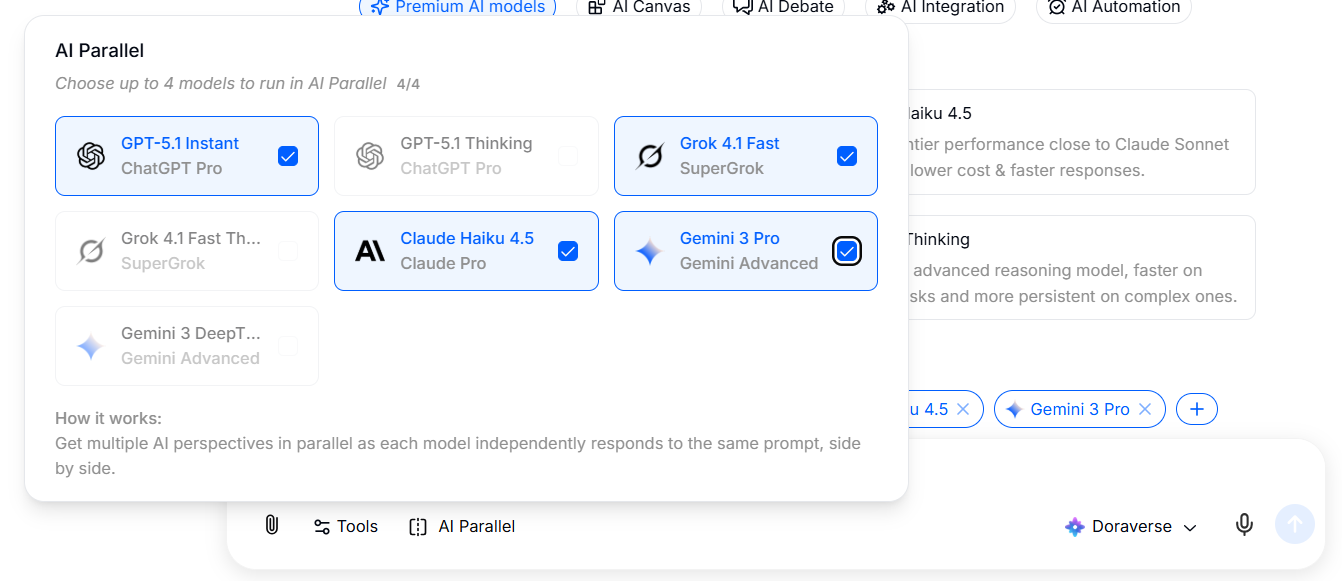
1. **Choose Parallel in the chat bar.** \
   Select the AI models you want to run in Parallel. All selected models will receive the same prompt and respond at the same time.<br>

   <figure><img src="https://82687067-files.gitbook.io/~/files/v0/b/gitbook-x-prod.appspot.com/o/spaces%2FbDXFRztwECY7ehfFFQoP%2Fuploads%2Fkz5LfAyNlqlqS6JvpsD5%2Fimage.png?alt=media&amp;token=2a486227-797e-46f8-a720-197de70a257e" alt=""><figcaption></figcaption></figure>
2. **Write the topic or problem that needs multi-perspective analysis**\
   This can be a complex question, a decision you need to evaluate, a comparison, or any problem that requires different angles. Or you can start with a suggestions from Doraverse.

   <figure><img src="https://82687067-files.gitbook.io/~/files/v0/b/gitbook-x-prod.appspot.com/o/spaces%2FbDXFRztwECY7ehfFFQoP%2Fuploads%2FxBZcgyky0eSgPRIdDM4G%2Fimage.png?alt=media&amp;token=3edf58b1-ab53-493e-835d-38b968b2e6ea" alt=""><figcaption></figcaption></figure>
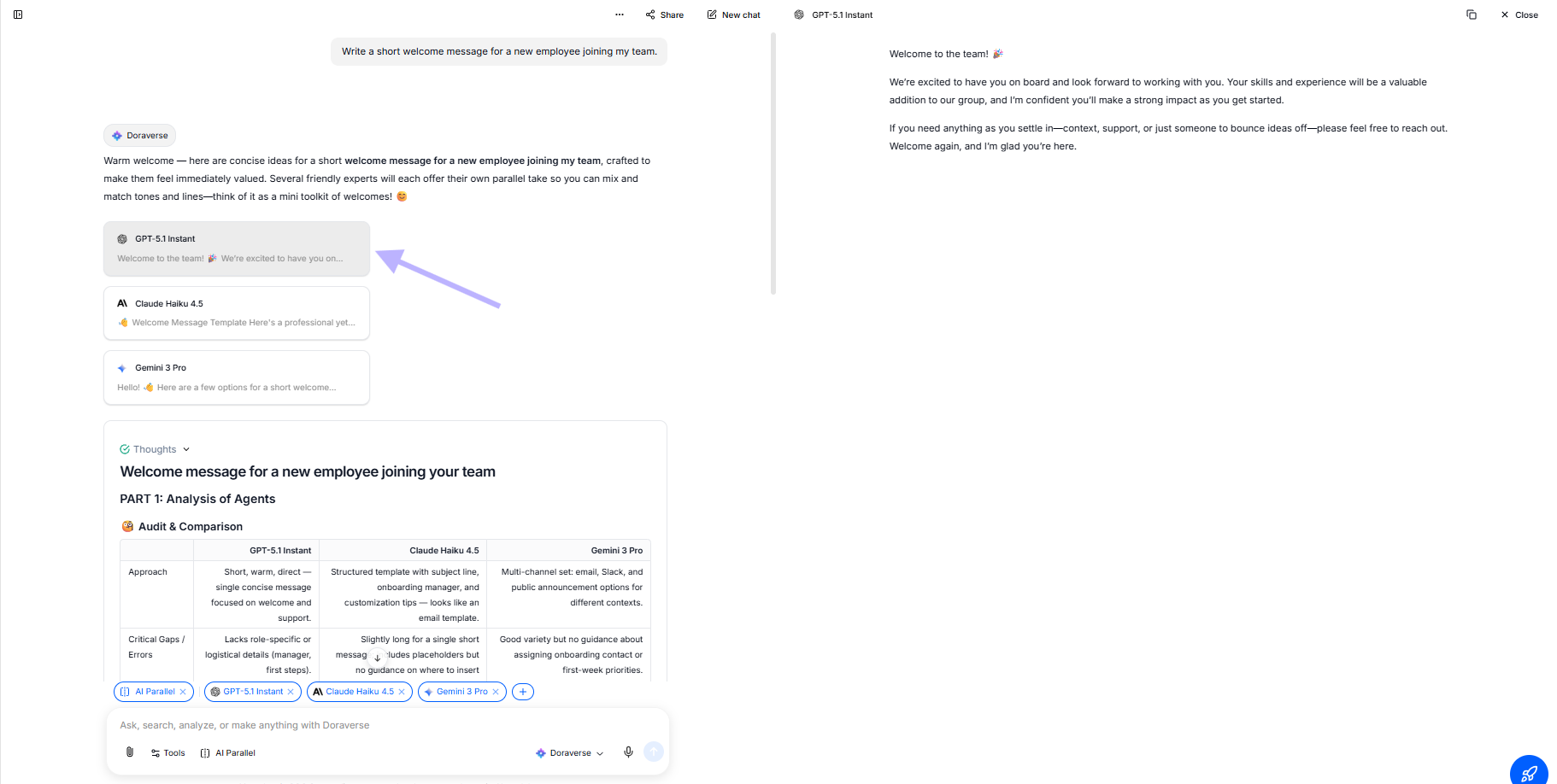
3. **Run the Parallel responses**\
   After you send the prompt, each model will think and respond independently. You will see a separate card or section for each model’s answer, so you can quickly scan and compare them.

   <figure><img src="https://82687067-files.gitbook.io/~/files/v0/b/gitbook-x-prod.appspot.com/o/spaces%2FbDXFRztwECY7ehfFFQoP%2Fuploads%2FG79UdzwHPXibcSOtsvTM%2Fimage.png?alt=media&amp;token=cc735c0b-5e79-4a72-80a8-c551b6a2d4e2" alt=""><figcaption></figcaption></figure>
4. **Review and choose what works best**\
   Read through the responses and pick the one that best fits your needs — or combine ideas from multiple models. You can continue the conversation with a specific model, refine a chosen answer, or start a new Parallel run with adjusted prompts or models.

<figure><img src="https://82687067-files.gitbook.io/~/files/v0/b/gitbook-x-prod.appspot.com/o/spaces%2FbDXFRztwECY7ehfFFQoP%2Fuploads%2FzRCnr8AjzTM4A7y3Y14D%2Fimage.png?alt=media&amp;token=aa4e30ae-256e-4507-b35d-3325e865a0eb" alt=""><figcaption></figcaption></figure>

<figure><img src="https://82687067-files.gitbook.io/~/files/v0/b/gitbook-x-prod.appspot.com/o/spaces%2FbDXFRztwECY7ehfFFQoP%2Fuploads%2Fqggv3te1iWKgXXQse7nE%2Fimage.png?alt=media&amp;token=dddab58a-4f08-478a-9a79-c6c90bdec24a" alt=""><figcaption></figcaption></figure>

***

## When to use Parallel vs. Debate?

You can think of Debate and Parallel as two different ways of working with multiple models:

<table><thead><tr><th width="103">Mode</th><th>How it behaves</th><th>Best for</th></tr></thead><tbody><tr><td>Debate</td><td>Models read and challenge each other, Doraverse summarizes.</td><td><strong>Checking model answers</strong>, risk analysis, multi‑perspective evaluation.</td></tr><tr><td>Parallel</td><td>Models answer independently, no interaction between them.</td><td><strong>Fast comparison</strong>, idea generation, testing prompts and models.</td></tr></tbody></table>

Use **Parallel** when you want **many independent answers quickly**.

Use **Debate** when you want **a refined conclusion from a multi‑step discussion**.

***

Try Parallel on your next task — one prompt, multiple answers, and a faster path to the version that works best for you.


# AI Studio

From simple ideas to stunning images, standout video and ear-catching audio — skip the design tool headaches.

[What is Doraverse Studio?](#what-is-doraverse-studio)

[Image Generation with Studio](#image-generation-with-studio)

[Video Generation with Studio](#video-generation-with-studio-coming-soon)

[Audio Generation with Studio (Coming soon)](#audio-generation-with-studio-coming-soon)

[Manage Your Gallery](#manage-image-in-your-gallery)

## What is Doraverse Studio?

Doraverse Studio is your all-in-one creative playground, designed for teams to bring raw ideas to life — whether you’re crafting compelling images, dynamic videos, impactful slides, or intuitive mindmaps.&#x20;

With a suite of powerful Generative AI tools, Studio transforms your concepts into impressive visual and multimedia assets, making creativity accessible and efficient at every stage — no more messy tabs or scattered tools.

### Why Go with Doraverse Studio?

<table data-view="cards"><thead><tr><th></th><th></th></tr></thead><tbody><tr><td><strong>Collab with World’s Leading Generative Models</strong></td><td>Put top-tier AI to work for you: GPT-Image-1, Gemini-Imagen-4, Flux Kontext Pro/Pro Max. </td></tr><tr><td><strong>10x Your Creative Workflow</strong></td><td>Deliver standout creations at lightning speed with powerful automations: auto-prompt, auto-style, auto-size.</td></tr><tr><td><strong>Less Manual Work, More Brilliant Results</strong></td><td>Generate in a chat interface that remembers your context, syncing every creation to your ideas.</td></tr></tbody></table>

***

## Image Generation with Studio

### Step 1: Access Studio&#x20;

From your Doraverse home screen, simply select Studio icon from the main menu. This will take you directly to your Studio space.

<figure><img src="https://82687067-files.gitbook.io/~/files/v0/b/gitbook-x-prod.appspot.com/o/spaces%2FbDXFRztwECY7ehfFFQoP%2Fuploads%2F4wwvI3NC0hCSnktQo3as%2FStudio%20for%20image.png?alt=media&amp;token=9def5b1c-d46d-4c14-941c-84dd51cb98c2" alt=""><figcaption></figcaption></figure>

### Step 2: Choose AI Models

Choose from leading AI models, preview their generation pricing:

* **GPT-Image-1:** Delivers vivid, accurate visuals with strong detail and natural composition, optimized for creating diverse scenes.
* **Gemini-Imagen-4:** Excels in photorealism, advanced understanding of prompts, and produces rich, expressive images with fine nuances.
* **Flux Kontext Pro/Pro Max:** Offers ultra-fast, high-resolution image generation with customizable styles and precise context handling.

**💡 Tips:** Try generating the same prompt across different models to compare results.

### Step 3: Start Creating

Type your image request directly into the chat box. Just describe what you want, and let Studio handle the rest.&#x20;

Level up your results with built-in automation tools for faster, easier, and more on-point creations:

* **Auto-prompt:** Let AI refine your request for the best possible prompt.
* **Auto-style:** Instantly apply your preferred artistic style, like cartoon, watercolor, anime, 3D, .etc.
* **Custom Size:** Pick the perfect image size to match your platform or purpose.
* **Creation Quantity:** Generate up to 4 images at a time and choose your favorite.

<figure><img src="https://82687067-files.gitbook.io/~/files/v0/b/gitbook-x-prod.appspot.com/o/spaces%2FbDXFRztwECY7ehfFFQoP%2Fuploads%2FkMCpRcASVGr69nqrF2Cy%2FImage%20generation.png?alt=media&amp;token=a46d4889-47c4-495e-b329-486abbaf3f52" alt=""><figcaption></figcaption></figure>

#### Provide more context or fine-tune your outcome?

Hit the "+" icon next to the chat bar and pick your option:

* Upload from your computer
* Browse in Library

### Download Image

<figure><img src="https://82687067-files.gitbook.io/~/files/v0/b/gitbook-x-prod.appspot.com/o/spaces%2FbDXFRztwECY7ehfFFQoP%2Fuploads%2FX6DHfT1i491lXLEFh49c%2FContinue%20Edit.png?alt=media&amp;token=c7231d29-7717-47e0-a06e-daa31abb12f8" alt=""><figcaption></figcaption></figure>

Once you’re happy with your creation, simply hover over the image and select Download Image to save it instantly.

### Edit Image &#x20;

If you want to make further adjustments, click Edit Image to continue refining your artwork, no need to start over.&#x20;

The image you want to edit will be automatically added to the upload section, ready for further customization.

<figure><img src="https://82687067-files.gitbook.io/~/files/v0/b/gitbook-x-prod.appspot.com/o/spaces%2FbDXFRztwECY7ehfFFQoP%2Fuploads%2FHE2i4JRogGPXH3ycwgdn%2FContinue%20Editing%202.png?alt=media&amp;token=dd25948a-90bf-436b-a4aa-5d43843dd988" alt=""><figcaption></figcaption></figure>

### View Image Information

Click on the image to easily view its detailed information. You’ll see attachments and key data such as creation time, author, dimensions, size, and file type.

<figure><img src="https://82687067-files.gitbook.io/~/files/v0/b/gitbook-x-prod.appspot.com/o/spaces%2FbDXFRztwECY7ehfFFQoP%2Fuploads%2FPoBSuiVufjnTedqIsxij%2FImage%20Info.png?alt=media&amp;token=2f8ed164-d2df-4e19-9673-9712501a88f7" alt=""><figcaption></figcaption></figure>

**💡 Tips**: Pay special attention to the last line. This is the AI prompt used to generate the image. It’s a helpful reference if you want to recreate, tweak, or reuse the prompt in the future.

***

## Video Generation with Studio

Create high-quality videos, fast, right inside Doraverse Studio. We add the most advanced video models and keep them current, so what you use today is the best you can get.

### What you can make

* **Text → Video**: describe the scene and let the model do the magic.
* **Image / Multi-image → Video**: animate a single look or stitch a light storyboard.

📌 Note: Some models handle both text and image inputs (e.g. Veo 3, Seedance). Others are image-to-video only (e.g. Kling Pro). Peek at the model card first — capabilities and limits are clearly listed.

### To generate a video **(same flow as Image Generation)**

* Pick a model: Check the description card for each model’s strengths, supported formats, and cost.
* Upload images (optional): Skip this if you’re going pure text-to-video.
* Type your prompt.
* Set the specs: Choose aspect ratio, size, duration, and audio (if the model exposes it).

<figure><img src="https://82687067-files.gitbook.io/~/files/v0/b/gitbook-x-prod.appspot.com/o/spaces%2FbDXFRztwECY7ehfFFQoP%2Fuploads%2FRrHudKzgIESvAq456egf%2FScreenshot%202025-10-23%20at%2021.35.28.png?alt=media&amp;token=7e493552-0a07-4163-a1c7-70da73c097d9" alt=""><figcaption></figcaption></figure>

You can also make a video from your Studio image by opening your image → choose **Make Video** and repeat the same flow.

<figure><img src="https://82687067-files.gitbook.io/~/files/v0/b/gitbook-x-prod.appspot.com/o/spaces%2FbDXFRztwECY7ehfFFQoP%2Fuploads%2FW6enLYgZJUWNXiYUKAcu%2FScreenshot%202025-10-23%20at%2021.27.39.png?alt=media&amp;token=9d470c52-a855-4455-ac7d-0e8993782f49" alt="" width="375"><figcaption></figcaption></figure>

***

## Audio Generation with Studio (Coming soon)

***

## Manage Your Gallery

In the Conversation Sidebar, select Gallery— where all generated images are stored and neatly organized for quick access.&#x20;

<figure><img src="https://82687067-files.gitbook.io/~/files/v0/b/gitbook-x-prod.appspot.com/o/spaces%2FbDXFRztwECY7ehfFFQoP%2Fuploads%2Fqt0Ct6idwfWfsSLnQz8D%2FGallery.png?alt=media&amp;token=c21a4d3d-c607-46a0-a420-a9d3575f25b5" alt=""><figcaption></figcaption></figure>

Inside the Gallery, you can easily:

* Download your favorite images
* Edit image
* Open conversation to review the creative steps behind each artwork
* View full screen for a detailed look
* Delete images you no longer need
* Image Information


# AI Agents

Build your own custom AI Assistants

[AI Agent Feature in Doraverse](#ai-agent-feature-in-doraverse)

[Step-by-Step Guide to Build Your Own AI Agent in Doraverse](#step-by-step-guide-to-build-your-own-ai-agent-in-doraverse)

[Using Your Agent](#using-your-ai-agent)

[Why Build AI Agents in Doraverse?](#why-build-ai-agents-in-doraverse)

## AI Agent Feature in Doraverse

Doraverse’s AI Agent feature lets you design intelligent assistants tailored to your specific tasks or unique workflows — no coding required. Powered by world's best AI models and powerful built-in tools, you can easily create agents with specialized capabilities to support your work, automate tasks, or deliver personalized responses.

## Step-by-Step Guide to Build Your Own AI Agent in Doraverse

***

### 1. **Access** the Agent Builder

Start by selecting **AI Agent** from the navigation sidebar on your home screen.&#x20;

This brings you into the AI Agent space—a central place where you can explore and build your and your team customized AI Agents.&#x20;

You’ll see three organized sections:

* **Recent Agents:** Quickly find AI Agents you've used most recently.
* **Your Agents:** View and manage all agents you’ve personally created.
* **By Your Team:** Discover agents made by your teammates, ready for collaboration.

### 2. Create **an Agent**

Click the **Create Agent** button located at the top right corner of the screen. This will open the **Agent Builder**, where you can start designing your custom AI Agent from scratch.

The creation of Agent includes:

* **Basic Settings:** Avatar, Name, Description, Instructions, Provider & Model, Model Parameters
* **More Settings:** Conversation starters, Knowledge, Code Interpreter API, Capabilities, Tools + Actions

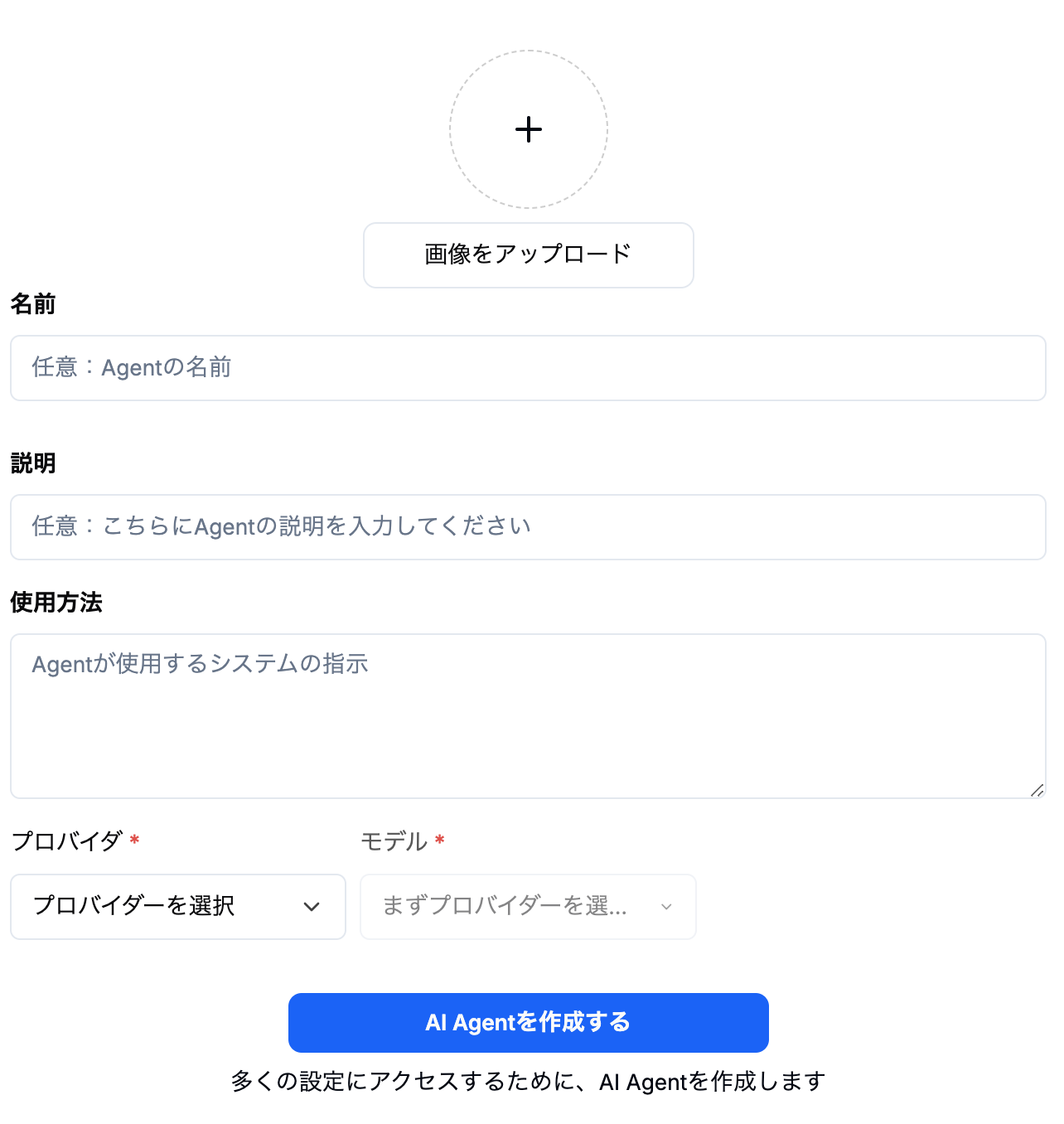
### 2.1 Basic Settings: Customize Your AI Agent’s Core Profile

When creating your AI Agent, the Basic Settings are the foundation that shape its identity and behavior.&#x20;

<figure><img src="https://82687067-files.gitbook.io/~/files/v0/b/gitbook-x-prod.appspot.com/o/spaces%2FbDXFRztwECY7ehfFFQoP%2Fuploads%2F5cb7MPtEViuhO3lVVE8o%2FBasic%20Settings_Agent.png?alt=media&amp;token=2d59be88-7c31-4f1b-bf50-34fff0e8ecbc" alt=""><figcaption></figcaption></figure>

Here’s what you need to know to set up your agent effectively:

### **Avatar**

Upload an image to personalize your agent’s profile and make it instantly recognizable to your team.

### **Name**

Choose a clear, relevant name that reflects your agent’s purpose for easy identification.

### **Description**

Add a concise note that describes what your agent does, helping your team quickly grasp the agent’s function and value.

*For example: Summarizes meeting transcripts automatically.*

***

### Instructions

System instructions define the agent’s core behavior. Well-crafted instructions ensure your agent operates consistently and delivers the results you expect. Write clear and specific directions covering:

* How the agent should behave
* What it should focus on
* Any rules or boundaries it should always follow

***

### Provider & Model

Select the AI model best suited to your task from the available options. Each model offers unique strengths tailored to different types of requests.

Explore [**Doraverse's Available AI Models**](https://doraverse.gitbook.io/docs/feature-list/available-ai-models) to see detailed profiles highlighting the strengths and ideal use cases for each model, helping you find the perfect match.

***

### Model Parameters

These settings control how your AI agent processes inputs and crafts responses. In simple terms, model parameters shape how your agent thinks and communicates — enabling you to fine-tune results for precision or innovation.

* **Temperature (Randomness or Creativity):** Controls how creative or varied the agent’s responses are. Higher values make answers more imaginative, while lower values keep them more focused and predictable.
* **Top\_p (Response Variety):** Controls how many word options the model considers when answering. Lower values focus on the most likely words for precise replies; higher values add diversity.

**Note:** It’s best to adjust either Temperature or Top\_p, not both at once.

* **Max Context Tokens (Input Length Limit):** Sets the maximum number of tokens (words or word parts) the model can use from your input and conversation history.
* **Max Output Tokens (Output Length Limit):** Limits how long the model’s answer can be, measured in tokens.
* **Frequency Penalty (Repetition Reduction):** Discourages the model from repeating the same words or phrases to keep responses fresh.
* **Presence Penalty (Topic Exploration):** Encourages the model to introduce new topics or ideas instead of repeating existing ones.
* **Prompt Caching (Reuse of Input):** Allows the model to remember and reuse parts of your last prompt for faster response time when you retry or regenerate answers.
* **Stop Sequences (Response End Markers):** Defines specific words or phrases that tell the model when to stop generating more text.
* **Reasoning Effort (Depth of Thought):** Adjusts how carefully the model thinks through its answers; higher settings yield more thoughtful and detailed responses.
* **Image Detail:** Controls how deeply the model interprets images you upload, affecting the quality and detail of visual analysis.
* **Resend Files:** Determines whether uploaded files should be reprocessed when regenerating a response, useful for updating or retrying results.

***🤔 Need guidance on optimizing these parameters?***

Check out our [**Model Parameter Guide**](https://doraverse.gitbook.io/docs/feature-list/ai-agents/ai-model-parameter) for clear, step-by-step tips and practical examples designed to get the best performance from your agent.

**Note:** You need to click **Create Agent** to access more settings.

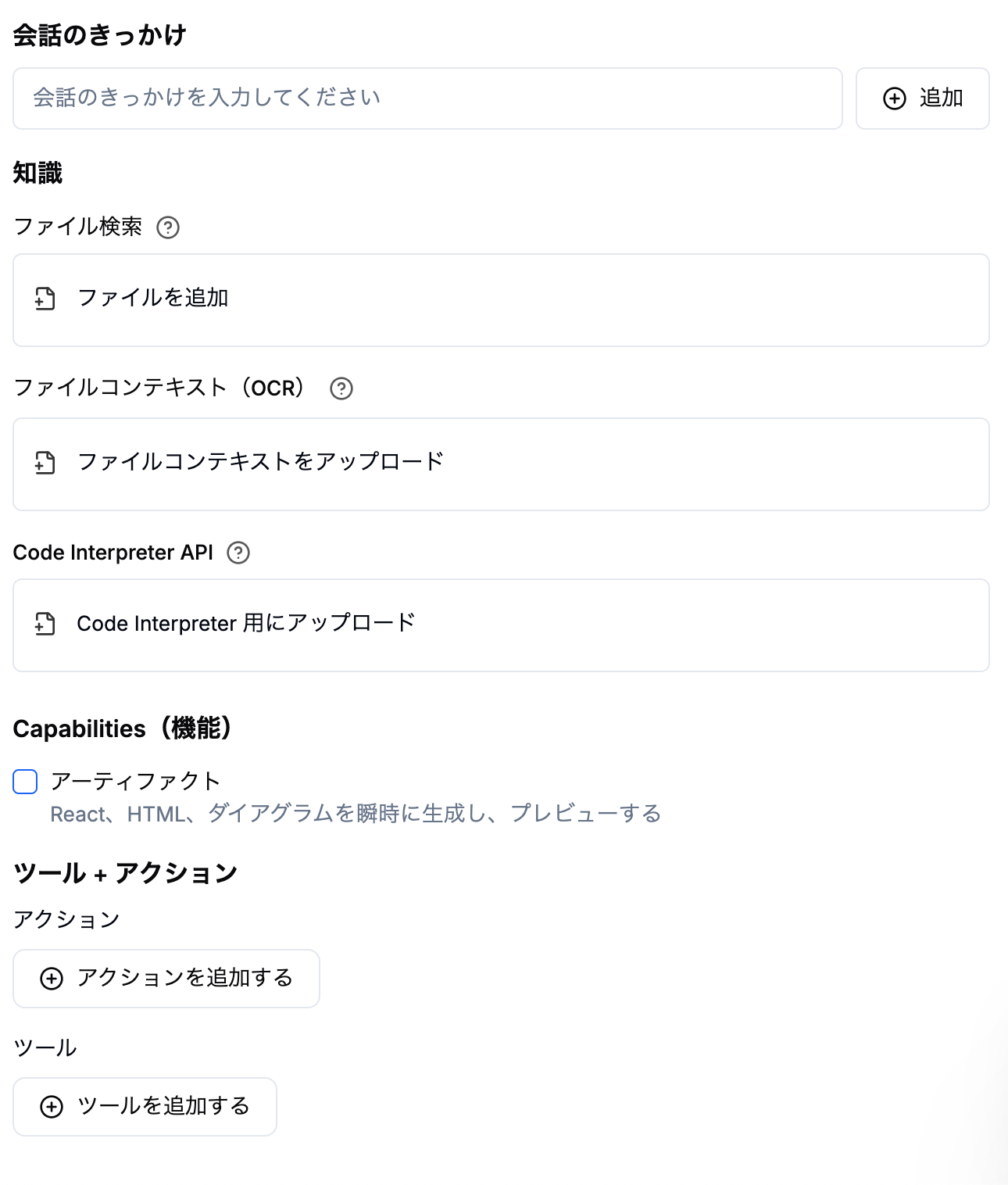
### 2.2 More Settings: Enhance Your AI Agent’s Power

Add advanced features and capabilities to your AI agent with more settings, empowering it to understand, respond, and perform tasks with greater intelligence and flexibility.

<figure><img src="https://82687067-files.gitbook.io/~/files/v0/b/gitbook-x-prod.appspot.com/o/spaces%2FbDXFRztwECY7ehfFFQoP%2Fuploads%2FSNra55WxX49erxXWFYfo%2FMore%20Settings_Agent.png?alt=media&amp;token=efae2f90-0da0-4d26-973c-bc9609a97b97" alt=""><figcaption></figcaption></figure>

### **Conversation Starters**

Set initial prompts that your agent uses to kick off conversations. These starters help shape the purpose right from the first interaction, making it easier for users to engage effectively.

<figure><img src="https://82687067-files.gitbook.io/~/files/v0/b/gitbook-x-prod.appspot.com/o/spaces%2FbDXFRztwECY7ehfFFQoP%2Fuploads%2FU3mitjrSOAfXXtoBohbW%2FConversation%20Starter.png?alt=media&amp;token=e2adbcee-3b71-4052-bab0-f442d0f8ec4f" alt=""><figcaption></figcaption></figure>

***

### **Knowledge**

**File Search**

Your agent’s Knowledge base is where it draws information to provide accurate, relevant answers. By **Add files**, your agent can access and search your documents and understand the meaning behind questions, making it ideal for research, onboarding, and data-driven tasks.

**Code Interpreter API**

A Code Interpreter is like a smart assistant that understands and runs computer code based on your natural language requests—no coding setup required. When you upload files for the Code Interpreter, it can process, analyze, and help you write code quickly and accurately.

***

### **Capabilities**

**Enable Code Interpreter** if you want your agent to:

* Execute code in multiple languages such as Python, JavaScript, Go, C++, Java, PHP, Rust, and more, without any local setup, configuration, or sandbox.
* Manage file uploads and downloads smoothly for seamless workflows.&#x20;
* Securely process and analyze files. Perform complex calculations and work with numbers or large data sets.

**Enable Artifacts** when you:

* Need to create visual or interactive outputs like React components, HTML snippets, or diagrams automatically.
* Want to present results visually within a focused UI window for clarity and ease of use.
* Wish to customize how your agent generates and displays interactive or visual content

**Enable File Search** when you:

* Want your agent to provide answers by retrieving facts directly from your uploaded documents, perfect for research, onboarding, or instant knowledge access.
* Need semantic search capabilities that understand the meaning and intent behind queries, not just keywords.

***

### Tools + Actions

**Actions**

Actions let you extend your AI agent’s capabilities by connecting it to external services through APIs. This enables your agent to interact with real-world data and perform useful tasks, like checking the weather, booking meetings, or retrieving important information. Think of it as teaching your agent a new skill: ***how to communicate seamlessly with other programs!***

<figure><img src="https://82687067-files.gitbook.io/~/files/v0/b/gitbook-x-prod.appspot.com/o/spaces%2FbDXFRztwECY7ehfFFQoP%2Fuploads%2F2UnXQBlBrBjG08TLCKRg%2FAction_Agent.png?alt=media&amp;token=fc7d3a68-ffc6-4871-8ff0-d26d5d3b1d35" alt=""><figcaption></figcaption></figure>

To create an action, you’ll need to provide:

* **Authentication:** Specify if the agent requires a password or special access to connect to the service. If you’re unsure, you can leave this set to “None.”
* **Schema:** This defines how the AI agent communicates with the service. Most users can select from ready-made examples, or you can ask a technical teammate to help you complete this part.
* **Privacy Policy URL:** Add a link to the service’s privacy policy to ensure transparency and build trust.

Once set up, your agent will be empowered to perform these new actions, making it even more helpful and responsive.

**Integrations**

Connect your agent to powerful external services like Google search, image generation, calculations, and more. Select only the integrations relevant to your workflow to keep your agent focused and your interface clutter-free.

<figure><img src="https://82687067-files.gitbook.io/~/files/v0/b/gitbook-x-prod.appspot.com/o/spaces%2FbDXFRztwECY7ehfFFQoP%2Fuploads%2Fytd3v6TIwmvFdWaKHk8M%2FTool_Agent.png?alt=media&amp;token=409959ad-51b0-43be-8a9f-43b8675cb9a3" alt=""><figcaption></figcaption></figure>

***

### **Publish Your Agent**

Use these settings to control who can access and modify your agent:

* **Share to all users:** This allows everyone in your organization to find and use the agent.
* **Allow other users to edit your agent:** This allows teammates collaborate by editing your agent’s configuration. When off, only you can make changes.

<figure><img src="https://82687067-files.gitbook.io/~/files/v0/b/gitbook-x-prod.appspot.com/o/spaces%2FbDXFRztwECY7ehfFFQoP%2Fuploads%2Fx9lYNbgYeYsok9A4j62j%2FPulish_Agent.png?alt=media&amp;token=2a4f3cf6-516c-4157-948f-58a1f134fc5b" alt=""><figcaption></figcaption></figure>

## Using Your AI Agent

Mention your Agent to use in chat by typing **"@"** in the chatbar.

<figure><img src="https://82687067-files.gitbook.io/~/files/v0/b/gitbook-x-prod.appspot.com/o/spaces%2FbDXFRztwECY7ehfFFQoP%2Fuploads%2FXCMKVIu56tCffgyNjDiU%2FMention%20Agent.png?alt=media&amp;token=5567f8cc-6646-402f-8100-0c805189cbc1" alt=""><figcaption></figcaption></figure>

### 💡**Tips**

* You can always edit, update, or duplicate agents as your needs grow.
* Test your agent: Interact with it, provide feedback, and refine its skills as needed.

***

## Why Build AI Agents in Doraverse?

* **No expertise required:** Everything is explained in everyday language, and setup is intuitive.
* **Custom fit:** Create agents for reporting, answering FAQs, extracting insights from files, and more to choose what suits your team best.
* **Result-focused:** Save time, reduce repetitive work, and boost productivity. Your agent works 24/7, tailored to your organization’s needs.


# AI Model Parameter

## **Temperature**

### **Purpose**

Controls the level of randomness in the model’s responses. A higher temperature makes the output more creative and varied, while a lower temperature generates deterministic and predictable responses.

### **How It Works**

At higher temperatures (e.g., 0.9), the model is more willing to explore less likely word combinations. At lower temperatures (e.g., 0.2), the model prioritizes the most probable tokens, leading to more conservative and straightforward answers.

### **Tips**

* **Set High Temperature (e.g 0.8–1.0)**: For brainstorming, generating poetry, or creating imaginative content where variety is desired.
* **Set Low Temperature (e.g 0.1–0.3)**: For tasks that require precision, such as answering factual questions or generating structured content like summaries.

***

## **Top\_p**

### **Purpose**

Controls the diversity of the model’s output by adjusting the range of token probabilities considered for each response.

### **How It Works**

Known as “nucleus sampling,” top\_p sets a cumulative probability threshold.&#x20;

For example, at top\_p=0.9, the model selects tokens from the smallest group of words whose combined probability equals 90%. Lowering top\_p restricts the model to using only the most probable tokens, reducing variability.

### **Tips**

* **Set High Top\_p (0.9–1.0)**: For creative and conversational tasks where a natural flow and variation are essential.
* **Set Low Top\_p (0.1–0.3)**: When consistency and focus are more critical, such as when generating technical instructions.

**Note:** When both `temperature` and `top_p` are set, the model uses both to sample tokens. It’s often best to tune only one at a time.

***

## **Max Tokens**

### **Purpose**

Sets the limit on the number of tokens (words, punctuation, or parts of words) in the model’s response. One token is roughly 4 characters or ¾ of a word in English.

### **How It Works**

This parameter ensures the response doesn’t exceed a specific length. Shorter limits are helpful for concise outputs, while more extended limits allow for detailed responses.

### Tips

* **Set Short Max Tokens (10–50)**: Generating taglines, headlines, or single-sentence outputs.
* **Set Long Max Tokens (100–500)**: For detailed explanations, long-form content, or summaries.

***

## **Frequency Penalty**

### **Purpose**

Penalizes repeated words or phrases within the response, encouraging more varied language.

### **How It Works**

A higher frequency penalty reduces the likelihood of the model reusing the same tokens multiple times, which can help make responses more engaging and dynamic.

### Tips

* **Set Higher Frequency Penalty (0.5–2.0)**: When you want varied phrasing or generate creative content like stories or marketing copy.
* **Set Lower Frequency Penalty (0.0–0.3)**: When repetition is acceptable or even desirable, such as when emphasizing a key point.

***

## **Presence Penalty**

### **Purpose**

Encourages or discourages the introduction of new ideas or topics in the response. A higher presence penalty increases the likelihood of the model exploring new concepts.

### **How It Works**

When this parameter is increased, the model is less likely to stay anchored to familiar topics or phrases, promoting more exploratory or innovative responses.

### Tips

* **Set Higher Presence Penalty (0.5–2.0)**: For brainstorming sessions or creative outputs where novelty and diversity are prioritized.
* **Set Lower Presence Penalty (0.0–0.3)**: For tasks that require sticking to a specific topic or reinforcing a central idea.

***

## **Max Context Tokens**

### **Purpose**

Defines the maximum number of tokens that can be processed in a single request, including both the input (prompt) and the output (response).

### **How It Works**

This value represents the model’s context window — the total number of tokens it can “remember” or reference in one interaction.&#x20;

For example:

* GPT-4.1: up to **1,047,576 tokens**
* Gemini 2.5 Pro: up to **1 million token**

The model uses this space for:

* Your prompt + Chat history
* Function call definitions
* System instructions
* And the model’s own reply

If this limit is exceeded, the API will return an error or truncate the context.

### **Tips**

* You don’t need to manually set this parameter, it’s managed by the system.
* Useful mostly for developers managing long conversations or documents.
* For long-form tasks (e.g. document Q\&A, summarization), ensure your inputs + expected output stay within the token limit.

***

## **Max Output Tokens**

### **Purpose**

Specifies the maximum length of the model’s response, in tokens.

### **How It Works**

This parameter limits how long the model can continue generating text. One token ≈ 4 characters in English or roughly ¾ of a word.

If the model hits this limit, it **stops immediately**, even mid-sentence.

#### **Tips**

* Short (10–50): For taglines, bullet points, quick summaries.
* Medium (100–300): Balanced responses like paragraphs or Q\&A.
* Long (500+): For stories, essays, or detailed explanations.
* Increase only if you're not getting enough detail in responses.

***

## **Stop Sequences**

### **Purpose**

Defines one or more strings that tell the model when to stop generating text.

### **How It Works**

If the model generates any of the specified sequences, it immediately halts its output — even if it hasn't reached the max token count.

Common examples:

* `"\\n\\n"` (double line break)
* `"User:"` (to stop at next prompt)
* `"###"` (used to separate sections)

### **Tips**

* Use this when formatting outputs, e.g., to stop after a list or prevent spillover.
* Multiple stop sequences can be provided, each as a separate string.
* Only advanced users or developers typically need to modify this.

***

## **Reasoning Effort**

### **Purpose**

Controls how deeply the model "thinks" when generating a response — higher effort encourages more deliberate, thoughtful answers.

### **How It Works**

This parameter is for OpenAI's o-series model only.

Higher values may slightly slow down responses, but often improve quality in tasks that require logic or explanation. Reducing reasoning effort can result in faster responses and fewer tokens used on reasoning in a response.

#### **Tips**

* Use **low/medium** for fast, general replies.
* Set to **high** when asking for:
  * Step-by-step explanations
  * Math or code reasoning
  * Analytical tasks or structured writing

***

## **Image Detail**

### **Purpose**

Controls how thoroughly the model analyzes image inputs.

### **How It Works**

* `low`: Faster, lighter scan of image content
* `high`: Deep inspection, useful for charts, documents, detailed images
* `auto`: Smart default — chooses based on image type and query complexity

### **Tips**

* Use `low` for casual screenshots or UI buttons.
* Use `high` for analyzing dense content like tables, diagrams, PDFs.
* `auto` is optimal for most use cases and balances speed with detail.

***

## **Resend Files**

Toggles whether previously uploaded files should be reprocessed or re-included when regenerating or retrying a response.

### **Tips**

* Leave ON if your request depends on file content (e.g. “summarize this PDF”).
* Toggle OFF if you're iterating only on prompt phrasing and don’t want delays.

***

## Best Practices for Parameter Adjustment <a href="#heading-best-practices-for-parameter-adjustment" id="heading-best-practices-for-parameter-adjustment"></a>

**Experimentation:** The best way to understand the impact of different parameters is through experimentation. Try various settings to see how they affect the responses.

**Balance:** Strive for a balance between creativity and coherence. Extreme values in some parameters can lead to less meaningful outputs.

**Context Awareness:** Consider the context and purpose of your agent application when adjusting parameters. Different scenarios may require different settings for optimal results.


# Agent's Capabilities

Discover powerful tools that expand what your AI Agent can do. Learn how to execute and manage code and files seamlessly with Code Interpreter, and create stunning visuals and user interfaces effortlessly using Artifact.&#x20;

Dive in to unlock advanced features that make your AI agent smarter and more interactive.

<table data-view="cards"><thead><tr><th></th><th></th><th data-hidden data-card-target data-type="content-ref"></th></tr></thead><tbody><tr><td><strong>Code Interpreter</strong></td><td>Code Execution &#x26; File Handle with AI</td><td><a href="https://doraverse.gitbook.io/docs/jp/feature-list/ai-agents/agents-capabilities/code-interpreter">https://doraverse.gitbook.io/docs/jp/feature-list/ai-agents/agents-capabilities/code-interpreter</a></td></tr><tr><td><strong>Artifact</strong></td><td>Visual &#x26; UI Generation</td><td><a href="https://doraverse.gitbook.io/docs/jp/feature-list/ai-agents/agents-capabilities/artifact">https://doraverse.gitbook.io/docs/jp/feature-list/ai-agents/agents-capabilities/artifact</a></td></tr></tbody></table>


# Code Interpreter

Code Execution & File Handle with AI

### What is Code Interpreter?

**Code Interpreter** is a powerful feature in Doraverse that provides a secure and hassle-free way to execute code and handle files via a simple interface.&#x20;

It offers a versatile sandbox environment for running code in languages like Python, JavaScript, Go, and more — all without requiring local installs or server maintenance.

***

### How Code Interpreter Works

Imagine you have a virtual assistant who can not only understand your questions but can also write and run small computer programs to help get things done — like organizing data, making calculations, or creating reports.

Here is how the Code Interpreter "assistant" works:

* When you ask the AI to perform a task involving code (like creating charts, diagrams, or files such as CSV reports) it generates the code (for example, Python scripts) using the Code Interpreter. This code is safely written and executed inside a protected space called a sandbox, all right within your chat interface.
* Not only does it provide the code, it can also create files you can download and keeps them organized through session-based storage.
* Plus, you can upload your own files, have the Code Interpreter process them with code, and then receive new or updated files to download—all securely and seamlessly.

In short, the Code Interpreter lets your AI do the “coding and computing” behind the scenes so you get fast, accurate answers or outputs with minimal effort.

***

### Key Features of Code Interpreter in Doraverse

#### Code Execution

* Execute code in multiple languages including Python, Node.js (JS/TS), Go, C/C++, Java, PHP, Rust, Fortran, and Rscript.
* Run code snippets dynamically and receive standard output, error streams, and detailed execution statistics such as memory usage and CPU time.
* Manage execution status, program arguments, and results securely within isolated sandbox environments.

#### File Handling

* Upload input files for processing and download the generated outputs seamlessly.
* List, delete, and organize files within session-based file management for efficient workspace handling.
* Securely manage files throughout the lifecycle of code execution sessions without manual intervention.

***

### How Code Interpreter Helps You

* Quickly run and debug code across multiple languages.
* Upload and process data files for analysis and transformation.
* Safely execute AI-generated code in a secure environment.
* Power interactive coding tools with multi-language support.
* Evaluate AI code to improve accuracy and reliability.

***

### Use Case

<details>

<summary><strong>Code Testing</strong></summary>

Quickly validate snippets across supported languages.

</details>

<details>

<summary>Handle &#x26; Transform files</summary>

Cleaning data, converting formats, or extracting information... to automate complex tasks and workflows without manual work.

</details>

<details>

<summary><strong>Development Environments</strong></summary>

Create interactive platforms supporting multiple programming languages.

</details>

<details>

<summary><strong>Logic Verification</strong></summary>

Assess and validate generated code for AI model improvements.

</details>


# Artifact

Visual & UI Generation

## What is Artifact?

Artifact is a generative UI tool that instantly produces React components, HTML code, and Mermaid diagrams. In Doraverse, it is integrated directly into the AI agent workflow, enables effortless creation and refinement of web UI elements and visualizations — all powered by your chosen AI model.

***

## Key Features of Artifact in Doraverse

* **Instant Prototyping:** Quickly generate websites, user interfaces, and layout components using generative AI, speeding up the front-end development process.
* **Generative UI:**&#x43;reate full React components, clean HTML code, and sophisticated Mermaid diagrams on demand to visualize complex ideas clearly.
* **Iterative Design:** Allows rapid, user-centric refinement of generated outputs, making it easy to improve designs step-by-step with AI assistance.
* **Display in a Separate UI Window:** Visual content generated by Artifact is displayed in a dedicated, separate UI window, improving clarity and making interaction with the visuals easier and more intuitive.

***

## How Artifact Helps You

* Speed up UI/UX design and development by generating code and diagrams instantly without spending hours on layout design.
* Visualize complex ideas by using Mermaid diagrams to clearly map workflows, site maps, or interaction charts.
* Easily explore design ideas and get AI suggestions to refine your UI.
* Enable stakeholders with little coding experience to participate in prototyping and feedback.
* Display visuals in a separate UI window for focused review and easier interaction.

***

## Use Cases

<details>

<summary>Rapid Website Prototyping</summary>

Create full React components or HTML snippets for landing pages, dashboards, or feature mockups in minutes.

</details>

<details>

<summary><strong>UI Component Design</strong></summary>

Automatically generate reusable UI elements styled and structured for responsiveness.

</details>

<details>

<summary><strong>Diagramming and Documentation</strong></summary>

Visualize processes, relationships, or system architecture using Mermaid diagrams generated on the fly.

</details>

<details>

<summary><strong>Learning and Experimentation</strong></summary>

Explore React and HTML fundamentals in an interactive environment powered by AI assistance.

</details>

## Additional Instructions with Artifact

To maximize the power and flexibility of Artifact, you can enable two important options that adjust how the AI generates and handles UI components:

#### Enable shadcn/ui Instructions

Adds special instructions so the AI understands how to use **shadcn/ui components**—a collection of reusable, well-designed UI components built with Radix UI and Tailwind CSS.

This helps the AI generate polished, consistent React components that conform to your design system, saving time and ensuring a professional look.

**Suggestion:** Enable this when your project or company uses shadcn/ui or you want cleaner, modular UI code that’s easier to maintain and customize.

<details>

<summary><em><strong>Example</strong></em></summary>

````
You are generating React components using the shadcn/ui library, which is built on Radix UI and styled with Tailwind CSS. Follow these guidelines:

1. Use shadcn/ui components as building blocks wherever possible (e.g., Button, Input, Dialog, Checkbox).
2. Respect the design system’s consistent styling patterns using Tailwind CSS classes included in shadcn/ui.
3. Ensure components are reusable and modular, separating concerns clearly.
4. Use accessible and semantic HTML elements as per Radix UI standards integrated in shadcn/ui.
5. Include proper props and events handled in a React-friendly way.
6. Generate clean, readable code with clear indentation and comments where necessary.
7. Avoid inline styles; use Tailwind utility classes exclusively.
8. For layouts, use common shadcn/ui layout primitives or Flex/Grid utilities with Tailwind classes.
9. Write responsive components that adapt gracefully to different screen sizes.

Example snippet using shadcn/ui Button component:

```jsx
import { Button } from "@/components/ui/button"

export function SubmitButton() {
  return (
    <Button type="submit" className="w-full">
      Submit
    </Button>
  )
}
````

</details>

#### Custom Prompt Mode

Disables the default Artifact system prompt, allowing you to provide your own custom instructions guiding the AI’s behavior.

This gives you full control over how the AI creates UI artifacts, from coding style to specific frameworks, naming conventions, or file structures.

**Suggestion:** Use this mode if you have specific requirements or want to tightly tailor output for your team’s development standards and workflows.


# AI Integration

Connect your apps to Doraverse and let AI handle work across them in one place.

When your work lives in scattered tabs: email here, docs there, CRM somewhere else — you lose time and context every time you switch. Decisions slow down, details get missed, and “quick updates” turn into an hour of copying, pasting, and double-checking.

The solution is simple: Connect your apps to Doraverse and work from one place.

### About Doraverse's Integrations

Integration in Doraverse lets you connect to your apps (with your permission) so the AI can fetch data, get context, take actions, and close loops end-to-end, without you juggling apps.

**Connect 50+ apps**, including:

* **Google Workspace**: Gmail, Drive, Sheets, Slides, Calendar, Meet
* **Microsoft365**: Outlook
* **Work Management and Productivity:** Notion, Slack
* **Sales & Ops**: HubSpot
* **Engineering**: GitHub

…with more coming soon.

***

## Connect an app with Integration

From the home screen chat bar, open **Manage Integrations** to see the list of apps you can connect. Click **Connect** on the one you choose.

<figure><img src="https://82687067-files.gitbook.io/~/files/v0/b/gitbook-x-prod.appspot.com/o/spaces%2FbDXFRztwECY7ehfFFQoP%2Fuploads%2FxIFRjiVEZfgqY4NkQacl%2FScreenshot%202025-10-23%20at%2021.09.19.png?alt=media&amp;token=6a398072-563e-498b-bc24-25f835237117" alt=""><figcaption></figcaption></figure>

<figure><img src="https://82687067-files.gitbook.io/~/files/v0/b/gitbook-x-prod.appspot.com/o/spaces%2FbDXFRztwECY7ehfFFQoP%2Fuploads%2Fj9OYUn69hVWJxKQbz9Tv%2FScreenshot%202025-10-23%20at%2021.05.39.png?alt=media&amp;token=4d701750-b1cd-4e7e-8cc0-f20b4c67c764" alt=""><figcaption></figcaption></figure>

You’ll be redirected to a **Composio** consent screen to sign in via OAuth and review the requested scopes. We recommend granting only the minimum necessary scopes — you can expand them later and revoke access at any time.&#x20;

<figure><img src="https://82687067-files.gitbook.io/~/files/v0/b/gitbook-x-prod.appspot.com/o/spaces%2FbDXFRztwECY7ehfFFQoP%2Fuploads%2F9LopbpPMnt5wp9EUobwQ%2FScreenshot%202025-10-23%20at%2021.17.15.png?alt=media&amp;token=ef1aed92-6e23-4153-97b1-f06ee2517e2e" alt=""><figcaption></figcaption></figure>

Approve, and you’ll return to Doraverse with the app connected.

📌 Note: Composio is our SOC 2 partner for OAuth. To learn about scopes, storage, and revoking access, see our[ **Integration - Data Control.**](/help/faqs/integration-data-controls)

***

## Use your connected apps

Open **Manage Integrations** and choose the connected app(s) you want to use. You can select multiple apps so that the AI can work across them.

<figure><img src="https://82687067-files.gitbook.io/~/files/v0/b/gitbook-x-prod.appspot.com/o/spaces%2FbDXFRztwECY7ehfFFQoP%2Fuploads%2FoHlXIs7eGa4htVMdHAk0%2FScreenshot%202025-10-23%20at%2021.16.09.png?alt=media&amp;token=3850b1ba-01a3-49ab-a71d-98681dd5dd1c" alt=""><figcaption></figcaption></figure>

\
When you enter **Integration mode**, Doraverse automatically switches the model to **Doraverse Integration** for best performance.

Then, just ask AI to get your task done.

<figure><img src="https://82687067-files.gitbook.io/~/files/v0/b/gitbook-x-prod.appspot.com/o/spaces%2FbDXFRztwECY7ehfFFQoP%2Fuploads%2FtVcLMs9rtoaHohMNlvrz%2FScreenshot%202025-10-23%20at%2021.13.07.png?alt=media&amp;token=ed315b63-ea80-45f5-8149-8418ea4fd41d" alt=""><figcaption></figcaption></figure>

***

## Quick recipes (ideas + copyable prompts)

Here are simple prompts for most done tasks you can paste into chat. Keep them short, Doraverse fills in the steps.

#### Gmail / Outlook

* **Triage & draft:** “Summarize my last 20 emails, mark priorities, and draft replies for the top 5.”
* **Draft replies:** “Find unanswered threads from this week and draft polite nudges.”
* **Scheduling**: "Write a polite follow-up for any thread I haven’t answered in 3+ days.”
* **Filters & cleanup:** “Archive all newsletters older than 14 days; keep the newest issue from each sender.”

#### Google Docs

* **Draft from brief:** “Turn these notes into a 1-page proposal in Docs with headings and action items.”
* **Polish:** “Edit this Doc for clarity and add a concise executive summary at the top.”

#### Google Sheets

* **KPI snapshot:** “Read KPIs from {file} and generate a weekly summary with trends.”
* **Cleanup:** “Scan the {sheet\_name} sheet for duplicates and normalize company names.”

#### Google Slides

* **Deck from outline:** “Create a 10-slide sales deck from this outline; include speaker notes and export to PDF.”
* **Update branding:** “Apply our master template to {file} and fix any layout issues.”

#### Google Calendar

* **Plan your day:** “Summarize today’s meetings, conflicts, and prep notes in 8 bullets.”
* **Book time:** “Find a free 45-minute slot next week for my therapy session.”

#### Google Meet

* **Meeting digest:** “Pull the notes/recording from today’s product sync and produce action items by owner.”
* **Share-out:** “Email the meeting summary to attendees.”

#### Slack

* **Channel digest:** “Summarize the last 24h in {topic} with top trends and 5 urgent tickets.”
* **Announcements:** “Draft and post a release note in {#channel} with links to Docs and GitHub.”

#### Notion

* **Meeting notes DB:** “Create a Notion page for {task}, include attendees, decisions, and next steps.”
* **Task capture:** “Parse these bullets into a Notion tasks database with assignee and due date.”

#### HubSpot

* **Zero-touch logging:** “Log the last client email to the {contact} and add a follow-up task for Friday.”
* **Pipeline update:** “Create a new deal for {client} and assign to {employee}.”

#### GitHub

* **PR review pack:** “List open PRs on {repo}, summarize risks, and tag owners with next actions.”
* **Release notes:** “Compile merged PRs since {ver} into human-readable release notes.”


# AI Scheduled Tasks

Automate your repetitive work without a single code

Task automation used to feel too technical—built for coders or big companies with IT teams.\
With **Doraverse Scheduled Tasks,** that changes.

## What is Doraverse Scheduled Tasks?

**Doraverse Scheduled Tasks** are a no-code way to put repetitive tasks and simple workflows on autopilot in minutes.

With **Scheduled Tasks**, anyone can set up a task where AI runs the workflow end to end—with no coding and no setup headaches:

* AI can use Web Search, Code Interpreter, and Artifact so your task can research, analyze, generate, and deliver outputs automatically.
* AI follows your instructions and processes the work step by step, the same way you’d do it—day or night, on schedule.
* When it’s done, Doraverse sends you an email notification with a link to access the result.

### Examples of Scheduled Tasks you can run in Doraverse

* Daily market & competitor research: Track market changes and competitors every day, then send a consolidated summary report.
* Daily information digest: Compile fresh updates such as stock movements, rankings/leaderboards, or industry news into a quick brief.
* File maintenance and updates: Automatically update spreadsheets, generate new files, or refresh recurring reports.

With Scheduled Tasks, you get an AI assistant that thinks, acts, and integrates directly into your daily work.

***

## Create Scheduled Tasks in Doraverse

From the conversation sidebar, click **Scheduled Tasks** to open the **Scheduled Tasks Hub**.

In Scheduled Tasks Hub, click **+ Add New** (or **Create your first Scheduled Task** if this is your first one).

### 1. Set up a scheduled task

* **Name:** Use something clear, like “Weekly Meeting Summary to Slack”.
* **Frequency:** Once / Daily / Weekly / Monthly\
  **Time:** HH:MM (24-hour format)
* **Choose your AI model:** Select a Provider and Model that fits your workflow.
* **Send email when completed:** Turn this on if you want Doraverse to email you when the scheduled task finishes.
* **Tools (optional, but powerful):** Enhance your scheduled task using Doraverse built-in tools:
  * **Web Search:** When the task needs to look up information online
  * **Code Interpreter:** For spreadsheets, CSVs, calculations, charts creation or data processing.
  * **Artifact:** To generate interactive outputs (e.g., diagrams, HTML pages, a web/app demo)
* **Scheduled Task Instructions:** Describe the task in plain language. The clearer you are, the better the results.\
  Use this structure as a starting point:
  * **Goal:** What should this scheduled task deliver?
  * **Sources:** Which apps/files should it read?
  * **Steps:** List the actions in order.
  * **Output:** Required format and tone.
  * **Delivery:** Where should it send the result?

### 2. Run Test

Click **Run Test** in the preview panel. The AI will execute the task once so you can review the result. Adjust instructions, tools, or model if needed.

### 3. Create Scheduled Tasks

When everything looks good, click **Create Scheduled Tasks**. Your scheduled task is now live.

From Scheduled Tasks Hub, you can:

* Monitor execution and status
* View logs and outputs
* Pause, resume, or edit your scheduled task at any time

***

### Multiply Your Productivity with Scheduled Task

Start with a few basic tasks, run tests, and keep refining the instructions until the results match exactly what you want.&#x20;

**Once a Scheduled Task is dialed in, it can save you hours every day**—and when you multiply that across dozens of scheduled tasks running reliably in the background, your productivity increases dramatically.


# AI Notetaker

Capture every meeting with a full transcript, structured notes, and action items.

[What is AI Notetaker?](#what-is-ai-notetaker)

[Plans & limits](#plans-and-limits)

[Get started with AI Notetaker in Doraverse](#get-started-with-ai-notetaker-in-doraverse)

## What is AI Notetaker?

AI Notetaker is your meeting sidekick that handles the boring bits: notes and next steps — so your team stays focused in the conversation and executes faster after.

It captures your meetings, turns them into clear, structured notes, and helps you bridge language gaps with **real-time translation** and easy sharing options.

### What AI Notetaker does

* Turn live meetings or imported recordings into a full transcript and clear, structured notes.
* Translate meetings in real time into your preferred language while the conversation is happening.
* Keep meetings organized and easy to find with tags.
* Generate actionable tasks from the discussion: titles, details, assignees, and due dates — all fully editable.
* Make meetings searchable, shareable, and accountable.
* Share meeting notes via email so you can review and forward them easily.

{% hint style="success" %}
AI Notetaker is currently in beta. Features may evolve as the product develops.
{% endhint %}

***

## Plans & limits

AI Notetaker availability and limits depend on your current Doraverse plan.

**Trial plan**

* Recording duration and recap listening time are limited.
* Real-time translation is available with limited usage.
* Email delivery is available for generated notes.

**Paid plans**

* Higher limits on recording duration and translation usage.
* Additional sharing options within your workspace (depending on your plan).

For the most up-to-date details on which plans include AI Notetaker and their exact limits, please refer to our [Pricing page.](https://doraverse.com/pricing)

## Get started with AI Notetaker in Doraverse

Open AI Notetaker from your workspace’s left navigation. You’ll land on two simple tabs:

* **Meetings:** A clean list of sessions you’ve recorded or uploaded.
* **Action Items:** All tasks generated from meetings.

<figure><img src="https://82687067-files.gitbook.io/~/files/v0/b/gitbook-x-prod.appspot.com/o/spaces%2FbDXFRztwECY7ehfFFQoP%2Fuploads%2F9ciBqv2CBkZX1y60bAct%2FMeetings%20%26%20Action%20Items.png?alt=media&amp;token=17e7823a-7e7a-4042-88e5-eb27b08acea3" alt=""><figcaption></figcaption></figure>

#### Capture a meeting

When you’re ready, click **New Meeting**. Choose how you want to capture:

* **Online Meeting:** Let AI Notetaker record a live call from tools like Zoom or Google Meet right from your browser, so you can stay focused on the conversation.
* **In‑Person Meeting:** Use your computer’s microphone to capture a face‑to‑face discussion in the room and turn it into searchable notes.
* **Upload Recording:** Upload an existing audio or video file for processing. Supported formats: mp4, mp3, mov.

<figure><img src="https://82687067-files.gitbook.io/~/files/v0/b/gitbook-x-prod.appspot.com/o/spaces%2FbDXFRztwECY7ehfFFQoP%2Fuploads%2FkYaLkt9wRoaICQHWWqyD%2Fimage.png?alt=media&amp;token=50c8c9c1-783a-469d-b4ce-10d86bcbe53e" alt=""><figcaption></figcaption></figure>

After recording or importing, the AI will prepare a full transcript, structure your notes, and suggest action items.

### Use AI Notetaker in an online meeting

1. In the **Online Meeting** dialog:
   * Check your **microphone** input.
   * Turn on **Also share audio** so Doraverse can hear voices from the meeting.
   * Under **Real-time Translation (BETA)**, set **Translate into** to your target language if you want live translation. Leave it **Off** if you only need transcription and notes.
2. Click **Start Record**.
3. Your browser will ask what you want to share:
   * Choose the **browser tab**, **window**, or **entire screen** where your online meeting is happening.
   * Turn on **Also share system audio** (or similar option) so the meeting sound is captured.
   * Click **Share**.

You will be taken to the meeting tab. When you return to Doraverse, you’ll see the recording status and, if enabled, the real-time translation panel.

<figure><img src="https://82687067-files.gitbook.io/~/files/v0/b/gitbook-x-prod.appspot.com/o/spaces%2FbDXFRztwECY7ehfFFQoP%2Fuploads%2FwyRmgaUMfmg0UWXYuupG%2Fimage.png?alt=media&amp;token=347e0de7-1c9d-464f-b9b2-965f91d35c79" alt=""><figcaption></figcaption></figure>

### Use AI Notetaker in an in-person meeting

1. In the **In-Person Meeting** dialog:
   * Select your **microphone**.
   * Under **Real-time Translation (BETA)**, choose your target language if you want live translation, or keep it **Off**.
2. Click **Start Record** and place your device where it can clearly capture everyone’s voice.

Doraverse will start recording and, if enabled, translating your conversation in real time.

<figure><img src="https://82687067-files.gitbook.io/~/files/v0/b/gitbook-x-prod.appspot.com/o/spaces%2FbDXFRztwECY7ehfFFQoP%2Fuploads%2FJW2NOW6iL05bDWhZcjke%2Fimage.png?alt=media&amp;token=d6a8eaee-ef52-4eb6-811c-cfcc3d6ff878" alt=""><figcaption></figcaption></figure>

### Track your recording and real-time translation

While the meeting is being recorded, you’ll see a recording bar at the top of the screen:

* **Recording bar:** Shows that audio is being captured and displays elapsed time.
* **Pause:** Temporarily pause the recording at any time.

If you turned on real-time translation:

* A panel on the right shows:
  * The **original transcript** as speakers talk.
  * The **translated text** in your chosen language.
* You can switch between **Bilingual**, **Translation only**, and **Original** views to focus on what you need.

<figure><img src="https://82687067-files.gitbook.io/~/files/v0/b/gitbook-x-prod.appspot.com/o/spaces%2FbDXFRztwECY7ehfFFQoP%2Fuploads%2FbD5vOpXJWo9Htqsrm2lt%2Fimage.png?alt=media&amp;token=ce4fb32d-72d1-4021-959a-7b5a1b1259bc" alt=""><figcaption></figcaption></figure>

If you did not enable real-time translation:

* You will only see the **Recording** bar.
* Translation can still be applied later when you generate notes by choosing an output language.

<figure><img src="https://82687067-files.gitbook.io/~/files/v0/b/gitbook-x-prod.appspot.com/o/spaces%2FbDXFRztwECY7ehfFFQoP%2Fuploads%2FxNC3dvFWwG5kjXwsD8xh%2Fimage.png?alt=media&amp;token=459524bb-42a9-4fbb-9600-fb9709a7f5d1" alt=""><figcaption></figcaption></figure>

### Finish a recording and generate meeting notes

1. When the meeting ends, click **Pause** on the recording bar.
2. You’ll see options to:
   * **Delete** the recording if you don’t want to keep this session.
   * **Generate notes** to create a structured recap from the conversation.
3. Click **Generate notes**. A configuration dialog will appear:
   * **Output Language:** Choose the language you want your meeting notes to be written in.
   * **Notify me via Email:** Turn this on if you want AI Notetaker to send the meeting note to your inbox.

<figure><img src="https://82687067-files.gitbook.io/~/files/v0/b/gitbook-x-prod.appspot.com/o/spaces%2FbDXFRztwECY7ehfFFQoP%2Fuploads%2FuRhFaCFaUQNQTrgFpoWR%2Fimage.png?alt=media&amp;token=0c625eb3-2004-437f-8936-1f6462a21e08" alt=""><figcaption></figcaption></figure>

4. Click **Generate notes** again to confirm.

Doraverse will process the recording and create:

* A full transcript.
* Structured notes of the discussion.
* Suggested action items (if applicable).

If you enabled email notification, a copy of the meeting note will be sent to your registered email automatically.

### Review and refine

* **Add tags** (e.g: team, project, quarter) to keep sessions organized and easy to find later.

<figure><img src="https://82687067-files.gitbook.io/~/files/v0/b/gitbook-x-prod.appspot.com/o/spaces%2FbDXFRztwECY7ehfFFQoP%2Fuploads%2Fdg6gJqg6jXwdwn1IIVHN%2FScreenshot%202025-11-14%20at%2012.36.27.png?alt=media&amp;token=f24ae027-60b9-4592-84b1-bb4fc5e9ceb2" alt=""><figcaption></figcaption></figure>

* **In Notes:** Edit the meeting notes directly — tighten wording, highlight decisions or add context.

<figure><img src="https://82687067-files.gitbook.io/~/files/v0/b/gitbook-x-prod.appspot.com/o/spaces%2FbDXFRztwECY7ehfFFQoP%2Fuploads%2Fvq64I9Q3o7RS1UggR9eV%2FEdit%20Notes.gif?alt=media&amp;token=5f558faf-936a-49bc-a34e-cc8f19814715" alt=""><figcaption></figcaption></figure>

* **In Transcript:** Update speaker to fix any mislabels.&#x20;

<figure><img src="https://82687067-files.gitbook.io/~/files/v0/b/gitbook-x-prod.appspot.com/o/spaces%2FbDXFRztwECY7ehfFFQoP%2Fuploads%2FEfi9gDkoB25WgoWfslmX%2FEdit%20transcript.png?alt=media&amp;token=c15aaf36-48be-401e-b709-7081ee0f39cb" alt=""><figcaption></figcaption></figure>

Copy the full transcript or notes when you need to share.

<figure><img src="https://82687067-files.gitbook.io/~/files/v0/b/gitbook-x-prod.appspot.com/o/spaces%2FbDXFRztwECY7ehfFFQoP%2Fuploads%2FIjIPJtd438Dv6ruZ5Att%2FScreenshot%202025-11-14%20at%2011.54.42.png?alt=media&amp;token=d0e8b46b-998a-454e-afca-8f86b7fe7f54" alt="" width="230"><figcaption></figcaption></figure>

* **In Action Items:** Review the AI’s next steps suggestions, edit titles and details, choose assignees, set deadlines, and add more tasks as needed.&#x20;

<figure><img src="https://82687067-files.gitbook.io/~/files/v0/b/gitbook-x-prod.appspot.com/o/spaces%2FbDXFRztwECY7ehfFFQoP%2Fuploads%2Fmxe3M8DWROAV5UekITCG%2FAction%20Item.gif?alt=media&amp;token=8bff0e97-40a6-4be0-828f-74b372e7b6fe" alt=""><figcaption></figcaption></figure>

Everything is fully editable, so you can make it work the way your team does.

***

## Share and collaborate

Once your notes are ready, you can share them with others or copy the content for reuse.

You have three ways to share:

* **Share via email**
* **Share with members in your workspace**
* **Copy notes or transcript**

All sharing options are available from the meeting action menu.

***

### Share via Email

Use this when you want to send the meeting note to someone directly — for example, a teammate, manager, or external collaborator.

#### How to share a meeting note by email

1. Open the meeting from the **Meetings** tab.
2. Click **Share via Email** in the top-right of the meeting view.
3. A draft email will open with:
   * **From:** AI Notetaker (<noreply@doraverse.com>)
   * **Subject:** Notes for \<Meeting title>
   * **Meeting note content** included in the email body
4. In the **To** field, enter one or more email addresses.
5. Review the content if needed, then click **Send**.

Users receiving the email can read the notes from their inbox without signing in to Doraverse.

> ***Tip:** Use this when sharing with participants outside your workspace, like customers, partners, or vendors.*

***

### Share with workspace members

Use this to share the meeting note **internally**, so your teammates can open and view it inside Doraverse.

#### How to share a meeting note with workspace members

1. Open the meeting from the **Meetings** tab.
2. Click the **••• (More)** menu next to “Share via Email”.
3. Select **Add members**.
4. A **Share Meeting Note** dialog will appear.
5. Search for people by:
   * username
   * email
   * department
6. Select the members you want to share with.
7. Click **Share**.

Those members will immediately have access to the meeting note in Doraverse.

> ***Access note:** Sharing is limited to users already in your workspace. For external recipients, use **Share via Email** instead.*

***

Ready to try? Open AI Notetaker and let the notes write themselves.


# Project

Use Projects to stay on top of ongoing tasks or simply to keep your workspace tidy and efficient.

[What is Project? ](#what-is-project)

[How to Create a Project?](#how-to-create-a-project)

[Key Components of Project Workspace](#key-components-of-project-workspace)

## What is Project?

Project is a workspace in Doraverse, designed to help you:

* Organize your work by topic, client, or goal
* Keep all related chats, files, and instructions in one place
* Tailor AI's responses specifically for that project

## **How to Create a Project?**

* Click the **+** button next to the Projects title.
* Fill in the Project Name and click **Save**. A **Project Workspace** will appear.

## **Key Components of Project Workspace**

* **Project Title:** The name of the project folder you selected. You can rename it anytime by clicking the dropdown Option button.
* **Color Options:** Assign a color to your project for easier categorization and visual organization.
* **Add Chat Files:** Chats within this project will have access to the uploaded files for reference or content generation. You can upload files such as PDFs, images, spreadsheets, and more.
* **Add Instructions:** Tailor how the AI model behaves in this specific project. You can specify writing style, topics to focus on or ignore, preferred language, etc.
* **Recent Chats in this Project:** Displays a list of all chat threads associated with this project. Click to reopen any previous discussion.
* **New Chat Box:** Start a new conversation within this project. Anything you type here will be part of the project and have access to its files and instructions.


# Deep Research

Finding, analyzing, and delivering expert-level insights in minutes.

[What is Doraverse's Deep Research?](#what-is-doraverses-deep-research)

[How to use Deep Research](#how-to-use-deep-research)

## What is Doraverse's Deep Research?

Deep Research is Doraverse’s AI-powered research assistant. It works like a dedicated research team: planning your investigation, searching across the web, and synthesizing hundreds of online sources to create a comprehensive, analyst-level report.

Doraverse’s Deep Research uses a modular, multi-agent workflow with **you in control** at every stage. The system combines human-in-the-loop planning, powerful search and crawling, and automated data processing to turn any topic into clear, actionable insights.

**With Deep Research, you can:**

* **Research much faster:** Skip the hours of manual searching and get a complete report in minutes.
* **Gain deeper insights:** Combines web, academic, and structured data to give you the full picture.
* **Trust every fact:** Each insight is linked to a real source you can verify instantly.
* **Choose your format:** Receive your findings as a polished report, a podcast-style summary, or a downloadable Markdown/PDF file.

***

## How to use Deep Research

### **Step 1: Define you topic**

* Type in your research topic or question.
* Provide context such as regions, industries, or timeframes to help the AI focus. (Optional)&#x20;

Once you send it, Deep Research instantly generates a clear action plan tailored to your query.

<figure><img src="https://82687067-files.gitbook.io/~/files/v0/b/gitbook-x-prod.appspot.com/o/spaces%2FbDXFRztwECY7ehfFFQoP%2Fuploads%2FIgKWAjDGlpmCO32OkioM%2F0815.gif?alt=media&amp;token=ca6d0666-9b48-4754-92fb-a0fe634cff64" alt=""><figcaption></figcaption></figure>

### **Step 2: Review and edit research plan**

Before the AI begins, you can review the proposed research plan and adjust it to your needs.\
You can clarify your goal and focus areas or add must-cover points. All changes can be made in natural language.

When you’re happy with it, click **Start Research**.

### **Step 3: Review the work**

The AI handles the entire research process — searching, reviewing articles, gathering data, and preparing the report — while you focus on other tasks.

<figure><img src="https://82687067-files.gitbook.io/~/files/v0/b/gitbook-x-prod.appspot.com/o/spaces%2FbDXFRztwECY7ehfFFQoP%2Fuploads%2FxtmOoy855ig45Yg1XBu4%2FDeep%20Research%20-%20Activities%20%26%20Report.png?alt=media&amp;token=da1c64c9-cbfd-4d34-8979-950a3c7148ac" alt=""><figcaption></figcaption></figure>

In the **Activities** tab, you can track real-time updates: which sites it visits, what it reads, the findings it uncovers, and the sources it references. You’ll always know what’s happening at each stage.

When the process is complete, the **Report** tab delivers a expert-level report — well-structured, clearly referenced, and packed with actionable insights you can trust.

### **Step 4: Use your report**

<figure><img src="https://82687067-files.gitbook.io/~/files/v0/b/gitbook-x-prod.appspot.com/o/spaces%2FbDXFRztwECY7ehfFFQoP%2Fuploads%2FzraFPnLyySGQCzXnD7Zr%2FResearch%20-%20H4.gif?alt=media&amp;token=538a5aff-9416-4f69-a817-9ec3e144ffec" alt=""><figcaption></figcaption></figure>

* Save it to your **NotebookAI** for quick access later
* Generate a **podcast-style audio summary**
* Edit the report directly in Doraverse
* Download it as **Markdown, PDF, or HTML**

With Deep Research in Doraverse, you’re always just one click away from the knowledge you need to move forward with confidence.


# Tools

Extend AI model capabilities with tools to deliver better answers.

[Personalization](#personalization)

[AI Canvas](#ai-artifact)

[Web Search & Code Interpreter](#web-search-and-code-interpreter)

Located conveniently in the chat bar, Doraverse offers powerful built-in tools that extend AI model capabilities beyond just text-based conversations.&#x20;

<figure><img src="https://82687067-files.gitbook.io/~/files/v0/b/gitbook-x-prod.appspot.com/o/spaces%2FbDXFRztwECY7ehfFFQoP%2Fuploads%2F0RS954WCqDAwamQOjY76%2FTools.png?alt=media&amp;token=ed1a4e52-2226-4235-8b83-2b275d5689c7" alt=""><figcaption></figcaption></figure>

## Personalization&#x20;

<figure><img src="https://82687067-files.gitbook.io/~/files/v0/b/gitbook-x-prod.appspot.com/o/spaces%2FbDXFRztwECY7ehfFFQoP%2Fuploads%2F1G45OeZQmpXNFPNybctQ%2FPersonalize.gif?alt=media&amp;token=7f6b9a76-7e4c-4b62-b6c7-92cee555c407" alt=""><figcaption></figcaption></figure>

The Personalization in Doraverse lets you customize how all AI models interact with you. From setting a nickname and title to defining the traits and communication style that resonate with your personality, you have the power to create an AI experience tailored exclusively to you.&#x20;

With your preferences securely in place, you won’t need to repeat information — Doraverse remembers the context and continuously provides answers that align with your unique needs.

Modify these settings anytime to keep your interactions fresh, personalized, and effortlessly connected to you.

## AI Canvas

**AI Canvas** is an AI‑powered visual panel in Doraverse where AI agents render and execute generated artifacts — from JSON configurations and UI components to full pages, charts, and documents.

Each AI Canvas opens as a separate UI window in your chat, running outputs like JSON and HTML/CSS/JS and turning them into live UI previews, charts, and other visuals next to your messages. No extra setup — just describe what you want and watch it build.

### Who AI Canvas is for:

AI Canvas fits teams who turn ideas into working interfaces and experiences:

* **Developers & frontend engineers:** code HTML/CSS/JS or JSON configs and see them as live UI.
* **Product & UX:** explore flows and screens as interactive canvases, not static specs.
* **Data & Ops:** Turn queries, CSVs, and configs into interactive charts, tables, and internal dashboards with downloadable files.
* **Marketing & Content:** shape landing pages and email layouts with instant visual feedback.

### What you can do with AI Canvas:

* Dashboards and reports with filters, tooltips, and dark mode
* CSV to live report, with KPI tiles, trends, cohorts, outliers and more
* Email HTML with branded styling
* Campaign microsites and landing pages — responsive and fast
* React components and app screens (forms, tabs, modals, validation,...)
* Diagrams and data stories—org charts, architecture maps, funnels
* Knowledge and help — product tours, interactive guides, JSON/log viewers

...and endless use cases are waiting for you. If you can imagine it, AI Canvas can bring it to life.

## Web Search & Code Interpreter

Doraverse now uses **Automatic tool orchestratio**n to make **Web Search and a built‑in Code Interpreter available to every AI model by default**.&#x20;

That means any model can search the web for the latest info (news, images) with inline citations, and write/run Python for file handling, coding, and charts. No manual tool toggles, no worrying about a model’s native browsing or coding support.

<figure><img src="https://82687067-files.gitbook.io/~/files/v0/b/gitbook-x-prod.appspot.com/o/spaces%2FbDXFRztwECY7ehfFFQoP%2Fuploads%2Fid13DfV8GOuZfajHr2no%2FSearch.png?alt=media&amp;token=314f1860-039c-4568-9462-9de7cb1f1e71" alt=""><figcaption></figcaption></figure>

<figure><img src="https://82687067-files.gitbook.io/~/files/v0/b/gitbook-x-prod.appspot.com/o/spaces%2FbDXFRztwECY7ehfFFQoP%2Fuploads%2FF8AObTyEeOmn1Kxlx9VT%2FCode%20Intepreter.png?alt=media&amp;token=e81fab86-9e5e-4829-bf16-d8845f59b0d6" alt=""><figcaption></figcaption></figure>


# Prompt Library

Create, save, and reuse powerful prompts

[Access Prompt Library](#access-prompt-library)

[Prompt Library Features](#prompt-library-features)

[Categorize, Share and Delete Prompt](#categorize-share-and-delete-prompt)

## Access Prompt Library

You can open the Prompt Library in two ways:

1. **From the chat bar**: Type **`/`** or click the **Prompt Library icon** next to the input box. Search prompts by **name** or **command,** then hit **Enter** to run.

<figure><img src="https://82687067-files.gitbook.io/~/files/v0/b/gitbook-x-prod.appspot.com/o/spaces%2FbDXFRztwECY7ehfFFQoP%2Fuploads%2FuL0TXSB0HVvkQNAkgJ7p%2FHu%CC%9Bo%CC%9B%CC%81ng%20da%CC%82%CC%83n%20su%CC%9B%CC%89%20du%CC%A3ng%20(21).png?alt=media&amp;token=4a126b3a-d03e-4322-86b8-61c49851d64a" alt=""><figcaption></figcaption></figure>

2\. **From the righ Side Panel**: Click the Side Panel toggle on the right side of the screen. Go to **Prompts → Manage**.

## Manage Prompt Library

### ▼ **Filter Prompts**

Search by **prompt name** to quickly find what you need.

### ➕ Create Reusable Prompt

* Click **Create Prompt, that will lead you to a Prompt creation space**. Fill in:
* **Prompt name**
* **Text:** The prompt content\
  Tip: Use `{{variables}}` and commands to build powerful, dynamic prompts for consistent results.
* **Description** *(Optional)*&#x20;
* **Command** for quick access *(Optional)*&#x20;

<figure><img src="https://82687067-files.gitbook.io/~/files/v0/b/gitbook-x-prod.appspot.com/o/spaces%2FbDXFRztwECY7ehfFFQoP%2Fuploads%2F9cH7afX4LztVNkhgIAPC%2Fimage.png?alt=media&amp;token=2c9d26b9-c291-424d-8858-db492933bad0" alt=""><figcaption></figcaption></figure>

### 🗂️ Categorize, Share and Delete Prompt&#x20;

Click any prompt in the left panel to perform actions:

* **Categorize prompts:** Organize your library by assigning prompts to relevant categories (e.g., “Idea", "Writing”, "Learning").
* **Share prompts:** Collaborate seamlessly by sharing prompts with your team or other users.
* **Delete prompts:** Removing prompts you no longer need.

<figure><img src="https://82687067-files.gitbook.io/~/files/v0/b/gitbook-x-prod.appspot.com/o/spaces%2FbDXFRztwECY7ehfFFQoP%2Fuploads%2F0WIXWicD0poxEV1CVzFF%2FUntitled%20design.png?alt=media&amp;token=543f363b-28b9-42f0-9961-2b097fa378ef" alt=""><figcaption></figcaption></figure>


# NotebookAI

Turn your internal documents into instant answers, insights, and collaborative knowledge .

[What is Doraverse NotebookAI?](#what-is-doraverse-notebookai)

[Create your NotebookAI](#create-your-notebookai)

[Using Your NotebookAI](#using-your-notebookai)

[Example Use Cases](#example-use-cases)

## What is Doraverse NotebookAI?

Doraverse NotebookAI is your **Digital Library for work**, designed to help you centralize, organize, and unlock insights from your internal knowledge and documents.&#x20;

With intuitive search and intelligent analysis, NotebookAI transforms static data—like company manuals, project notes, scattered reports—into valuable insights, while ensuring absolute protection of your company’s data.

## Create your NotebookAI

From your Doraverse home screen, simply select Notebook icon from the main menu. This will take you directly to your personal NotebookAI space.

<figure><img src="https://82687067-files.gitbook.io/~/files/v0/b/gitbook-x-prod.appspot.com/o/spaces%2FbDXFRztwECY7ehfFFQoP%2Fuploads%2FAdpMXSasAwFDPxf1SH79%2FNotebook.png?alt=media&amp;token=86c48ccc-2d86-4555-94a2-d1fd91abbb79" alt=""><figcaption></figcaption></figure>

To create a new notebook, click Create New Notebook.

You’ll be prompted to personalize your notebooks:

* Set a Notebook Title
* Choose an Icon Color for quick visual identification

***

## Using Your NotebookAI

<figure><img src="https://82687067-files.gitbook.io/~/files/v0/b/gitbook-x-prod.appspot.com/o/spaces%2FbDXFRztwECY7ehfFFQoP%2Fuploads%2FhMb39l9nECk6SzHd0N1H%2FIn%20Notebook.png?alt=media&amp;token=b4217367-481d-4a39-896a-8174960d8613" alt=""><figcaption></figcaption></figure>

### Step 1: Add Your Sources

A “source” refers to any document or piece of content you add to the NotebookAI, such as project reports, documents or transcripts.

Each notebook can contain up to 50 sources. Supported file types include PDF, text (.txt), and Markdown.&#x20;

#### Ways to add sources:

* Upload from your computer
* Add from Google Drive\
  If you haven’t connected your Google Drive yet, see [H**ow to connect your Google Drive to Doraverse**](https://help.doraverse.com/feature-list/chat-with-ai-models#how-to-connect-your-google-drive-to-doraverse)
* Paste content: Copy and paste plain text and Markdown.

### Step 2: Chat with Your Documents

Unlock knowledge with AI-powered Q\&A, following:

* Select one or multiple documents from your sources to interact with.
* Pick your preferred AI model for the conversation.
* Type your question
* Receive fast, reliable answers grounded in your provided information. Each answer includes clickable citations that link directly to the quoted sources, so you can use them with confidence.

<figure><img src="https://82687067-files.gitbook.io/~/files/v0/b/gitbook-x-prod.appspot.com/o/spaces%2FbDXFRztwECY7ehfFFQoP%2Fuploads%2FaiGkE7bhcW8wa0LEzvgU%2FNotebook%20in%20use.png?alt=media&amp;token=17a5daa8-d592-4c5f-b926-898d76420cae" alt=""><figcaption></figcaption></figure>

**📌 Important note:**

* The AI only uses the materials you have uploaded. Answers do not reference external data.
* Conversations are never stored. Each chat is private and resets with the Refresh button or when you start a new session.

### Step 3: Save to Notes

For any answer you find valuable and want to keep for future reference, simply **save it as a Note.**

Notes help you collect and organize insights, making it easy to revisit findings and share with your team.

#### Managing Notes:

* Access your saved Notes by toggling the button on the top-right of chat.
* Review, organize, or delete Notes as you needed.
* You can convert any Note into a full document (each Note can be converted once).

***

## Example Use Cases

<details>

<summary>Centralize Project Documentation for Instant Q&#x26;A</summary>

Upload and organize files from every team member, ensuring everyone has access to the latest information. Easily share Notebooks and Notes to promote seamless collaboration and keep your team aligned.

</details>

<details>

<summary>Summarize Documents, Notes, and Reports Effortlessly</summary>

Quickly generate concise summaries from lengthy documents, scattered notes, or complex reports. NotebookAI highlights key topics and connects related ideas, making information easy to digest and act on.

</details>

<details>

<summary>Brainstorm, Spark Ideas, and Capture Key Insights</summary>

Store brainstorming sessions, market analyses, and competitor research in NotebookAI. Leverage AI to identify emerging trends, suggest new initiatives, and surface hidden insights—transforming ideas into actionable strategies.

</details>

<details>

<summary>Create Professional Presentation Outlines</summary>

Upload your source materials and let NotebookAI automatically structure them into polished presentation outlines, complete with main talking points and supporting evidence—ready for meetings, pitches, or stakeholder reviews.

</details>

<details>

<summary>Accelerate Onboarding</summary>

Empower new team members with instant access to searchable company knowledge. NotebookAI enables quick understanding and analysis of internal policies and resources, speeding up integration and productivity.

</details>


# Create Image

Bring concepts to life faster than ever.

Unleash your creative potential with Doraverse's Create Image feature — where imagination meets instant results. Powered by **gpt-image-1**, you can turn simple, natural-language prompts into stunning visuals directly within your chat.&#x20;

[Generate Images In Chat](#generate-images-in-chat)

[Edit or Update Existing Images](#edit-or-update-existing-images)

[Download Image](#download-image)

### Generate Images In Chat

Click the three-dot menu in your chatbar, select **Create Images**.

<figure><img src="https://82687067-files.gitbook.io/~/files/v0/b/gitbook-x-prod.appspot.com/o/spaces%2FbDXFRztwECY7ehfFFQoP%2Fuploads%2FjaLWbaXZQLJDnrbQrbw0%2FCreate%20Image_1.png?alt=media&amp;token=05e10a72-f138-4b05-b4eb-35291ac8cc34" alt=""><figcaption></figcaption></figure>

The Create Images tool is designed to understand and follow your most detailed instructions, giving you creative control. You can:

* Specify objects, styles, or color schemes/
* Add custom text within the image.
* Request specific details or transparent backgrounds, .etc.

<figure><img src="https://82687067-files.gitbook.io/~/files/v0/b/gitbook-x-prod.appspot.com/o/spaces%2FbDXFRztwECY7ehfFFQoP%2Fuploads%2FTEQCtkEzT3F2qUVzEvtA%2FCreate%20Image%204.png?alt=media&amp;token=8ef9c3dc-1e3a-4d73-bc28-d69e72aa40a7" alt=""><figcaption></figcaption></figure>

<figure><img src="https://82687067-files.gitbook.io/~/files/v0/b/gitbook-x-prod.appspot.com/o/spaces%2FbDXFRztwECY7ehfFFQoP%2Fuploads%2F1EAoBnt8JDnGZPYHXU81%2FCreate%20Image_3.png?alt=media&amp;token=058d7478-0ba0-459f-9796-e4395ec96ee1" alt=""><figcaption></figcaption></figure>

Most images are ready in under one or two minutes, even for complex requests.

### Edit or Update Existing Images

Refine your creations or improve visuals you've already made:

* Upload an existing image from your device.
* Describe what you want to change (e.g., "Make the background white," or "Add a logo in the corner").

AI will instantly apply your requested updates on the current image.

<figure><img src="https://82687067-files.gitbook.io/~/files/v0/b/gitbook-x-prod.appspot.com/o/spaces%2FbDXFRztwECY7ehfFFQoP%2Fuploads%2FMdrMEaimSTz74v8hteMn%2FCreate%20Image_2.png?alt=media&amp;token=2a6c07f1-2da7-4c07-a427-adbd64b4944b" alt=""><figcaption></figcaption></figure>

<figure><img src="https://82687067-files.gitbook.io/~/files/v0/b/gitbook-x-prod.appspot.com/o/spaces%2FbDXFRztwECY7ehfFFQoP%2Fuploads%2FUEDgwrzbzspwRqFu0QD4%2FCreate%20Image%206.png?alt=media&amp;token=5a7f1897-d9ab-4586-b9d4-876c1a57f614" alt=""><figcaption></figcaption></figure>

### Download Image

Simply right-click on the image and choose **Save image as.** Your image will be saved as a .png file by default.

<figure><img src="https://82687067-files.gitbook.io/~/files/v0/b/gitbook-x-prod.appspot.com/o/spaces%2FbDXFRztwECY7ehfFFQoP%2Fuploads%2FupzcwUtxHvST71SmGyKr%2FCreate%20Image%205.png?alt=media&amp;token=ac893cbe-131c-43c9-83ff-512f06944cf6" alt=""><figcaption></figcaption></figure>

If you need a different format, just ask the AI to convert your image to another file type before downloading.

### 💡Tips for best results

* Use concise, specific prompts for greater accuracy.
* Try including style references (e.g., "minimalist," "realistic," "cyberpunk") and clear instructions.
* Experiment and update images as your ideas evolve.


# Workspace Management

Workspace Management is your admin hub for overseeing users, roles, access, usage, billing, and configuration. It centralizes monitoring, permissions, and settings so admins can keep operations efficient and secure.

## What's in Workspace Management?

{% content-ref url="/spaces/bDXFRztwECY7ehfFFQoP/pages/NxnnfxolP0r2WiowIhrd" %}
[Reporting](/admin/reporting)
{% endcontent-ref %}

{% content-ref url="/spaces/bDXFRztwECY7ehfFFQoP/pages/ucKVsJpgaBeU28DN9Fsa" %}
[Members](/member-management)
{% endcontent-ref %}

{% content-ref url="/spaces/bDXFRztwECY7ehfFFQoP/pages/v0dn4q4sYA2foIp8ad8k" %}
[Usage Limits](/usage-limits)
{% endcontent-ref %}

{% content-ref url="/spaces/bDXFRztwECY7ehfFFQoP/pages/XT4NpBrquO95dlTkw2BR" %}
[Settings](/settings)
{% endcontent-ref %}

{% content-ref url="/spaces/bDXFRztwECY7ehfFFQoP/pages/EDUr9CJ2BCNYz0pAEWto" %}
[Plans, Billing & Payment](/plans-billing-and-payment)
{% endcontent-ref %}

## How to access Workspace Management?

1. Click on **Account** in the bottom-left corner of the screen.
2. Select **Admin Settings**.&#x20;

<figure><img src="https://82687067-files.gitbook.io/~/files/v0/b/gitbook-x-prod.appspot.com/o/spaces%2FbDXFRztwECY7ehfFFQoP%2Fuploads%2Fc1ghbad6HkAh5sRP8AAf%2FAdmin%20Setting.png?alt=media&amp;token=30ee1cea-8ef5-4424-91dd-021ba4bdf5be" alt="" width="375"><figcaption></figcaption></figure>

You’ll now see the **Workspace Management** with multiple control tabs designed for administration.

💡 **Note:** The **Workspace Management** is only visible to users with admin role. For access, please contact your organization’s Doraverse administrator.


# Overview

Gives admins instant visibility into plan, spending, credits, seats, and quick actions.

The Overview tab in Doraverse Workspace Management is your home base for workspace health. The Overview tab shows status, plan, usage, and shortcuts in one clean screen.

<figure><img src="https://82687067-files.gitbook.io/~/files/v0/b/gitbook-x-prod.appspot.com/o/spaces%2FbDXFRztwECY7ehfFFQoP%2Fuploads%2F06rcxIMiYbLk0EidNDgm%2FScreenshot%202025-11-15%20at%2016.25.50.png?alt=media&amp;token=14118298-7dda-4520-beb1-9b0ae6600203" alt=""><figcaption></figcaption></figure>

## What you’ll see:

* **Your Current Plan:** Current plan, active status, renewal timing, with inline actions to **Change plan** and **Edit period**.
* **Monthly credits:** A real‑time progress bar for credits used vs. remaining, reset timing, and a quick link to **Purchase credits**.
* **Members & seats:** Simple visibility into current members compared with paid seats, plus a shortcut to **Manage members.**
* **Quick access: Open Doraverse** to jump into work, **Billing** for payments and invoices, and **Usage Limits** to set budget guardrails.

{% hint style="info" %}
**Note:** Button availability depends on your workspace role; some actions may be hidden based on permissions.
{% endhint %}


# Reporting

Reporting tab is your central hub for monitoring and managing AI activities across your organization. It brings together all essential reports and analytics for quick, data-driven decision-making.

## **What’s included in the Reporting:**

### [**Overview**](#overview)

Get a real-time summary of your organization’s AI usage and spending for any selected period.

<figure><img src="https://82687067-files.gitbook.io/~/files/v0/b/gitbook-x-prod.appspot.com/o/spaces%2FbDXFRztwECY7ehfFFQoP%2Fuploads%2FFjXbdwXbpUvp6auLP8a8%2Fimage.png?alt=media&amp;token=020f5eb9-db8b-4e86-8e91-b57851a43558" alt=""><figcaption></figcaption></figure>

### [**User Activity Report**](https://help.doraverse.com/jp/admin/dashboard/user-activity-report)

Gain detailed insights into user engagement and usage trends across your organization.

<figure><img src="https://82687067-files.gitbook.io/~/files/v0/b/gitbook-x-prod.appspot.com/o/spaces%2FbDXFRztwECY7ehfFFQoP%2Fuploads%2FxrK9A4qIwgOS7DHsUpxH%2FScreenshot%202025-07-11%20at%2010.20.56.png?alt=media&amp;token=054d2788-72d5-4550-accb-5d52ba117f0c" alt=""><figcaption></figcaption></figure>

### [**Model Usage Report**](#model-usage-report)

Analyze the usage and costs of each AI model to optimize performance and spending.

<figure><img src="https://82687067-files.gitbook.io/~/files/v0/b/gitbook-x-prod.appspot.com/o/spaces%2FbDXFRztwECY7ehfFFQoP%2Fuploads%2Fy9CxGprIjM2JJGetZoH1%2FScreenshot%202025-07-11%20at%2010.21.59.png?alt=media&amp;token=c2f0d2c6-ec17-44ea-adf0-8bf29dda825a" alt=""><figcaption></figcaption></figure>


# Overview

Provide a real-time summary of your organization’s AI usage and spending for any selected period.

<figure><img src="https://82687067-files.gitbook.io/~/files/v0/b/gitbook-x-prod.appspot.com/o/spaces%2FbDXFRztwECY7ehfFFQoP%2Fuploads%2FD5mGh13BKbHBJGQ5Wy8Z%2Fimage.png?alt=media&amp;token=2976bb4d-78d8-4a2c-9316-c4b42bc2d62f" alt=""><figcaption></figcaption></figure>

## How to Use the Overview Dashboard

1. **Select Time Range**

* Click the time range dropdown at the top right of the dashboard.
* Choose from preset options like **Today**, **Yesterday**, **This Week**, **Last 7 Days**, **Last 30 Days**, **This Month**, or **Last Month.** For a specific period, select **Custom** and set your preferred start and end dates using the calendar.
* Click **Apply** to update the dashboard with your chosen time range.

2. **Review Key Metrics**

<details>

<summary><strong>Total Credit Usage</strong></summary>

The total number of credits consumed within the selected timeframe.&#x20;

</details>

<details>

<summary>Total Active Users</summary>

The number of users actively sending at least one message during the timeframe.

</details>

<details>

<summary><strong>Cost Per User</strong></summary>

The average number of credits consumed per active user.

Cost Per User = Total Credit Usage / Total Active Users

</details>

<details>

<summary><strong>Cost Per Message</strong></summary>

The average number of credits consumed per message.

Cost Per Message: Total Credit Usage / Total Messages

</details>

<details>

<summary><strong>Total Messages</strong></summary>

The total number of completed chat turns, where each user-initiated message that receives a response from an AI model is counted as one event, within the selected timeframe.

</details>

3. **Analyze Charts of Credit Usage to Gain Deeper Insights**

<details>

<summary><strong>Credit Usage Over Time</strong></summary>

A chart displaying the total credit usage by day, allowing you to monitor usage trends and detect abnormal increases.

</details>

<details>

<summary><strong>Credit Usage by Provider</strong></summary>

A chart showing the distribution of total credit usage across different providers, helping to optimize provider selection based on budget and efficiency.

</details>

<details>

<summary><strong>Credit Usage by Model</strong></summary>

A chart displaying the allocation of total credit usage by model, supporting decisions to balance cost and effectiveness.

</details>

<details>

<summary><strong>Credit Usage by Channel</strong></summary>

A chart presenting total credit usage broken down by channel (e.g., Chat, Agent, Project), helping to understand user engagement by channel and evaluate each channel’s effectiveness.

</details>

<details>

<summary><strong>Credit Usage by Department</strong></summary>

A chart showing credit usage by department for monitoring departmental consumption.

</details>

<details>

<summary><strong>Credit Usage by User</strong></summary>

A table listing total credit usage per user, helping to identify heavy users and monitor individual usage

</details>


# User Activity Report

Use this report to monitor daily activity, identify top users, and optimize resource allocation.

<figure><img src="https://82687067-files.gitbook.io/~/files/v0/b/gitbook-x-prod.appspot.com/o/spaces%2FbDXFRztwECY7ehfFFQoP%2Fuploads%2FmIzh3TjDDlt4mx7kkPEd%2Fimage.png?alt=media&amp;token=b67f1699-9403-49f7-8b42-ffc40fb96104" alt=""><figcaption></figcaption></figure>

## How to Use the User Activity Report

1. **Select Time Range**\
   Start by choosing your desired time period using the date range filter. This will update the report to show data relevant to the selected period.
2. **Analyze Daily Active Users Chart**\
   See how many unique users are actively engaging with AI tools each day. Look for trends, spikes, or drops in activity. These may signal increased adoption, successful initiatives, or potential engagement issues.
3. **Review User Breakdown Table**\
   Below the chart, the report provides a ranked list of users with the following key metrics:

* **User**: Name of the active user.
* **Department**: User’s department or team.
* **Credit Used**: Total AI credits spent by the user during the selected timeframe.
* **Total Messages**: Number of messages sent to AI Models
* **Cost Per Message**: Average credit spend per message.
* **Last Period**: Comparison metric with the previous period to spot changes in user behavior.
* **Top Model**: The AI model most frequently used by each user.

## 💡**Tips**

* Identify your most and least active users to recognize power users or provide targeted support.
* Track credit usage and cost efficiency to optimize spending.
* Monitor trends and compare with previous periods to evaluate the impact of training, onboarding, or process changes


# Model Usage Report

Give you detailed insights into the usage and costs of each AI model in your organization.

Use this report to monitor performance, optimize spending, and guide model selection.

<figure><img src="https://82687067-files.gitbook.io/~/files/v0/b/gitbook-x-prod.appspot.com/o/spaces%2FbDXFRztwECY7ehfFFQoP%2Fuploads%2FId9En8YuYBlvYAP4vixk%2Fimage.png?alt=media&amp;token=1462e05c-5d45-4520-96c7-d01b43fdacff" alt=""><figcaption></figcaption></figure>

## **How to Use Report by Models:**

1. **Filter by Time, Provider, and Model**\
   Select your desired **Time Range**, **Provider**, and **AI Model** at the top to narrow your analysis to a specific period, source, or model.
2. **Review Key Metrics for Each Model**\
   The main table displays detailed metrics for every AI model in use:

* **Model:** The name (and icon) of the AI model for easy identification.
* **Code:** The specific model version or code.
* **Total Messages:** The number of messages processed by each model, indicating its utilization and workload.
* **Amount Spent:** The total cost incurred for each model, helping you track resource allocation.
* **Cost Per Message:** The average cost per message, making it easy to compare efficiency and value across models.

## 💡**Tip**

Leverage this insight to:

* Optimize AI usage and assign the best-suited models to each department or task.
* Compare cost-efficiency between models to inform budgeting and resource allocation.
* Identify which models are most used and which incur the highest costs.


# Members

Manage your workspace roster: add member, assign roles remove members.

[Add Members](#add-members)

[Change Roles](#change-roles)

[Removing Members](#removing-members)

[Workspace Owners Leaving](#workspace-owners-leaving)

The **Member Management** tab is where you control and organize workspace members in Doraverse.\
Navigate to: **Account → Admin Settings → Members**

Here, you can:

* View all current members, their assigned roles, and paid seats.
* Search the full member list by email, role, or last active time.
* Add new members, change roles, or remove members.

<figure><img src="https://82687067-files.gitbook.io/~/files/v0/b/gitbook-x-prod.appspot.com/o/spaces%2FbDXFRztwECY7ehfFFQoP%2Fuploads%2FF1wAUsydajCYU8fA0hA5%2FMember%20Management.png?alt=media&amp;token=c012dd7a-4542-4b6e-ae8e-59fd9fc50246" alt=""><figcaption></figcaption></figure>

***

## Add Members

Follow these step to bring new people into your workspace:

1. Click **Add Members**.

📌 **Note:** You can only add members based on the number of available seats in your workspace.

2. Enter details:

* **Email**: Add one email per line.
* **Role**: Select one of the following:
  * Owner – Full control of the workspace.
  * Member – Access to Doraverse features only (no access to Admin Settings).
  * Billing – Manage billing details only.
  * Viewer – View-only access.
* **Department**: Assign the department the member belongs to. Learn more in [Department](/workspace-settings/department).

<figure><img src="https://82687067-files.gitbook.io/~/files/v0/b/gitbook-x-prod.appspot.com/o/spaces%2FbDXFRztwECY7ehfFFQoP%2Fuploads%2FQF9ltQ3sHzULLibKBjtA%2FScreenshot%202025-10-04%20at%2022.13.29.png?alt=media&amp;token=7fd93eaa-adac-45c7-9b05-943903d07304" alt=""><figcaption></figcaption></figure>

3. Click **Add member**

Doraverse will email them an invitation email with the log in credentials.&#x20;

If they haven’t joined yet, just click **Resend** to send another invite.

***

## Change Roles

To update a member’s permissions:

* Find their name in the member list.
* Click the Role dropdown and select the new role.

<figure><img src="https://82687067-files.gitbook.io/~/files/v0/b/gitbook-x-prod.appspot.com/o/spaces%2FbDXFRztwECY7ehfFFQoP%2Fuploads%2F5sFx1jCCvchaH3QejCBn%2FChange%20role.png?alt=media&amp;token=6c3de496-93c8-42dc-af9d-b599f2940e72" alt=""><figcaption></figcaption></figure>

📌 **Please note:** Only Workspace Owners can change roles.

***

## Removing Members

Workspace Owners can remove members at any time:

* Find the member in the list.
* Open the Role dropdown next to their name.
* Select **Remove from workspace**.

{% hint style="info" %}

#### Important:

#### What happens when you remove a member

* They lose access to the workspace immediately.
* Their historical data (e.g., chat history, tasks, AI outputs, uploaded files, statistics) remains in the workspace, but their name is replaced with **“Deleted account”** in past activity.
* Their email address is retained in system logs and may be archived for auditing or recovery purposes.
* If re-invited, they will join as a **completely new member** with no link to their previous account.
  {% endhint %}

***

## Workspace Owners Leaving

An Owner cannot leave the workspace if they are the only remaining Owner while other members are still active.

If you want to leave but there are still members, you must either assign another Owner, or remove all members first.

Once the last user leaves, the workspace becomes **Inactive**.\
You’ll have a **30-day grace period** to reactivate by adding members back. After 30 days, the workspace (and its subdomain) will be permanently deleted. Lear more in our [**Term of Service**](https://doraverse.com/article/gl/term-of-service).


# Usage Limits

Control how much access the entire workspace or individual users have when using models.

<figure><img src="https://82687067-files.gitbook.io/~/files/v0/b/gitbook-x-prod.appspot.com/o/spaces%2FbDXFRztwECY7ehfFFQoP%2Fuploads%2Fe5mzjUNHH0d4Cb0qvlro%2FScreenshot%202025-07-11%20at%2010.28.28.png?alt=media&amp;token=13c71794-1fa1-4fbc-99a6-e2e7c0a57e45" alt=""><figcaption></figcaption></figure>

## How to Set Up AI Limits

1. From the main screen, go to **Account → Admin Settings → Usage Limits**
2. Click **Edit** button in the top right to enable changing the limits.
3. **Set Credit Limits**

* **Set Workspace Credit Limits:** This helps manage overall AI expenditure and keeps organization-wide usage within budget. Enter the desired daily and monthly credit limits for your entire workspace.
* **Set Member Credit Limits:** This ensures individual users do not exceed allowed credit, providing granular control over usage. Enter the daily and monthly credit limits for each member.
* Click **Save** to apply<br>


# Workspace Settings

Customizing your brand settings in Doraverse to ensures a professional, distinctive workspace aligned with brand identity.

{% content-ref url="/spaces/bDXFRztwECY7ehfFFQoP/pages/vwH8b9v2G4LNutFKGOTZ" %}
[Branding](/workspace-settings/branding)
{% endcontent-ref %}

{% content-ref url="/spaces/bDXFRztwECY7ehfFFQoP/pages/8LwFEcJ6ufxMXir6GF8n" %}
[Department](/workspace-settings/department)
{% endcontent-ref %}

{% content-ref url="/spaces/bDXFRztwECY7ehfFFQoP/pages/JJM8ClbLthLBp4Lt9LnT" %}
[Domain](/workspace-settings/custom-domain)
{% endcontent-ref %}


# Branding

[Brand Name](#brand-name)

[Tagline](#tagline)

[Description](#description)

[Logo](#logo-url)

[Poster ](#social-media-poster-url)

## Brand Name

Choose a concise, clear name that represents your team or company.&#x20;

This name appears in browser tabs, SEO metadata, and throughout the application interface, so keep it simple and easy to recognize (up to 50 characters).

## Tagline

Use this space for a brief, memorable phrase that complements your brand name.&#x20;

It appears alongside the brand name in browser tabs and SEO metadata, helping convey what your workspace or company is about at a glance.&#x20;

## Description

This is the place to write a succinct overview of your brand. It’s used in SEO metadata and social media sharing cards, so try to clearly communicate your team’s mission, purpose, or core service in just a few sentences. Aim for clarity and relevance to make your workspace more discoverable and engaging.

## Logo (Light Mode & Dark Mode)

Upload your logo image optimized for light and dark theme backgrounds. This logo will appear on the main screen, browser tab icon, and app icon.&#x20;

The recommended size is 256 x 256 pixels to ensure it looks sharp and professional.

## Poster&#x20;

The image will be displayed when your workspace links are shared on social media platforms.&#x20;

To create the best impression, use a high-quality image sized around 2400 x 1256 pixels.&#x20;


# Department

Allow you to organize your workspace into departments, making it easy to manage teams, assign resources, and monitor usage.

### **Add a New Department**

1. Click the **Add Department** button in the upper right corner.
2. Enter the new department name in the dialog box that appears.
3. Click **Save** to add the department, or **Cancel** to exit without saving.

Your new department will appear in the list immediately.

### **Search for a Department**

1. Use the **Search** bar at the top of the department list.
2. Enter the department name you want to find.
3. The list will automatically filter to show matching results


# Domain

Set up your custom domain on Doraverse

In Doraverse, you can set up a custom domain (like `ai.my-domain.com` or `work.my-domain.com`) so your workspace is easier to remember, access, and truly feels like your own.

> 📌 Please note:
>
> Doraverse doesn’t sell domains or replace your current domain provider. You’ll need a domain that you already own and manage elsewhere. Doraverse simply connects your domain to your chosen custom domain.

Below is a step-by-step guide to get you up and running.

### Step 1: Access Your Admin Workspace

From your home screen, go to: Account → Admin Settings → Workspace Settings → Domain.&#x20;

<figure><img src="https://82687067-files.gitbook.io/~/files/v0/b/gitbook-x-prod.appspot.com/o/spaces%2FbDXFRztwECY7ehfFFQoP%2Fuploads%2FFzQ3iOhLdC4zz0CelmQE%2F1.png?alt=media&amp;token=59fa7b2a-a9a3-4f24-813f-9f08de54752e" alt=""><figcaption></figcaption></figure>

### Step 2: Enter Your Custom Domain

There are a few important rules to follow when adding your custom domain to ensure a smooth setup:

* You must already own your domain (bought from domain registrars like Namecheap, GoDaddy, etc.).
* Include a subdomain when entering your custom domain, such as:

  `wwww.my-domain.com`\
  `work.my-domain.net`\
  Any subdomain is fine (e.g., `chat.my-domain.com`)

<figure><img src="https://82687067-files.gitbook.io/~/files/v0/b/gitbook-x-prod.appspot.com/o/spaces%2FbDXFRztwECY7ehfFFQoP%2Fuploads%2FEYi9FqBUkamplW8SZa8N%2FScreenshot%202025-08-07%20at%2017.19.42.png?alt=media&amp;token=0be187c9-f96c-4327-8923-e1d3d43694da" alt=""><figcaption></figcaption></figure>

In the example:&#x20;

* `aidol.social` is your root domain (sometimes called your main domain)
* `work` is the subdomain prefix — this is the part you add in front of your main domain.

👉  Together, your full subdomain becomes `work.aidol.social`       &#x20;

> ❓Why a subdomain?
>
> Most providers require a subdomain (the part before the main domain, like “www” or “portal”) for the connection to work properly.

Click **Add Domain**. Doraverse will show you the exact DNS record you’ll need to add to your domain provider.

<figure><img src="https://82687067-files.gitbook.io/~/files/v0/b/gitbook-x-prod.appspot.com/o/spaces%2FbDXFRztwECY7ehfFFQoP%2Fuploads%2FsN1wiAAYRHYQvcMbnugC%2Fsubdomain.png?alt=media&amp;token=9221f83c-e363-4c6b-a249-0b3f577f0ea8" alt=""><figcaption></figcaption></figure>

### Step 3: Set Up a CNAME Record with Your Domain Provider

* Go to your domain registrar’s dashboard (where you manage your domain). Find the settings called DNS Records or Host Records.
* Create a CNAME record with the details provided by Doraverse:
  * Host/Name: Copy the “Name” shown in Doraverse.
  * Value/Points to: Copy the “Value” shown in Doraverse.
  * TTL (Time To Live): You can leave TTL on “Automatic,” which works fine for most users. If you want your changes to update more quickly, set TTL to a low value like 5 minutes.&#x20;

<figure><img src="https://82687067-files.gitbook.io/~/files/v0/b/gitbook-x-prod.appspot.com/o/spaces%2FbDXFRztwECY7ehfFFQoP%2Fuploads%2F1ZXyuZ2L1dyMAJK4lRJn%2FScreenshot%202025-08-07%20at%2017.24.22.png?alt=media&amp;token=09535d8c-8e69-4bf6-9a41-3e95964864dd" alt=""><figcaption></figcaption></figure>

Save your changes. DNS records might take sometime to update.

### Step 4: Check Your Connection

Return to the Domain setting space in Doraverse. Click **Check.**\
If everything is set up correctly, your workspace is now live at your custom address.

<figure><img src="https://82687067-files.gitbook.io/~/files/v0/b/gitbook-x-prod.appspot.com/o/spaces%2FbDXFRztwECY7ehfFFQoP%2Fuploads%2F90OJYeO99T5xsZUUdylB%2FScreenshot%202025-08-07%20at%2023.27.35.png?alt=media&amp;token=e19070ab-9f50-4dfc-84ed-475063cd69fb" alt=""><figcaption></figcaption></figure>

You can always change the custom domain later. Just repeat the setup steps carefully to update your settings.

<figure><img src="https://82687067-files.gitbook.io/~/files/v0/b/gitbook-x-prod.appspot.com/o/spaces%2FbDXFRztwECY7ehfFFQoP%2Fuploads%2FgxlnegoAQPOJfEiwEMer%2FScreenshot%202025-08-07%20at%2023.33.58.png?alt=media&amp;token=379cdf31-04ce-4738-b0a5-53d8367d2587" alt=""><figcaption></figcaption></figure>

***

### 💡 Tips: Fixing "Domain Name Mismatch Detected"&#x20;

<figure><img src="https://82687067-files.gitbook.io/~/files/v0/b/gitbook-x-prod.appspot.com/o/spaces%2FbDXFRztwECY7ehfFFQoP%2Fuploads%2FpzaFwxXvFdaUvGARfO6h%2FScreenshot%202025-08-07%20at%2023.01.47.png?alt=media&amp;token=6b7f1268-74ff-4582-973b-c548326bbf0c" alt=""><figcaption></figcaption></figure>

If you enter this error, it means: Doraverse checked your DNS settings and found the CNAME or domain name you entered doesn't match what’s in your DNS provider’s records.

### How to Fix:

* Double-check the domain/subdomain you typed. Make sure it matches exactly (no typos, extra spaces, or missing words). Do not include https\:// or http\:// (That is a link, not a domain name)
* Ensure you have added the **CNAME record** exactly as shown by Doraverse:\
  Type: CNAME\
  Name/Host: Copy what’s shown (example: work)\
  Value/Points to: Copy the full value (example: clsb31ax1.doraverse.com)
* Don’t use your root domain (like mycompany.com) as the CNAME "Name" unless instructed.
* Wait a few minutes and retry — sometimes DNS updates aren’t instant.

<details>

<summary><strong>Learn more about domains</strong></summary>

[https://www.godaddy.com/help/what-is-dns-665\
\
https://www.godaddy.com/help/manage-dns-records-680\
\
https://www.namecheap.com/support/knowledgebase/article.aspx/434/2237/how-do-i-set-up-host-records-for-a-domain/\
\
https://www.namecheap.com/support/knowledgebase/article.aspx/9646/2237/how-to-create-a-cname-record-for-your-domain/\
\
https://developers.cloudflare.com/dns/zone-setups/partial-setup/setup/\
\
https://support.squarespace.com/hc/en-us/articles/360002101888-Adding-custom-DNS-records-to-your-Squarespace-managed-domain](<https://www.godaddy.com/help/what-is-dns-665&#xA;&#xA;https://www.godaddy.com/help/manage-dns-records-680&#xA;&#xA;https://www.namecheap.com/support/knowledgebase/article.aspx/434/2237/how-do-i-set-up-host-records-for-a-domain/&#xA;&#xA;https://www.namecheap.com/support/knowledgebase/article.aspx/9646/2237/how-to-create-a-cname-record-for-your-domain/&#xA;&#xA;https://developers.cloudflare.com/dns/zone-setups/partial-setup/setup/&#xA;&#xA;https://support.squarespace.com/hc/en-us/articles/360002101888-Adding-custom-DNS-records-to-your-Squarespace-managed-domain>)

</details>


# Model Management

Assign specific AI models that best suit each department's needs.

From the main screen, go to **Account → Admin Setting → Chat → Model Management.**

Click **Edit** to enable editing mode.

<figure><img src="https://82687067-files.gitbook.io/~/files/v0/b/gitbook-x-prod.appspot.com/o/spaces%2FbDXFRztwECY7ehfFFQoP%2Fuploads%2Fg9jYXpXb8nViSVEBrZpi%2FScreenshot%202025-11-15%20at%2016.11.37.png?alt=media&amp;token=d73cb7f0-ec80-445c-9750-62e026966086" alt=""><figcaption></figcaption></figure>

Turn the toggle **On/Off** to enable or disable AI model for each department.

Click **Save Changes** to apply or **Cancel** to discard any modifications.

## 💡 **Tip**&#x20;

Review [our latest AI model updates](https://doraverse.gitbook.io/docs/feature-list/available-ai-models) regularly to ensure your departments always have access to the most relevant and powerful tools.


# Settings

[What is Setting?](#what-is-portal-setting)

[What’s Included in Setting?](#whats-included-in-portal-setting)

## What is Setting?

Settings allow administrators to customize and manage core configurations of your AI workspace in Doraverse. These settings ensure your portal aligns with your company’s operational needs, branding and AI model preferences.

## What’s Included in Setting?

### Brand Setting

* Upload your company logo, brand name, and tagline.
* Adjust UI themes to match your corporate identity.
* Set up you custom domain&#x20;

### Setup AI Models

Enable/disable specific models for different departments to meet their needs.

### Setup Limits

Define usage quotas for  workspace or individuals (e.g., API calls, chat interactions).


# Plans, Billing & Payment

[Plan Overview](#plan-overview)

[Free Trial](#free-trial)

[Seats & Proration (Business Plan)](#seats-and-proration-business-plan)

[Types of Credit](#types-of-credit)

[Change Plans](#change-plans)

[Cancel Subscription](#cancel-subscription)

[Billing & Invoices](#biliings-and-invoice)

## Plan Overview

We offer plan options that fit how you work and who you work with:

* **Individuals (Starter, Pro)** — for one person; best for solo use and personal work. Each plan includes **1 seat** and a fixed amount of **monthly credits**.
* **Business** — for teams and organizations; includes multiple seats, and each seat comes with its own monthly credits so your total credits scale with the number of seats.

For the latest plan options, inclusions, and pricing, check our [**Pricing page**](https://doraverse.com/pricing).

***

## Free Trial

Try Doraverse free for 14 days — no credit card required, with no limit on workspace members during the trial.

### **What’s included during the trial**

* All Business plan features, **except video generation and custom domain.**
* **Unlimited members** in your workspace during the trial.
* Free credits to explore all AI features.

### How the trial works

* **If you subscribe during the trial:** Your trial ends immediately. You’re charged right away and your billing cycle starts on that date. Monthly credits for your chosen plan are added immediately. Any remaining free credits stay usable until they expire.
* **If you don’t subscribe:** The trial ends automatically after 14 days. Any remaining free credits stay usable until they expire.
* If you choose an Individuals plan (Starter or Pro) after the trial, your workspace will be limited to **1 seat** and all other members will lose access.

***

## Seat Adjustment (Business Plan)

Seat adjustments are only available on the Business plan. Individuals plans (Starter, Pro) always include 1 seat and do not support additional seats.

### **Included seats**

On the **Business plan**, you pay per seat. Each workspace must have **at least 3 seats**, and you can add or remove seats in **Admin Settings → Billing → Overview → Adjust seats.**

Each seat on the Business plan includes its own monthly credits, so both your total cost and monthly credits scale with the number of seats.

### Increase seats

* Additional seats are charged immediately.
* If you add seats mid-cycle, the seat price is **prorated** for the days remaining in the current billing cycle.

<details>

<summary><strong>What is a Prorated Charge?</strong></summary>

A prorated charge means you pay only for the portion of the billing cycle that the extra seat was in use.&#x20;

For example, if you add a seat halfway through the month, you are charged only for those remaining days, not the full month.

</details>

* Each extra seat increases your monthly seat charges and adds additional monthly credits, because Business plans grant credits per seat.

> **Monthly credits =&#x20;**<mark style="color:$info;">**Number of seats × Price per seat**</mark>

<details>

<summary>Calculation example</summary>

**Business plan terms:**

* Price per seat: **$25/seat/month**
* Minimum seats: **3 seats**
* Billing day: **30th of each month**

**Current billing cycle:** Jun 30 → Jul 29

**Current seats:** 3 seats (already billed for this cycle)

**Jul 10:** You add **2 seats** (days remaining: **20/30**)

1. **Prorated charge for added seats (charged immediately):**

   `2 seats × $25 × 20/30 = $33.33` (rounded to the nearest cent on your invoice)
2. **Next renewal (Jul 30):**
   * **Workspace total seats:** `3 (existing) + 2 (added) = 5 seats`
   * **Monthly seat charges:** `5 seats × $25 = $125/month` *(excluding applicable taxes)*
   * **Monthly credits:** increase in proportion to the total number of seats; with 5 seats, your workspace receives more monthly credits than it did with 3 seats, because credits are allocated per seat on the Business plan.

</details>

### Decrease seats vs. remove members

* Removing a member does not reduce your paid seat count. The seat remains **available to reassign** until the end of the current cycle.
* To decrease seats, update the seat quantity in **Billing → Adjust seats**. The change is scheduled for your next renewal. No refunds for the current cycle.

***

## Types of Credit

Doraverse uses three credit types. They are used in this order: **Free credit → Monthly credit → Prepaid credit**.

### **Free Credit**

* Earned via Doraverse's promotions: trials, referrals or exclusive campaigns.
* Has an expiration (see in **Billing**).

### **Monthly Credit**

* Included with your subscription plan.
* The amount of monthly credits depends on your current plan (Starter, Pro, or Business). See details on the [Pricing page](https://doraverse.com/pricing).
* Reset at the start of each billing cycle. Unused monthly credits don’t roll over.

### **Prepaid Credit**

* Purchased via one-time top-ups.
* Stay available as long as the workspace exists.
* Non-refundable.

### When credits run out

If your workspace runs out of credits, AI features become unavailable. Access resumes when your monthly credits reset at the start of the next billing cycle **or** when you top up with Prepaid credits.

Don’t worry — we’ll email you when your credits are running low so you have time to top up before anything pauses.

***

## Change Plans

Workspace Owner and Billing role can switch plans any time. Before confirming, review how the change affects members, seats, and billing.

### **Moving to Business plan**

* **Seats & members:** Multi-seat support turns on and you can add member anytime.
* **Admin access:** Unlock full Admin Settings — Reporting (user activity & model usage), Member Management, and Workspace Settings (branding, custom domain, etc.).
* **Billing:** Charge applies immediately. Mid-cycle changes are prorated for the remaining days; any unused amount is credited to your account balance and applied to your next invoice.
* **Credits:** Monthly credits reset to the new plan. Prepaid/free credits remain.

### **Moving to an Individuals plan**

* **Seats & members:** The person who confirms the plan change remains in the workspace (as Owner); all other members are removed immediately and lose access. The workspace seat count is set to 1.
* **Admin access & workspace management:**
  * Advanced workspace management features such as **Workspace management system, Role-based permissions, Team Members, Custom branding, Department management, and Custom domain** are removed.
  * You **still keep access to the Report dashboard** (model, user, and credit usage), but it is limited to your individual activity and workspace usage.
  * Any team- or department-based configurations tied to these removed features will no longer be available.
* **Billing:** Charge applies immediately. Mid-cycle changes are prorated for the remaining days; any unused amount is credited to your account balance and applied to your next invoice.
* **Credits:** Monthly credits reset to the new plan. Prepaid/free credits remain.

{% hint style="info" %}
**Important:** These changes are not auto-restored if you switch back later. All removed members’ data will be permanently deleted and cannot be recovered.
{% endhint %}

***

## Cancel Subscription

Canceling schedules your subscription to end at the end of the current billing cycle. Until that date, your workspace remains fully usable.\
You can undo a scheduled cancellation any time before it takes effect in **Billing**.

***

## Billing & Invoices

### **Payment processing**

All payments are handled securely by **Stripe**. Doraverse does not store sensitive card data. You can manage everything in **Account → Admin Settings → Billing**.

### **When you’re charged:**

* **Subscription start/renewal:** Charged on your billing day.&#x20;
* **Change plan:** Charged immediately upon confirmation (prorated if mid-cycle); any unused amount is credited to your account balance and applied to your next invoice.
* **Add more seats:** Charged immediately (prorated if mid-cycle).
* **Top up prepaid credit:** Charged at purchase.

### **Pricing and taxes**&#x20;

All prices are shown and charged in **USD**. Plan prices are **exclusive of tax** — any applicable tax is added at checkout based on your billing address.

For common billing countries:

* **Vietnam: Tax rate 10%**
* **Japan: Tax rate 10%**
* **United Kingdom (UK): Tax rate 20%**

The exact tax amount is calculated and displayed before you confirm payment.

### Failed payments

* **Immediate charges** (e.g., Prepaid top-ups, adding seats, upgrades charged now): If the charge fails, the purchase does not complete and no changes are applied. Update your payment method in **Billing** and try again.
* **Subscription renewals:** If the charge fails, we’ll retry automatically and notify you by email. If payment is still unsuccessful after the retry window, your workspace is paused until payment is completed. Access is restored immediately once the payment goes through.

### Manage Billing & Invoices

Go to **Account → Admin Settings → Billing**.\
From there, open **Manage Billing** to:

* View current subscription.
* Update payment methods.
* Update billing details.
* View & download invoice history (invoices and receipts).

> **Who can manage billing:** Only Workspace Owners and Billing role users can view and change these settings.


# Help Center

## Administration

<table data-view="cards"><thead><tr><th></th><th></th><th data-hidden data-card-target data-type="content-ref"></th></tr></thead><tbody><tr><td>🚀 <strong>Getting Started</strong></td><td>Access your workspace and essential tips to begin your Doraverse journey.<br></td><td><a href="https://doraverse.com/docs/overview-dashboard">https://doraverse.com/docs/overview-dashboard</a></td></tr><tr><td>⚙ <strong>Workspace Management</strong></td><td>Setup workspace, manage members and view dashboard statistics.</td><td><a href="https://doraverse.com/docs/workspace-settings">https://doraverse.com/docs/workspace-settings</a></td></tr><tr><td>🗞 <strong>Plans, Billing &#x26; Payment</strong></td><td>Manage payments and invoices for your team and business.</td><td><a href="https://doraverse.com/docs/plans-billing-payment">https://doraverse.com/docs/plans-billing-payment</a></td></tr><tr><td>📜 <strong>Term of Service</strong></td><td>Details on our usage policy.<br></td><td><a href="https://doraverse.com/article/gl/term-of-service">https://doraverse.com/article/gl/term-of-service</a></td></tr><tr><td>🔒 <strong>Privacy Policies</strong></td><td>Details on our privacy policy.</td><td><a href="https://doraverse.com/article/gl/privacy-policy">https://doraverse.com/article/gl/privacy-policy</a></td></tr></tbody></table>

## User Guide

<table data-card-size="large" data-view="cards"><thead><tr><th></th><th></th><th data-hidden data-card-target data-type="content-ref"></th></tr></thead><tbody><tr><td>👋 <strong>Getting Started</strong></td><td>Step-by-step guides to help you set up your account, personalize your workspace and explore Doraverse features.<br></td><td><a href="https://help.doraverse.com/getting-started">https://help.doraverse.com/getting-started</a></td></tr><tr><td><strong>🖇 Feature List</strong></td><td>All the powerful AI tools and capabilities in Doraverse to help you work smarter and faster.</td><td><a href="https://help.doraverse.com/feature-list">https://help.doraverse.com/feature-list</a></td></tr></tbody></table>


# FAQs

Have a question? Check out the FAQs to see answers from the Doraverse Team on our most common topics!

<details>

<summary>Onboarding</summary>

How do teams and businesses sign up for Doraverse?

</details>

<details>

<summary>Account &#x26; Login</summary>

</details>

<details>

<summary>Privacy &#x26; Policies</summary>

</details>

<details>

<summary> Chat with AI Models</summary>

</details>

<details>

<summary>AI Agents</summary>

</details>


# On-Boarding

## **How do I sign up for Doraverse?**

To get started, simply fill out our Service Request Form registration form.&#x20;

Select your preferred form below:

* 🇻🇳 [**Vietnamese Registration Form** ](https://tally.so/r/mOrdAa)
* 🇯🇵[ **Japanese Registration Form**](https://tally.so/r/nrgGl2)
* [🌐 **English Registration Form**](https://tally.so/r/wvgEX8)

Once submitted, our team will review your information and contact you to help you get started with your Doraverse.

***

## **Who can sign up for Doraverse?**

Doraverse is designed for teams and businesses. We recommend having a team leader or business representative complete the registration form to begin the onboarding process.

***

## **What to expect after I complete the registration form?**

After you submit your registration, our team will reach out to you by email once your workspace is ready. We’ll guide you through the initial setup and ensure your workspace fits your requirements.

***

## **How do I invite team members to my AI workspace in Doraverse?**

After your workspace is set up, admins can invite team members directly from the Doraverse Admin Management. Invited members will receive email instructions to join.

For step-by-step instructions, visit [**Invite members to your workspace**](https://doraverse.gitbook.io/docs/member-management#invite-member-into-workspace)**.**

***

## **Can I try Doraverse for free before committing?**

Yes! Every new workspace enjoys a **30-day trial** that includes **$100 in credits** to explore all Doraverse features.

***

## **What if I need help during setup?**

Our support team is here to help with any questions or challenges during onboarding. Reach us anytime at <support@doraverse.com>.

***

## **Are there resources to help me learn Doraverse features?**

Visit our [**Features List**](https://doraverse.gitbook.io/docs/feature-list) to learn more about what Doraverse can do for your team.


# Account & Login

## **How do I log in to Doraverse as an admin?**

Once your workspace is live, you will receive an email containing your login credentials. Please use these details to access your Doraverse workspace.

***

## How do I access my Doraverse workspace as a team member?

Team members can log in either through the invitation email from your workspace admin or directly via your workspace URL.\
For a detailed step-by-step guide, [**click here**](https://doraverse.gitbook.io/docs/getting-started/log-in-to-your-workspace-in-doraverse).

***

## I didn’t receive my invitation email. What should I do?

If you haven’t received your Doraverse invitation email, try the following steps:

* **Check your spam and promotions folders**: Sometimes automated emails may be filtered.
* **Confirm your email address**: Make sure your workspace admin has your correct business email.
* **Request a resend**: Ask your workspace admin to resend your invitation.
* **Wait briefly**: Occasionally, email delivery may be delayed by a few minutes.

***

## Why haven’t I received my verification code?

If you haven’t received your verification code, please try the following:

* **Verify your email address:** Make sure you’re checking the correct email inbox associated with your workspace.
* **Check your spam or promotions folder:** Sometimes, the code email may be filtered.
* **Wait a few minutes:** Email delivery can occasionally be delayed.
* **Request a new code:** Look for an option to resend the verification code on the login page.

***

## Why can’t I log in to my workspace?

If you’re having trouble logging in, here are some steps to help resolve common issues:

* **Double-check your workspace URL**: Ensure you’re entering the correct address (e.g. `https://yourcompany.doraverse.com`).
* **Verify your login credentials**: Make sure you’re using the correct email sent to you or that you registered with.
* **Check your invitation status:** Confirm with your workspace admin that they have sent the invitation to your correct email address.
* **Clear your browser cache**: Sometimes, caching issues can prevent login.

***

## Can I update my account information?

Yes, as a workspace member, you can update your personal information such as your display name and avatar in your account settings. However, your department assignment is managed by your workspace admin and cannot be changed by individual members.

For detailed instructions, see our [**User's Account Management**](https://doraverse.gitbook.io/docs/getting-started/account-management) guide.<br>


# Privacy & Policies

## **How does Doraverse protect my data and privacy?**

At Doraverse, the security and privacy of your business and personal data are of utmost importance to us.

* **Compliance:** We comply with the **General Data Protection Regulation (GDPR)** for all users and follow the **Act on the Protection of Personal Information (APPI)** for our users in Japan.
* **Encryption:** All data is encrypted both in transit and at rest, using industry-standard protocols.
* **Access Controls:** Only authorized users and workspace members have access to your data.
* **Transparency:** We never sell your data or share it with unauthorized third parties.
* **Data Ownership:** You retain complete ownership and control over your data at all times.

***

## **Who owns the data I upload or create in Doraverse**

You retain full ownership of your content and data within Doraverse. We do not claim ownership of any materials you upload, create, or store on our platform.

***

## **Does Doraverse use my data to train AI models?**

No, your private and business data is not used to train public AI models. We only use generalized, anonymized data to improve our services—and never without your consent.

***

## **Where is my data stored, and is it encrypted?**

Your data is securely stored on servers located in Japan and Vietnam. All data is encrypted both in transit and at rest to ensure confidentiality.

***

## **Who can access my workspace data?**

Access to your workspace data is strictly limited to authorized team members and workspace admins. Doraverse staff can only access your data for support purposes, and only with your permission.

***

## **What happens to my data if I delete my account or workspace?**<br>

If you choose to delete your account or workspace, your data will be permanently removed from our systems within **30 days**, unless otherwise required by law.

***

## **Are conversations with AI models private and secure?**

Yes, all interactions with AI models are encrypted and private within your workspace. Only authorized admin and users in your workspace can see your conversations unless explicitly shared.

***

## **Where can I read Doraverse’s full privacy policy and terms of service?**

You can review our complete [**Privacy Policy**](https://doraverse.gitbook.io/docs/privacy-policy) and our [**Terms of Service**](https://doraverse.gitbook.io/docs/policies/terms-of-service) for more details.


# Chat with AI Models

## **Can I chat with different AI models at the same time?**

In Doraverse you can open multiple chat sessions and select a different AI model for each one. This allows you to leverage the unique strengths of each model for your various business needs.&#x20;

For instructions, see [**Choose AI Model to Chat.**](https://doraverse.gitbook.io/documents/feature-list/chat-with-ai-models#choose-ai-model-to-chat)

You can even compare the responses from different models to the same prompt side-by-side, helping you choose the most suitable result for your task.\
\
To learn how to compare model results, see [**Compare Results.**](https://doraverse.gitbook.io/documents/feature-list/chat-with-ai-models#compare-results-square-with-plus-button)

***

## How do I know which AI model is best for my task?

Each AI model has different strengths.&#x20;

You can refer to our [**Choose AI Model Based on Your Task**](https://doraverse.gitbook.io/documents/feature-list/available-ai-models/choose-ai-model-based-on-your-task) and [**Choose AI Model Based on Their Capabilities**](https://doraverse.gitbook.io/documents/feature-list/available-ai-models/choose-ai-model-based-on-their-capabilities) guide or consult with your admin to select the best model for your specific task.

***

## What AI models are available to chat with?

Doraverse provides access to the world’s leading and most advanced large language models, helping your business stay ahead in productivity and innovation.

See [**Doraverse Available AI Models**](https://doraverse.gitbook.io/documents/feature-list/available-ai-models) for more details.

***

## Can I save or export the chat conversations for future reference?

Yes, you can export chats as text files or save them within Doraverse for easy access and review later. For detailed steps, please see the [**Share/Export Conversation**](https://doraverse.gitbook.io/docs/feature-list/chat-with-ai-models#conversation-options-three-dot-menu) page.

***

## Can I customize the AI responses to fit my department’s needs?

You can create a dedicated AI Agent, essentially a personalized AI assistant—designed to handle specific tasks relevant to your department. These Agents can understand your team’s unique objectives, workflows, language, requirements, and delivering tailored responses and automating routine processes like report generation, customer support, data analysis, or content creation.&#x20;

To get started and learn more about how AI Agents can enhance your work, visit the [**AI Agents** ](https://doraverse.gitbook.io/docs/feature-list/ai-agents)**in Doraverse**.

***

## Is there a limit to the number or length of conversations I can have?

Limits are managed through a credit system set by your workspace admin. Credits represent your usage allowance and are calculated based on factors such as message volume or the specific AI model used. Each conversation consumes credits accordingly.&#x20;

Your admin allocates credits at both the workspace and individual user levels to ensure fair and efficient use of the platform. For more details, please contact your admin.

***

## Can I get recommendations on which AI model to use for specific tasks?

Yes, Doraverse provides guidance and examples for model selection. See the **Model Recommendations** page for more details.

***

## How frequently are the AI models updated or improved?

When a provider releases an updated or new model, the Doraverse team carefully tests and optimizes it to ensure the best performance and efficiency on our platform. Once validated, the model is added to our available list. All updates are documented in our **Change Log** for your reference.

***

## What should I do if I encounter an error message while chatting with a model?

Error messages can occur due to various reasons such as network issues, browser settings, or system disruptions. To troubleshoot common errors and find step-by-step solutions, please visit our [**Error Messages Troubleshooting**](https://doraverse.gitbook.io/docs/help/troubleshooting).

***

## **Why is my AI response cut off or incomplete?**

An AI response may be cut off or incomplete for several reasons:

1. **Exceeding the model’s maximum response length limit**
   1. **For standard models (models provided by the platform)**:\
      The maximum response length for each model is fixed by default and cannot be modified. However, you can guide the AI to deliver longer answers by adjusting your prompt, for example:
      * Ask the AI to split its answer into multiple parts and send them sequentially. For instance:\
        *“Split my response into four parts. Send me the first part now, and wait for me to type ‘next’ before sending the next.”*
        * Use instructions like *“reply with X paragraphs”* or *“maximum X words”* to control response length.
   2. **For custom agents you or your team have created:**\
      You can increase the **Max tokens output** parameter in the agent’s model settings to allow longer responses.
2. **Network issues**

A slow or unstable internet connection can interrupt the data stream from the AI, causing incomplete replies.

3. **Server-side problems**

Occasional issues on the servers hosting the AI can lead to responses being cut off or delayed.

4. **Prompt length**

Very long or complex prompts use more tokens upfront, which can cause the model to reach its token limit before finishing the reply.

***

## How do I provide feedback on the AI model’s responses?

You can easily share your feedback by clicking the like or dislike icon in the [**Feedback and Action Bar**](https://doraverse.gitbook.io/documents/feature-list/chat-with-ai-models#feedback-and-action-bar) below each response.

***

## Can I connect my Google Drive to Doraverse?

Yes, you can connect Google Drive to Doraverse to send files directly in chat without manual uploading. Easily manage this connection by navigating to **Account > Manage intergrations**

***Note:*** To connect, you will need to grant Doraverse permission to access your Google Drive. For your security, Doraverse only accesses files you explicitly select, with strong privacy and security protections in place.

***

## Is there a limit to how many images I can create?

You may have a daily or monthly limit on image generation, depending on the limits set by your administrators. Please check with your admin or review your plan details for more information.

***

## Can I use images I’ve created for commercial purposes?

Yes, you can use images generated by Doraverse’s AI models for commercial purposes, including selling, publishing, and merchandising. Please review Doraverse’s [**Terms of Service** ](https://doraverse.gitbook.io/docs/policies/terms-of-service#id-2.-your-rights-and-obligations)for full guidance on commercial usage and any potential restrictions.

***

## Are all answers provided with citations?

No, citations only appear when a response includes information obtained from external sources. In Doraverse, only search models, such as built-in Search, Deep Research tools or specialized search models like Sonar Deep Research, provide responses with inline citations and clickable source links.


# Choose AI Model Based on Your Task

The world of AI is evolving rapidly, and the wide variety of AI models available can sometimes feel overwhelming. The best way to navigate this landscape is to start by focusing on your specific tasks-- what you need to accomplish, and then select the AI model that best supports those tasks. This method is known as the **Task-First Approach to Choosing AI Models.**

***

## 1. Start with What You Need to Do

Before diving into AI model names or technologies, take a moment to look closely at your workplace activities:

* What routine or complex tasks take up your time?
* Where do you need faster content creation, deeper analysis, or smarter problem-solving?
* Which processes involve language, numbers, images, or data review?

Answering these questions helps pinpoint where AI can accelerate your work or add value-- and where it might be less effective.

By grounding your AI choices in actual tasks, you’ll focus your efforts and make smarter decisions.

***

## 2. Define the Types of AI Models You Need

Navigating the AI ecosystem effectively starts with understanding that AI models generally fall into three main categories: **Generative Models, Reasoning Models and Deep Research Models.**

Each type has distinct characteristics, strengths, and ideal use cases based on the kinds of tasks it supports best.

### **Generative Models**

**What are they?**

A generative model is a pre-trained model designed primarily for generating new content. Trained on massive datasets, they can produce human-like text, images, or other media formats.

**Strengths:**\
Fast and efficient for common or repetitive tasks, with strong capabilities in natural language generation. However, they may occasionally sacrifice precision for speed.

**Best For:**

* Writing and editing content
* Summarizing information
* Answering straightforward questions
* Speedy content generation and creative tasks
* They work well for repetitive, common tasks requiring quick outputs, although sometimes accuracy might be limited compared to more specialized models.

**Use Cases:**\
Email drafting, summarizing lengthy documents, brainstorming ideas, creating marketing copy, and generating conversational responses, e.g.

**Available Generative AI Models in Doraverse:**&#x20;

* **ChatGPT:** GPT-4o, GPT-4.1, GPT-4.1-mini
* **Llama:** Llama 4 Maverick, Llama 4 Scout
* **Claude:** Claude 3.5 Haiku&#x20;
* **Perplexity:** Sonar, Sonar Pro
* **SuperGrok:** Grok 3
* **DeepSeek:** Deepseek Chat (DeepSeek-V3)

***

## **Reasoning Models**

**What Are They?**

A reasoning model is a type of model that can perform complex reasoning tasks. Instead of quickly generating output based solely on a statistical guess of what the next word should be in an answer, as an LLM typically does, a reasoning model will take time to break a question down into individual steps and work through a **“Chain of Thought” (CoT) process** to come up with a more accurate answer. In that manner, a reasoning model is much more human-like in its approach.

**Strengths:**\
Provide explainable outputs that help users understand how conclusions are reached. This elevates confidence in AI suggestions, especially for strategic or technical tasks.

**Best For:**\
Complex problem-solving, code debugging, detailed data analysis, fact-checking, e.g.

**Use Cases:**\
Debugging software code, extracting insights from large datasets, evaluating AI-generated content authenticity, and making high-stakes decisions based on AI analysis.

**Available Reasoning AI Models in Doraverse:**&#x20;

* **ChatGPT:** o4-mini, o3-mnini
* **Gemini Advanced:** Gemini 2.5 Flash, Gemini 2.5 Pro
* **Claude:** Claude 3.7 Sonnet
* **Perplexity:** Sonar Reasoning, Sonar Reasoning Pro
* **SuperGrok:** Grok 3 Mini (Thinking)
* **DeepSeek:** Deepseek Reasoner (DeepSeek-R1)

***

## **Deep Research AI**

**What Are They?**\
A deep research AI is an advanced AI systems integrated with extensive external data sources that conduct in-depth research and synthesis. They crawl across diverse information pools to compile comprehensive reports.

**Strengths:**\
Highly thorough and accurate due to cross-referencing multiple sources. Tend to have slower response times because of the intensive data retrieval and processing.

**Best For:**\
Market research, scientific and technical analysis, PhD-level work, competitive intelligence gathering.

**Use Cases:**\
Generating detailed market analysis reports, conducting academic or scientific literature reviews, trend forecasting, and compiling exhaustive competitive intelligence.

**Available Deep Research AI in Doraverse:**&#x20;

* **Perplexity:** Sonar Deep Research

After understanding the importance of starting with your specific tasks, the next step is understanding AI models’ capabilities. For a deeper dive, check out our detailed guide on choosing **AI models based on capabilities.**


# Choose AI Model Based on Their Capabilities

[Key Model Capabilities to Consider](#key-model-capabilities-to-consider)

[Model Capabilities Breakdown](#model-capabilities-breakdown)

## Key Model Capabilities to Consider

### Modalities (Input & Output)

Modality means the type or format of data an AI model can process as input and produce as output.

### Maximum Context Length (Context Window)

Context Length refers to how much information (e.g., words or tokens) a model can “consider” at once when producing an output.

* **Short Context (up to \~1,000 tokens):** Perfect for simple tasks like answering short queries, classifying emails, or recognizing objects in small images.
* **Medium Context (around 2,000-4,000 tokens):** Useful for handling longer documents, paragraphs, or multi-turn conversations, like summarizing reports or supporting chatbots.
* **Long Context (10,000+ tokens or more):** Enables deep understanding of lengthy documents, complex conversations, or large datasets. It ideal for legal document reviews, books, or extensive customer support dialogs.

**Tips:** Match context length to your workload. Longer contexts improve understanding but usually come with higher computational cost and latency.

## Intelligence

Intelligence refers to how effectively an AI model understands, processes, and generates information to meet your task requirements. It encompasses accuracy, contextual comprehension, reasoning ability, and adaptability.&#x20;

One common way to measure intelligence is the **MMLU (Massive Multitask Language Understanding)** score, which evaluates a model’s performance across a wide range of academic and professional tasks. Higher MMLU scores indicate stronger language comprehension and problem-solving abilities, helping you gauge which model best fits your needs.

### Speed and Latency

Speed is how fast an AI model can complete a given task or process a piece of data.&#x20;

Latency is the delay between submitting a request to the AI model and receiving a response.&#x20;

These performance aspects are critical depending on the use case: for example, real-time applications like chatbots require low latency for seamless interactions, while batch processing tasks can tolerate higher latency.&#x20;

**Tips:** Understanding speed and latency helps you select models that deliver timely responses without overloading resources.

### Cost

Cost depends on the amount of data processed by the AI model, measured in tokens. Input token cost is the expense for processing the data you send, while output token cost covers the tokens the model generates in response. These are usually billed per 1,000 tokens.&#x20;

**Tips:** Understanding token usage helps you manage expenses and get the most value from your AI.

### Key Features

AI models often come with specialized features and skills designed to enhance their performance on particular tasks. Understanding these unique capabilities can help you choose a model that fits your needs precisely.

### **Best Suited Use Cases**

Different AI models shine in different applications. Matching their strengths with your business needs is key.

## Model Capabilities Breakdown

You can click a model name in the list below to jump to a detailed overview of its strengths and use cases.

**GPT**

* [GPT-4o](#gpt-4.0)
* [GPT-4.1](#gpt-4.1)
* [GPT-4.1-mini](#gpt-4.1-mini)
* [o3-mini Thinking](#o3-mini-thinking)
* [o4-mini (Thinking)](#o4-mini-thinking)

**Claude**

* [Claude 3.5 Hailku](#claude-3.5-hailku)
* [Claude 3.7 Sonnet](#claude-3.7-sonnet)

**Gemini**&#x20;

* [Gemini 2.5 Flash](#gemini-2.5-flash)
* [Gemini 2.5 Pro](#gemini-2.5-pro)

***

### GPT-4.0

OpenAI GPT-4o is a multimodal model that supports text and images. It responds in real time and works well for lightweight development tasks and conversational prompts.

**Multimodal support**

* Input: Text, Image
* Output: Text

**Context Window:** 128,000 tokens

**Intelligence: Higher**

* MMLU score:&#x20;

**Speed: Medium**&#x20;

* &#x20;token/s

**Latency: Lower**

* s

**Price ($/M token)**&#x20;

* $2.50 input / $10.00 output

**Best suit:**

* Suitable for complex tasks, deep understanding, multi-step instructions

***

### GPT-4.1

This OpenAI’s latest model outperforms GPT-4o across the board, with major gains in coding, instruction following, and long-context understanding. It has a larger context window and features a refreshed knowledge cutoff of June 2024.

OpenAI has optimized GPT-4.1 for real-world use based on direct developer feedback about: frontend coding, making fewer extraneous edits, following formats reliably, adhering to response structure and ordering, consistent tool usage, and more. This model is a strong default choice for common development tasks that benefit from speed, responsiveness, and general-purpose reasoning.

**Multimodal support**

* Input: Text, Image
* Output: Text

**Context Window:** 1,047,576 tokens

**Intelligence: Higher**

* MMLU score: 0.806

**Speed: Medium**&#x20;

* 120.9 token/s

**Latency: Lower**

* 0.57s

**Price ($/M token)**&#x20;

* $2.00 input / $8.00 output

**Best suit:**

* Complex tasks and cross-domain problem solving
* Excels in agentic coding tasks including frontend development, precise diff-based edits, consistent tool integration, and strict instruction adherence.

***

### GPT-4.1-mini

GPT-4.1 mini provides a balance between intelligence, speed, and cost that makes it an attractive model for many use cases.

**Multimodal support**

* Input: Text, Image
* Output: Text

**Context Window:** 1,047,576 tokens

**Intelligence: High**

* MMLU score: 0.781

**Speed: Slower**&#x20;

* 74.2 token/s

**Latency: Lower** Slower&#x20;

* 79.2s

**Price ($/M token)**&#x20;

* $0.40 input / $1.60 output

**Best suit:**

* Suitable for complex tasks, deep understanding, multi-step instructions

***

### o4-mini (Thinking)

**Multimodal support**

* Input: Text, Image
* Output: Text

**Context Window:** 200,000 tokens

**Intelligence: Higher**

* MMLU score: 0.832

**Speed: Faster**&#x20;

* 139.9 token/s

**Latency: Higher**&#x20;

* 51.15s

**Price ($/M token)**&#x20;

* $1.10 input / $4.40 output

**Best suit:**

* Efficient performance in coding and visual tasks.

***

### o3-mini (Thinking)

**Multimodal support**

* Input: Text
* Output: Text

**Context Window:** 200,000 tokens

**Intelligence: Higher**

* MMLU score: 0.791

**Speed: Faster**&#x20;

* 189.2 token/s

**Latency: Higher**&#x20;

* 13.01s

**Price ($/M token)**&#x20;

* $1.10 input / $4.40 output

***

### Llama 4 Maverick

**Multimodal support**

* Input: Text, Image
* Output: Text, Code

**Context Window:** 1,048,576 tokens

**Intelligence: Higher**

* MMLU score: 0.809

**Speed: Faster**&#x20;

* 129.0 token/s

**Latency: Lower**&#x20;

* 0.36s

**Price ($/M token)**&#x20;

* $0.16 input / $0.60 output

**Key Features**

* Mixture-of-experts (MoE) architecture
* Optimized for vision-language tasks
* Instruction-tuned for assistant-like behavior
* Image reasoning
* Long-context, multiple languages supports
* Demonstrates high coding and memorization abilities

**Best suit:**

* Suited for research and commercial applications requiring advanced multimodal understanding and high model throughput.

***

### Llama 4 Scout

**Multimodal support**

* Input: Text, Image
* Output: Text, Code

**Context Window:** 10,000,000 tokens

**Intelligence: Higher**

* MMLU score: 0.752

**Speed: Faster**&#x20;

* 121.8 token/s

**Latency: Lower**&#x20;

* 0.43s

**Price ($/M token)**&#x20;

* $0.08 input / $0.30 output

**Key Features**

* Superior text and visual intelligence
* Assistant-style interaction and visual reasoning
* Long-context, multiple languages supports
* Demonstrates high coding and memorization abilities

**Best suit:**

* Use in multilingual chat, captioning, and image understanding tasks

***

### Gemini 2.5 Flash

**Multimodal support**

* Input: Text, Images, Audio, Video
* Output: Text

**Context Window:** 1,000,000tokens

**Intelligence: Higher**

* MMLU score: 0.832

**Speed: Faster**&#x20;

* 339.5 token/s

**Latency: Higher**&#x20;

* 7.46s

**Price ($/M token)**&#x20;

* $0.15 input / $0.60 output

**Best suit:**

* Responding instantly in live chats and AI assistants
* Summarizing emails, documents, and web content
* Handling lightweight code or text generation on the fly
* Powering fast, embedded AI across mobile and browsers
* Scaling to thousands of users without slowing down

***

### Gemini 2.5 Pro

**Multimodal support**

* Input: Text, Images, Audio, Video
* Output: Text

**Context Window:** 1,000,000tokens

**Intelligence: Higher**

* MMLU score: 0.858

**Speed: Faster**&#x20;

* 154.3 token/s

**Latency: Higher**&#x20;

* 34.26s

**Price ($/M token)**&#x20;

* $1.25 input / $10.00 output

**Best suit:**

* Solving multi-step technical or logical problems, advanced reasoning in math and science
* Analyzing large documents or datasets in context
* Generating, debugging, and refactoring code
* Assisting with scientific writing, research, and analysis
* Creating visually compelling web apps that require structure and long-term memory

***

### Claude 3.5 Hailku

**Multimodal support**

* Input: Text
* Output: Text

**Context Window:** 200,000 tokens

**Intelligence: Lower**

* MMLU score: 0.634

**Speed: Slower**

* 64.0 token/s

**Latency: Lower**&#x20;

* 0.93s

**Price ($/M token)**&#x20;

* $0.80 input / $4.00 output

**Key Features**

* Optimized for fast, effective responses.
* Improved comprehension and precise instruction following.
* Delivers high-performance, autonomous coding solutions.
* Balanced combination of speed, accuracy, and cost-effectiveness.

**Best suit:**

* Fast, accurate code completions to boost developer productivity.
* Interactive chatbots for customer service, e-commerce, and education.
* Efficient extraction and labeling of unstructured data in finance, healthcare, and research.
* Real-time content moderation with advanced reasoning for safe, appropriate online communities and media.

***

### Claude 3.7 Sonnet&#x20;

**Multimodal support**

* Input: Text
* Output: Text

**Context Window:** 200,000 tokens

**Intelligence: Higher**

* MMLU score: 0.837

**Speed: Slower**

* 88.2 token/s

**Latency: Lower**&#x20;

* 1.64s

**Price ($/M token)**&#x20;

* $3.00 input / $15.00 output

**Key Features**

* Hybrid Reasoning:
  * Standard Mode for quick responses to simple tasks.
  * Extended Thinking Mode for detailed, step-by-step reasoning on complex problems.
* Adjustable Thinking Budget to balance speed and accuracy.
* Full-Stack Development: Supports coding across multiple languages and environments.
* Enhanced NLP: Better instruction following and more relevant, useful replies.
* Effective with structured data and long-form text.

**Best suit:**

* Instruction-following task
* General reasoning, multimodal capabilities
* Agentic coding with extended thinking providing a notable boost in math and science.


# AI Agent

## **What are Agents in Doraverse?**

Agents in Doraverse are intelligent assistants that use AI to pursue goals and complete tasks on behalf of users. They demonstrate reasoning, planning, memory, and autonomy—allowing them to make decisions, learn, and adapt over time.&#x20;

Powered by advanced generative AI and large language models (LLMs), Doraverse Agents are tailored by combining clear instructions with company- or industry-specific knowledge and capabilities, enabling you to build sophisticated assistants without coding. They support a wide range of activities, from everyday business tasks to technical support.&#x20;

While similar to ChatGPT’s GPTs, Doraverse Agents offer broader AI model options and a no-code setup, making it easy to create powerful assistants without programming.

***

## **Do I need to know how to code to create an Agent?**

No, coding skills are not required at all. Doraverse makes creating and customizing agents accessible to non-technical users from any field and anyone on your team.&#x20;

***

## What types of tasks can an AI Agent perform?

An AI Agent in Doraverse can handle a wide range of tasks designed to boost your productivity, streamline workflows, automate repetitive work, and reduce manual effort.&#x20;

To learn more about how different teams use AI Agents, explore our **AI Agent Use Case** where we showcase examples across customer support, employee productivity, creative work, data analysis, coding, security, automation, and more.

***

## **How do I create an Agent?**

You can start building an Agent easily by accessing the AI Agent feature from the Navigation bar. From there, you provide clear instructions on what the Agent should do, upload files containing your company- or industry-specific knowledge to build its knowledge base, adjust model parameters, and select the capabilities that best suit your workflow.&#x20;

For detailed instructions, please refer to the step-by-step guide [**here**](https://doraverse.gitbook.io/docs/feature-list/ai-agents#step-by-step-guide-to-build-your-own-ai-agent-in-doraverse)**.**

***

## Can I train the AI Agent with company-specific data or workflows?

Yes, you can tailor your AI Agent to your company’s or team’s unique needs by providing relevant data and clear instructions.&#x20;

Simply upload documents, reports, FAQs, or other materials that reflect your business context for File Search to create the agent’s knowledge base. The AI Agent uses this content to deliver answers and perform tasks specific and relevant to your workflows.&#x20;

***

## Can multiple employees collaborate on building or improving an AI Agent?

Absolutely! Doraverse encourages collaboration. Multiple team members can view, edit, or update AI Agents based on the sharing permissions you set.&#x20;

For more details on managing access, please refer to the [**Set Sharing & Permissions section for Agents.**](https://doraverse.gitbook.io/docs/feature-list/ai-agents#id-6.-set-sharing-and-permissions)

***

## What happens if the AI Agent makes a mistake or provides incorrect information?

While AI Agents are designed for accuracy and reliability, errors can occur, especially with complex or unusual queries. Because the agent’s performance depends on how it’s set up, providing clear, specific instructions helps minimize mistakes. You can also adjust model parameters to improve its responses. Regular testing and refinement are essential to maintaining an effective AI Agent.

***

## Can Agents in Doraverse be integrated with or accessed on my company websites?

Yes! Soon you will be able to embed specific AI Agents as chat widgets on other websites. This upcoming feature will let you bring your custom assistant directly to your preferred platforms, making interaction seamless and convenient.

You can check the our latest **Changelog** for updates.

***

## Can the AI Agent show results visually?

Yes! By enabling the [**Artifact**](https://doraverse.gitbook.io/docs/feature-list/ai-agents/agents-capabilities/artifact) capability in the Agent’s settings, your AI Agent can generate and display complex visuals such as Mermaid diagrams, website prototypes, and interactive UI components for React and HTML.&#x20;

These visuals are presented in a separate UI window to improve clarity and make interaction with the content easier and more intuitive.

***

## Can I download output files generated by the AI Agent?

Absolutely! When you enable the [**Code Interpreter capability**](https://doraverse.gitbook.io/docs/feature-list/ai-agents/agents-capabilities/code-interpreter) in the Agent’s settings, the AI Agent can run code to create files like reports or data outputs, which you can download directly.&#x20;

It also securely handles file uploads and processing within your session.

***

## Can Artifact and Code Interpreter be used together?

Absolutely! Combining both allows your AI Agent to generate code (via Code Interpreter) and immediately visualize the results in a separate UI window (via Artifact) for a powerful interactive experience.

***

## How often should I update or retrain my AI Agent?

It’s a good practice to regularly review and update your AI Agent to keep it aligned with changing business needs, new data, or evolving workflows. You should update it whenever there are significant changes in your company’s processes, policies, or knowledge base.

Retraining or refining the agent periodically helps improve accuracy and responsiveness, especially if you receive feedback indicating misunderstandings or errors. Regular testing and iteration ensure your AI Agent remains a valuable, reliable assistant.

***

## Can the Agent remember previous conversations or tasks?

By default, an AI Agent processes and responds based on the immediate conversation context within a single chat session. To provide continuity across interactions or ongoing projects, training the model through updates to its instructions or knowledge base is typically required.&#x20;

However, Doraverse offers an advanced **Memory** feature that enables your AI Agent to retain information from prior conversations. This capability allows the agent to deliver personalized, context-aware responses over time, enhancing collaboration and project continuity.&#x20;

For privacy and control, you can choose to enable or disable this memory feature as needed.


# Integration - Data Controls

Learn how your data is accessed and used when you connect your apps to Doraverse.

## **How does Doraverse connect to my apps?**

Doraverse connects via OAuth using Composio (our SOC 2 integration partner and sub-processor). OAuth lets you grant scoped, revocable access without sharing passwords.

## **Who is Composio and what do they do with my data?**

Composio is the integration platform that brokers OAuth, executes only the actions you request (e.g., read a Slack channel, create a Notion page), and returns results to Doraverse. You can review how Composio collects/uses data in their [Privacy Policy](https://composio.dev/privacy).

## **What data can Doraverse access from connected apps?**

We request only the minimum scopes you approve during OAuth (principle of least privilege).&#x20;

App’s toolkit and common actions via Composio:

<table><thead><tr><th width="92.77166748046875">App</th><th width="227.07586669921875">Toolkit and common actions</th><th width="235.5535888671875">Data categories</th><th>Example scopes</th></tr></thead><tbody><tr><td><strong>Gmail</strong></td><td>Connect mailboxes; send/read messages via toolkit actions.</td><td>Message metadata, message bodies/attachments you authorize; ability to send if write scope granted.</td><td><p><code>gmail.readonly</code></p><p><code>gmail.send</code></p></td></tr><tr><td><strong>Google Drive</strong></td><td>50+ actions (create/delete comments, create shortcuts, etc.).</td><td>File/folder metadata; file contents if read scopes enabled; write operations if granted.</td><td><p><code>drive.readonly</code></p><p><code>drive.file.picker</code> </p></td></tr><tr><td><strong>Google Docs</strong></td><td>Create/read/update documents via toolkit.</td><td>Document metadata &#x26; content for the docs you authorize.</td><td><code>documents</code><br><code>drive.file</code></td></tr><tr><td><strong>Google Slides</strong></td><td>Create/duplicate/update presentations.</td><td>Presentation metadata &#x26; slide content you authorize.</td><td><p><code>read.slide</code></p><p><code>edit.slide</code> </p></td></tr><tr><td><strong>Google Sheets</strong></td><td>Read/update spreadsheet ranges, etc.</td><td>Sheet metadata, cell values/ranges you authorize.</td><td><code>spreadsheets</code><br><code>drive.file</code></td></tr><tr><td><strong>Google Calendar</strong></td><td>Manage/read events.</td><td>Calendar lists, events (titles, times, attendees, etc.).</td><td><code>calendar</code><br><code>calendar.events</code></td></tr><tr><td><strong>Google Meet</strong></td><td>Connect Meet to coordinate meetings.</td><td>Meeting metadata (links, times) as permitted via Meet/Calendar scopes.</td><td><p><code>meetings.space.crea</code></p><p><code>calendar.events</code></p></td></tr><tr><td><strong>Slack</strong></td><td>Read channels/messages; post messages if enabled.</td><td>Channel list, messages in authorized channels; post capability if write scopes granted.</td><td><p><code>channels:history</code></p><p><code>chat:write</code></p></td></tr><tr><td><strong>Notion</strong></td><td>30+ actions; create/update pages &#x26; databases via MCP/tools.</td><td>Pages, databases, properties you share with the integration; schema metadata.</td><td>No string scopes; access is granted by sharing pages/databases to the integration)</td></tr><tr><td><strong>HubSpot</strong></td><td>Use CRM endpoints based on scopes you configure.</td><td>CRM objects you authorize (contacts, companies, deals, etc.).</td><td><p><code>crm.objects.contacts.write</code></p><p><code>crm.objects.deals.write</code></p></td></tr><tr><td><strong>GitHub</strong></td><td>800+ actions via MCP; issues, PRs, repos (read/write if enabled).</td><td>Repo metadata, issues/PR content; code if repo scope granted; write if requested.</td><td><p><code>repo</code></p><p><code>read:org</code></p></td></tr><tr><td><strong>Outlook</strong> </td><td>Outlook toolkit; additional scopes for OneDrive/Teams/SharePoint/Excel as needed.</td><td>Mail, calendar, files, teams/channels, etc.</td><td><code>Mail.Read</code>, <code>Calendars.Read</code></td></tr></tbody></table>

**📌 Please note:** Exact access = scopes you set in Composio's consent screen.

## **Does Doraverse use my data to train AI models?**

No. Content retrieved from connected apps is used to fulfill your requests only and is not used to train generalized models. (For Google connectors, even when “Improve the model for everyone” is ON, connector content isn’t used for training.)

## **Which AI/model providers process my data?**

Depending on the feature, Doraverse may route prompts/context to your chosen model/agent. We share only what’s necessary for the task. You can request our current sub-processor list at <support@doraverse.com>.

## **Can Doraverse act in my apps without me knowing?**

No. Any automated action (e.g., post to Slack, create a Notion page, comment on a GitHub PR) must be explicitly enabled by you per app and appears in your audit log.

## **How do I disconnect and revoke access?**

In Doraverse: **Navigate the chat bar → Manage Integrations**. Select the app you want to disconnect and click **Disconnect**. We immediately invalidate the OAuth token.


# Subscription

<details>

<summary>What’s included in my Subscription?</summary>

</details>

What’s included in my Base Subscription?

A base sub A flat-fee plan (monthly or upcoming annual) covering up to 5 seats plus a bundle of monthly AI-usage credits. Full access to all Doraverse features is included.

How do Credits work?

– Credits power every AI feature and are consumed in this order:

Monthly credits (reset each cycle)\
Prepaid credits (never expire)\
Free/promotional credits (time-limited per program)\
How can I top up Credits or cover overages?

– Purchase prepaid credits in your dashboard. They’re used only after your monthly credits are exhausted.

What happens if I exceed my included seats?

– Inviting a 6th (or beyond) member automatically adds a seat and incurs the per-seat fee, pro-rated for the remainder of the billing cycle. Charges appear on your next invoice.

Can I remove a seat mid-cycle?

– Yes. Removing a user does not cancel the seat charge; that seat remains active (and reassignable) through the cycle’s end. No refunds, but you can swap in another member at no extra cost.

How does the 14-Day Free Trial work?

– New workspaces get 14 days of full-feature access + up to $20 trial credits (no card required). Trial ends after 14 days or upon subscription. Any unused trial credits convert to free credits (valid 90 days) or are held 90 days if you don’t subscribe.

How do I change my Subscription plan?

– To upgrade or switch (e.g., monthly → annual), go to Account → Admin → Billing and select “Change Plan.” Pro-rated charges apply for mid-cycle upgrades.


# Billings & Invoice


# Troubleshooting

[Common Error Messages](#common-error-messages)

## Common Error Messages

### "Something went wrong."

This general error often indicates a temporary server issue or a problem with your device or network.

The following actions may help you resolve this issue:

* Refresh the page or start a new session
* Clear your browser cache and cookies
* Use an incognito or private browsing window
* Disable browser extensions, especially privacy or security tools
* Turn off VPNs or secure DNS services
* Try switching to a different network

***

### "A network error occurred."&#x20;

These errors suggest difficulty establishing a reliable connection to Doraverse’s servers.

The following actions may help you resolve this issue:

* Disable VPNs or proxy connections
* Turn off security filters or DNS protection services
* Try a different browser or incognito mode
* Switch to another network or device

***

### "There was an error generating a response."

Occurs when the AI is unable to generate an answer.

This may be a temporary issue. Try regenerating the response or:

* Restart your browser or device
* Disable VPNs or proxy connections
* Turn off security filters or DNS protections
* Try a different browser or incognito mode
* Switch to another network or device

***

### "Download failed" / "File Not Found."

This error occurs when attempting to download files or click on file links generated by the platform.

* For custom AI agents, please ensure that the necessary capabilities to generate and enable file downloads are properly enabled and up to date:
  * **Run Code under the Code Interpreter API**, which allows the agent to execute code and create files programmatically.
  * **Enable Artifacts**, which lets the agent deliver generated files directly within the chat interface for seamless downloading.

Both capabilities must be enabled in your Agent’s settings to support file generation and downloading.

* Confirm the file was recently generated, as files may expire quickly.
* Disable VPNs or proxy connections.


# Terms of Service

### **1. Introduction to the Service & Definitions** <a href="#id-1.-introduction-to-the-service-and-definitions" id="id-1.-introduction-to-the-service-and-definitions"></a>

These Terms of Service govern your access to and use of the Doraverse platform, related applications, websites, and services provided by **Doraverse** ("we," "us," or "our").

Doraverse is an all-in-one artificial intelligence (AI) workspace for teams and businesses, designed to empower you and your team by providing a suite of powerful AI tools. Our Service includes, but is not limited to:

* **AI Chat:** Features allowing you to interact and converse with various large language models (LLMs) through a unified interface.
* **AI Agent:** Tools enabling you to design agents and multi-agent workflows to perform specific tasks.
* **Automation:** A workflow builder that uses artificial intelligence to streamline business processes and tasks across systems and departments, supports the automation of complex processes that require understanding context, making decisions, and taking appropriate actions across multiple systems.
* **AI Notebook:** A research and note-taking online tool that uses artificial intelligence to assist you in interacting with your sources, to explore, analyze, and synthesize information faster.
* **AI Studio:** Useful and valuable image and video generation with a natively multimodal model capable of precise, accurate, photorealistic outputs.
* Other related features, functionalities, content, and supporting services offered by Doraverse.

(Collectively referred to as the "**Service**").

By accessing or using the Service, you agree to be bound by these Terms and our Privacy Policy. If you do not agree to any part of these Terms or the Privacy Policy, you are not permitted to access or use the Service.

For clarity, as used in these Terms:

* "**You**" or "**Your**" refers to the individual or entity accessing or using the Service. If you are using the Service on behalf of an entity (e.g., your business), you represent and warrant that you have the authority to bind such entity to these Terms.
* "**Entity**" or "**Workspace**" refers to the account or shared workspace created within the Service to represent your business or team, where multiple Users can collaborate.
* "**User Content**" means any and all data, information, files, text, prompts, queries, code, images, documents, and other content that you or other Users within your Workspace upload, submit, store, process, or generate in the course of using the Service. This includes, but is not limited to, data input into AI features, conversation history, Agent instruction, Automation workflow configurations, and attached files.
* "**AI Output**" means the result generated by the AI features of the Service based on the User Content you provide. This includes, but is not limited to, responses in various formats, generated code snippets, generated images/videos, and workflow execution results.
* "**Third-Party AI Model Provider**" refers to external companies or services that Doraverse integrates with to provide the underlying AI models used within the Service (e.g., OpenAI, Google, xAI, Anthropic). The use of these models may be subject to their own terms of service and policies.

***

### **2. Your Rights and Obligations** <a href="#id-2.-your-rights-and-obligations" id="id-2.-your-rights-and-obligations"></a>

By using the Service, you agree to comply with these Terms and all applicable laws and regulations.

**2.1. License to Use the Service**

Subject to your compliance with these Terms, Doraverse grants you a limited, non-exclusive, non-transferable, non-sublicensable, and revocable license to access and use the Service solely for your internal business purposes as permitted by the features and plan you have subscribed to.

**2.2. Your Responsibilities**

You are responsible for all activities that occur under your account and within your Workspace(s). You agree that you will not, directly or indirectly:

a. Use the Service for any illegal, unauthorized, or unethical purpose.

b. Use the Service in any manner that could disable, overburden, damage, or impair the Service or interfere with any other party's use of the Service.

c. Attempt to gain unauthorized access to, interfere with, damage, or disrupt any parts of the Service, the server on which the Service is stored, or any server, computer, or database connected to the Service.

d. Use any robot, spider, or other automatic device, process, or means to access the Service for any purpose, including monitoring or copying any of the material on the Service.

e. Introduce any viruses, Trojan horses, worms, logic bombs, or other material that is malicious or technologically harmful.

f. Copy, modify, distribute, sell, or lease any part of our Service, nor may you reverse engineer or attempt to extract the source code of the software components of the Service, unless laws prohibit those restrictions or you have our written permission.

g. Use the Service (including AI features) to create, generate, upload, share, or store any User Content or AI Output that:

* Is unlawful, harmful, threatening, abusive, harassing, defamatory, vulgar, obscene, libelous, invasive of another's privacy, hateful, or racially, ethnically, or otherwise objectionable;
* Infringes upon the intellectual property rights (including copyright, trademark, patent, trade secret, or other proprietary rights), privacy rights, publicity rights, or any other rights of any third party;
* Contains or promotes illegal activities or provides instructional information about illegal activities;
* Constitutes unsolicited or unauthorized advertising, promotional materials, "junk mail," "spam," "chain letters," "pyramid schemes," or any other form of solicitation;
* Contains viruses or any other computer code, files, or programs designed to interrupt, destroy, or limit the functionality of any computer software or hardware or telecommunications equipment.

h. Use the AI Agent Builder or Automation Workflow features to:

* Engage in or promote any activity that is harmful, fraudulent, deceptive, or misleading;
* Attempt to circumvent any security or authentication measures;
* Send unsolicited commercial messages (spam) or perform other unauthorized activities that violate applicable anti-spam laws or regulations;
* Engage in any activity that could damage, disable, overburden, or impair the Service or interfere with any other party's use and enjoyment of the Service.
* Misrepresent your identity or affiliation with any person or entity.

**2.3. Account Security**

a. You are responsible for maintaining the confidentiality of your account credentials (including your username and password) and for all activities that occur under your account or within your Workspace(s), whether or not you have authorized them.

b. You agree to notify Doraverse immediately of any unauthorized access to or use of your account or any other breach of security. Doraverse will not be liable for any loss or damage arising from your failure to comply with this security obligation.

c. If you are managing a Workspace for an Entity, you are responsible for ensuring that all users invited to and using the Service within that Workspace comply with these Terms.

***

### **3. Use of AI Features** <a href="#id-3.-use-of-ai-features" id="id-3.-use-of-ai-features"></a>

Your use of AI-powered features is subject to the following specific terms:

* You acknowledge that AI Output is generated by machine learning models and may contain inaccuracies, errors, biases, or inappropriate content. AI Output is not guaranteed to be factual, current, or reliable. You understand and agree that you must independently review and verify the accuracy, completeness, and appropriateness of any AI Output before relying on, publishing, or otherwise using it.
* AI Output is provided for informational, creative, and assistive purposes only. It is not intended to constitute, and should not be relied upon as, professional advice, definitive analysis, expert opinion, or a substitute for your own human judgment, expertise, or independent verification. You are solely responsible for any decisions or actions you take based on AI Output, and Doraverse disclaims all liability in this regard.
* By using these AI features, you consent to the transmission of User Content to Third-Party AI Model Providers for processing transfer of data. Your interaction with these Third-Party AI Model Providers via the Service is also governed by their respective terms of service and privacy policies. For more details on how your data is handled by Doraverse and concerning Third-Party AI Model Providers, please refer to our Privacy Policy.

***

### 4. Pricing & Payment <a href="#id-4.-pricing-and-payment" id="id-4.-pricing-and-payment"></a>

Certain aspects of the Doraverse services may be offered on a Paid Services. The specific features, pricing, billing cycles, and payment terms for these Paid Services are described on our **Pricing** Page.

By signing up for or using any Paid Services, you agree to the pricing, payment, and billing terms applicable to that plan as set forth on the Pricing Page, which are incorporated into these Terms by reference. All fees are non-refundable except as expressly stated otherwise on the Pricing Page or as required by applicable law.

***

### **5. Privacy and Data Handling** <a href="#id-5.-privacy-and-data-handling" id="id-5.-privacy-and-data-handling"></a>

#### **5.1. Privacy Policy** <a href="#id-5.1.-privacy-policy" id="id-5.1.-privacy-policy"></a>

By accessing or using the Service, you agree to the terms of our Privacy Policy, which describes in detail how we collect, use, store, protect, and disclose your information, including your personal data rights and User Content.

#### **5.2. Data Processing Compliance** <a href="#id-5.2.-data-processing-compliance" id="id-5.2.-data-processing-compliance"></a>

Doraverse processes your data, including User Content, strictly in accordance with our Privacy Policy and all applicable data protection laws and regulations, such as GDPR, CCPA, and similar legal frameworks relevant to our operations and your location.

***

### 6. **Intellectual Property** <a href="#id-6.-intellectual-property" id="id-6.-intellectual-property"></a>

#### 6.1 Doraverse Intellectual Property <a href="#id-6.1-doraverse-intellectual-property" id="id-6.1-doraverse-intellectual-property"></a>

All intellectual property rights in and to the Doraverse Service, including but not limited to the platform, software, code, algorithms, user interface, design, trademarks, logos, service marks, trade names, copyrighted materials (excluding User Content and AI Output as defined herein), know-how, trade secrets, and any other proprietary rights are and shall remain the exclusive property of Doraverse and its licensors.

#### **6.2 Your User Content** <a href="#id-6.2-your-user-content" id="id-6.2-your-user-content"></a>

You retain ownership of any text, data, information, and other content or materials that you upload, submit, post, or otherwise provide to the Doraverse services ("User Content"). You are solely responsible for your User Content and the consequences of submitting and publishing your User Content on the services.

#### **6.3 License to Doraverse** <a href="#id-6.3-license-to-doraverse" id="id-6.3-license-to-doraverse"></a>

By submitting User Content to the Doraverse services, you grant Doraverse a worldwide, non-exclusive, royalty-free, fully paid-up, transferable, and sublicensable license to use, reproduce, process, adapt, modify, publish, transmit, display, and distribute your User Content **solely for the purpose of providing, operating, and improving the Doraverse services for you and other users, including, without limitation, for generating AI Output based on your input.** This license includes the right for Doraverse to use your User Content in an anonymized and aggregated form for service improvement, research, and development, provided it does not identify you personally.

#### **6.4 AI Output** <a href="#id-6.4-ai-output" id="id-6.4-ai-output"></a>

Subject to your ownership of your User Content and your compliance with these Terms, Doraverse hereby assigns to you all its right, title, and interest in and to the AI Output generated for you based on your User Content and your use of the services. This means that, as between you and Doraverse, you own the AI Output and are free to use it for any purpose permitted by law, at your own risk. You acknowledge that AI Output may not be unique and that other users may generate similar or identical output.

#### **6.5 Representations and Warranties** <a href="#id-6.5-representations-and-warranties" id="id-6.5-representations-and-warranties"></a>

You represent and warrant that your User Content and Doraverse's use thereof as permitted hereunder will not infringe, misappropriate, or violate a third party’s intellectual property rights, or rights of publicity or privacy, or result in the violation of any applicable law or regulation.

***

### **7. Disclaimer of Warranties** <a href="#id-7.-disclaimer-of-warranties" id="id-7.-disclaimer-of-warranties"></a>

The Service, including all features, functionalities, content, and AI Output provided thereof, is provided to you on an "**as is**" and "**as available**" basis, without warranties of any kind, whether express, implied, statutory, or otherwise.

Without limiting the foregoing, Doraverse hereby expressly disclaims all warranties of any kind, whether express or implied, including but not limited to:

* Implied warranties of merchantability, fitness for a particular purpose, title, and non-infringement.
* Warranties regarding the accuracy, completeness, reliability, correctness, or usefulness of the Service, AI Output, or any information obtained through the Service.
* Warranties that the Service or AI Output will meet your requirements or expectations, be uninterrupted, secure, error-free, or free of viruses or other harmful components.
* Warranties that defects in the Service or AI Output will be corrected.

Any content or material downloaded or otherwise obtained through the use of the Service is done at your own discretion and risk, and you will be solely responsible for any damage to your computer system or loss of data that results from the download of any such material.

No advice or information, whether oral or written, obtained by you from Doraverse or through or from the Service shall create any warranty not expressly stated herein.

***

### **8. Limitation of Liability** <a href="#id-8.-limitation-of-liability" id="id-8.-limitation-of-liability"></a>

To the maximum extent permitted by applicable law, in no event shall Doraverse, its affiliates, officers, directors, employees, agents, licensors, or service providers be liable for any direct, indirect, incidental, special, consequential, punitive, or exemplary damages, including but not limited to, damages for loss of profits, goodwill, use, data, or other intangible losses (even if Doraverse has been advised of the possibility of such damages), whether arising out of or in connection with your access to or use of, or inability to access or use, the Service or AI Output, under any theory of liability (contract, tort, negligence, strict liability, or otherwise).

This limitation of liability applies regardless of whether the damages arise from:

* Your use or misuse of the Service or AI Output;
* Your reliance on the Service or AI Output;
* The interruption, suspension, or termination of the Service;
* Any unauthorized access to or alteration of your transmissions or data;
* Any other matter relating to the Service or AI Output.

Notwithstanding anything to the contrary contained herein, **in no event shall the aggregate liability of Doraverse** and its affiliates, officers, directors, employees, agents, licensors, and service providers to you for all claims arising out of or relating to the Service or these Terms, regardless of the form of action or theory of liability, exceed the total amount of fees actually paid by You or Your Entity/Workspace to Doraverse for the Service in the **six (6)** months immediately preceding the event giving rise to the claim.

You hereby release Doraverse and its affiliates, officers, directors, employees, agents, licensors, and service providers from any and all obligations, liabilities and claims in excess of this limitation."

Some jurisdictions do not allow the exclusion of certain warranties or the limitation or exclusion of liability for incidental or consequential damages. Accordingly, some of the above limitations may not apply to you. In such jurisdictions, Doraverse's liability is limited to the greatest extent permitted by law.

***

### **9. Indemnification Clause** <a href="#id-9.-indemnification-clause" id="id-9.-indemnification-clause"></a>

You agree to indemnify, defend, and hold harmless Doraverse, its affiliates, officers, directors, employees, agents, and licensors from and against any and all claims, liabilities, damages, losses, and expenses, including reasonable attorneys' fees and costs, arising out of or in any way connected with:

* Your access to or use of the Doraverse services;
* Your violation of these Terms or any applicable law or regulation;
* Your violation of any third-party right, including without limitation any intellectual property right, publicity, confidentiality, or privacy right; or
* Any dispute or issue between you and any third party.

We reserve the right, at our own expense, to assume the exclusive defense and control of any matter otherwise subject to indemnification by you, and in such case, you agree to cooperate with our defense of that claim.

***

### **10. Termination Clause** <a href="#id-10.-termination-clause" id="id-10.-termination-clause"></a>

These Terms will remain in full force and effect while you use the Doraverse services.

**Termination by You:** You may terminate these Terms at any time by discontinuing your use of the Doraverse services and, if applicable, deleting your account.

**Termination by Us:** We may suspend or terminate your access to and use of the Doraverse services, at our sole discretion, at any time and without notice to you, including, but not limited to, upon your breach of these Terms or if we suspect fraudulent, abusive, or illegal activity. We may also terminate the services or any part thereof at any time, for any reason, by providing reasonable prior notice to you.

**Effect of Termination:** Upon termination of these Terms or your access to the services, any rights and licenses granted to you hereunder will immediately terminate. Any sections of these Terms that, by their nature, should survive termination (including, but not limited to, Intellectual Property, Indemnification, Disclaimer of Warranties, Limitation of Liability, Governing Law and Dispute Resolution) will remain in effect after termination.

***

### **11. Third-Party Services** <a href="#id-11.-third-party-services" id="id-11.-third-party-services"></a>

#### **11.1. Your Agreement to Third-Party Terms** <a href="#id-11.1.-your-agreement-to-third-party-terms" id="id-11.1.-your-agreement-to-third-party-terms"></a>

By using the AI features of the Service, you acknowledge and agree that your User Content may be processed by these Third-Party AI Model Providers. Your use of these features is also subject to and governed by the respective **Terms of Service and Privacy Policies of these Third-Party AI Model Providers**. We encourage you to review the terms and policies of the relevant providers whose models you utilize through the Service, as Doraverse has no control over, and assumes no responsibility for, their practices. Information on the specific providers used for certain features may be available within the Service interface or detailed in our Privacy Policy.

#### **11.2. Disclaimer and Data Handling by Third Parties** <a href="#id-11.2.-disclaimer-and-data-handling-by-third-parties" id="id-11.2.-disclaimer-and-data-handling-by-third-parties"></a>

To the maximum extent permitted by applicable law, Doraverse is not responsible for the availability, accuracy, functionality, practices, policies, actions, or omissions of any Third-Party AI Model Providers or other third-party services linked to or integrated with the Service.

While Doraverse facilitates the transmission of your User Content to these Third-Party AI Model Providers *for the purpose of providing the Service to you*, **Doraverse cannot control or be responsible for how these Third-Party AI Model Providers further process, use, or store your User Content** once it is transmitted to them. Their handling of your data is governed by *their* own terms of service and privacy policies, not Doraverse's.

Unless explicitly stated otherwise for specific features or enterprise agreements with particular commitments regarding non-training from the model provider, you should assume that the Third-Party AI Model Provider's own data usage policies apply to the data you submit through the Service for AI processing. Doraverse itself does **not** use User Content submitted to Third-Party AI Model Providers via the Service to train Doraverse's own internal models.

Your reliance on any third-party service, including their AI models, their output, and their data handling practices, is **solely at your own risk**.

***

### **12. Governing Law and Dispute Resolution** <a href="#id-12.-governing-law-and-dispute-resolution" id="id-12.-governing-law-and-dispute-resolution"></a>

These Terms of Use and provisions stated herewith will be governed by and construed in accordance with the laws of the **Socialist Republic of Vietnam**, without giving effect to its conflict of laws provisions or your actual country or territory of residence. Any claims, legal proceedings or litigation arising in connection with these Terms of Use or the Doraverse services will be brought solely in Vietnam, and you consent to the exclusive jurisdiction of the courts located in Vietnam.

***

### **13. General Provisions** <a href="#id-13.-general-provisions" id="id-13.-general-provisions"></a>

#### **13.1. Force Majeure** <a href="#id-13.1.-force-majeure" id="id-13.1.-force-majeure"></a>

Neither party will be liable for any delay or failure to perform any obligation under these Terms if the delay or failure is caused by events beyond the party's reasonable control, provided that payment obligations are not excused.

#### **13.2. No Waiver** <a href="#id-13.2.-no-waiver" id="id-13.2.-no-waiver"></a>

The failure of Doraverse to enforce any right or provision in these Terms shall not constitute a waiver of such right or provision unless acknowledged and agreed to by us in writing.

#### **13.3. Severability** <a href="#id-13.3.-severability" id="id-13.3.-severability"></a>

If any provision of these Terms is held to be invalid or unenforceable by a court, the remaining provisions of these Terms will remain in full effect.

#### **13.4. Entire Agreement** <a href="#id-13.4.-entire-agreement" id="id-13.4.-entire-agreement"></a>

These Terms, together with any documents referred to herein, constitute the entire agreement between you and Doraverse regarding the Service.

#### **13.5. Assignment** <a href="#id-13.5.-assignment" id="id-13.5.-assignment"></a>

You may not assign or transfer these Terms or any rights or obligations hereunder without Doraverse's prior written consent. Doraverse may assign these Terms or any rights or obligations hereunder without restriction.

#### **13.6. Feedback** <a href="#id-13.6.-feedback" id="id-13.6.-feedback"></a>

You grant Doraverse a worldwide, perpetual, irrevocable, royalty-free license to use and incorporate any feedback, comments, or suggestions you provide regarding the Service into the Service.

***

### 14. Changes to These Terms <a href="#id-14.-changes-to-these-terms" id="id-14.-changes-to-these-terms"></a>

We reserve the right, at our sole discretion, to modify or replace these Terms at any time. If a revision is material, we will provide you with reasonable prior notice of **at least 30 days before the changes take effect**, typically by posting the updated Terms on our website, through in-Service notifications, or via email to the address associated with your account.

By continuing to access or use our Service after those revisions become effective, you agree to be bound by the revised Terms. If you do not agree to the new Terms, you must stop using the Service and, if applicable, delete your account before the changes take effect.


# Privacy Policy

Doraverse ("we," "us," or "our") is committed to protecting your privacy. This policy explains how we collect, use, and protect data when you use our platform and related services (the "Services").

This policy applies to our Customers (subscribing businesses), their End Users, and visitors to our website.

Key Definitions:

* **Personal Data:** Information relating to an identifiable natural person.
* **Customer:** The business entity subscribing to the Services.
* **End User:** An individual authorized by a Customer to use the Services.
* **Customer Data:** Data submitted by Customers or End Users for processing via the Services (e.g., inputs/outputs in Chat, data processed by AI Agents, content in Notebooks). May contain Personal Data.
* **Service Data:** Data related to Service registration, use, and performance (e.g., usage stats, logs, account info, user profiles). May contain Personal Data of End Users.

When processing Customer Data, the Customer is the Data Controller, and **Doraverse is the Data Processor,** acting on Customer instructions. For **Service Data**, **Doraverse is the Data Controller**.

***

### **1. Information We Collect** <a href="#id-1.-information-we-collect" id="id-1.-information-we-collect"></a>

#### **1.1 Information You Provide Directly** <a href="#id-1.1-information-you-provide-directly" id="id-1.1-information-you-provide-directly"></a>

* **Account Information:** Name, business email, company name, job title, password, contact details for account administration (collected from Customer administrators and potentially End Users for their profiles).
* **Payment Information:** Billing and payment details for paid plans, processed securely by our third-party payment processor. We do not store full credit card numbers.
* **Support Communications:** Information provided when you contact support or give feedback.

#### **1.2 Customer Data (Processed on Behalf of Customers):** <a href="#id-1.2-customer-data-processed-on-behalf-of-customers" id="id-1.2-customer-data-processed-on-behalf-of-customers"></a>

* **Chat Interactions:** Text prompts, conversation history (if saved by user), AI model selections, and text outputs generated via the Services by End Users.
* **AI Agent & Automation Data:** Configuration details, credentials provided by the End User to connect external services (handled securely), and the data passed into, processed by, and outputted from these Automations as directed by the End User's configuration.
* **Notebook Content:** Documents, text, notes, data sources, and other content uploaded, connected, or generated within the Notebook feature by End Users.
* **Studio Data:** Text prompts, reference inputs (if applicable) uploaded by End Users, and the outputs generated by AI models accessed via the Services.

#### **2.3 Information Collected Automatically (Service Data):** <a href="#id-2.3-information-collected-automatically-service-data" id="id-2.3-information-collected-automatically-service-data"></a>

* **Usage Data:** Information on how End Users interact with the Services, such as features accessed, actions taken, time spent, frequency, **automation** execution metrics, and performance data.
* **Log Data:** Server logs including IP address, browser type, OS, device info, timestamps, pages viewed, referring URLs when End Users access the Services.
* **Cookies and Similar Technologies:** Used for operating the Services, gathering usage data, and improving experience (essential, performance, functionality cookies).

### **3. How We Use Information** <a href="#id-3.-how-we-use-information" id="id-3.-how-we-use-information"></a>

#### **3.1 To Provide, Maintain, and Operate the Services** <a href="#id-3.1-to-provide-maintain-and-operate-the-services" id="id-3.1-to-provide-maintain-and-operate-the-services"></a>

* We use Service Data for authentication of End Users, payment processing, account management, and delivering core functionality.
* We process Customer Data strictly as directed by the Customer and its End Users:
  * AI Chat: Processing text inputs and transmitting them to selected model APIs to generate text outputs for the End User.
  * AI Agents/Automation: Executing configured automation logic, processing and transmitting data between Doraverse and connected external services per End User instructions.
  * Notebook: Processing and analyzing content for insights as requested by the End User.
  * Studio: Processing prompts (and reference inputs) provided by the End User and transmitting them to relevant AI model APIs to generate **outputs**.
* We use Service Data for technical support.

#### **3.2 To Improve, Develop, and Optimize the Services:** <a href="#id-3.2-to-improve-develop-and-optimize-the-services" id="id-3.2-to-improve-develop-and-optimize-the-services"></a>

* We analyze **Service Data** (often in anonymized or aggregated form) to understand usage trends, identify popular features, troubleshoot technical issues, improve performance, and inform the development of new features and functionalities.
* **Our Commitment Regarding Customer Data:** **Doraverse does NOT use Customer Data (which includes any inputs like prompts or uploaded documents, and outputs like AI-generated text or outputs received via the Services) to train Doraverse's own general-purpose AI models or the general models of the underlying providers we integrate with.** Furthermore, we will not use identifiable Customer Data for general service improvement or research and development outside of providing the service directly to you. **We may, however, use Customer Data in an anonymized and aggregated form (which does not identify you or any individual) for limited purposes such as service improvement, research, and development, consistent with our Terms of Service.** Any other use of Customer Data for model training or development would only occur if explicitly requested by the Customer through a separate agreement for a specific service (e.g., a custom model fine-tuning service) and would require the Customer's explicit, opt-in consent.

#### **3.3 To Communicate with You** <a href="#id-3.3-to-communicate-with-you" id="id-3.3-to-communicate-with-you"></a>

* Using Service Data (like End User email addresses) for important administrative messages (updates, alerts, policy changes).
* Sending marketing communications (subject to preferences/law), with opt-out options.

#### **3.4 For Security and Compliance:** <a href="#id-3.4-for-security-and-compliance" id="id-3.4-for-security-and-compliance"></a>

* Using Service Data and sometimes Customer Data to detect/prevent fraud or abuse, investigate incidents, enforce terms, and protect rights and safety.
* Processing data to comply with laws, regulations, legal processes, or governmental requests.

### **4. Legal Basis for Processing (Primarily for GDPR Compliance)** <a href="#id-4.-legal-basis-for-processing-primarily-for-gdpr-compliance" id="id-4.-legal-basis-for-processing-primarily-for-gdpr-compliance"></a>

#### **4.1 Processing Service Data (Doraverse as Controller)** <a href="#id-4.1-processing-service-data-doraverse-as-controller" id="id-4.1-processing-service-data-doraverse-as-controller"></a>

Based on:

* **Performance of Contract:** To provide the subscribed Services to the Customer and its End Users.
* **Legitimate Interests:** Improving/securing Services, analyzing usage, marketing (where permitted), balanced against End User rights. *(Ensure LIA performed internally)*.
* **Consent:** Where required from the End User (e.g., certain cookies, marketing).
* **Legal Obligation:** To comply with legal requirements.

#### **4.2 Processing Customer Data (Doraverse as Processor)** <a href="#id-4.2-processing-customer-data-doraverse-as-processor" id="id-4.2-processing-customer-data-doraverse-as-processor"></a>

Based solely on Customer instructions per our agreement (including the DPA). The Customer (Controller) is responsible for ensuring a valid legal basis for processing any Personal Data of End Users or others within Customer Data.

### **5. Information Sharing and Disclosure** <a href="#id-5.-information-sharing-and-disclosure" id="id-5.-information-sharing-and-disclosure"></a>

#### **5.1 With Sub-processors** <a href="#id-5.1-with-sub-processors" id="id-5.1-with-sub-processors"></a>

We use third-party service providers (Sub-processors) for functions like cloud hosting, payment processing, support tools, and analytics. They are bound by contract to protect data confidentiality and security and process only per our instructions.

#### **5.2 With Underlying Model APIs (AI Features)** <a href="#id-5.2-with-underlying-model-apis-ai-features" id="id-5.2-with-underlying-model-apis-ai-features"></a>

When an End User uses AI features, relevant Inputs are transmitted to the API of the selected underlying model provider solely for receiving the AI-generated Output for that request. We rely on the data usage policies associated with these providers' commercial API offerings, which generally state API data is not used for training their general models. We encourage you to review the data usage policies of the model providers you choose to interact with via Doraverse.

#### **5.3 With External Services via Automation** <a href="#id-5.3-with-external-services-via-automation" id="id-5.3-with-external-services-via-automation"></a>

If a Customer or End User configures an Automation to connect Doraverse with an external service (e.g., a spreadsheet application, communication platform, or CRM system), data will be transferred between Doraverse and that service as directed by the automation's configuration set up by the Customer/End User. We are not responsible for the data practices of these external services. Customers should review their policies.

#### **5.4 For Legal Reasons** <a href="#id-5.4-for-legal-reasons" id="id-5.4-for-legal-reasons"></a>

We may disclose information if required by law, legal process, or governmental request; to enforce terms; detect/prevent fraud or security issues; or protect the rights, property, or safety of Doraverse, our Customers, End Users, or the public.

#### **5.5 Business Transfers** <a href="#id-5.5-business-transfers" id="id-5.5-business-transfers"></a>

Information may be transferred during a merger, acquisition, or similar transaction, as permitted by law/contract and subject to confidentiality.

#### **5.6 With Customer Consent** <a href="#id-5.6-with-customer-consent" id="id-5.6-with-customer-consent"></a>

We may share information in other ways if directed or consented to by the Customer.

#### **5.7 No Sale or Sharing of Personal Data** <a href="#id-5.7-no-sale-or-sharing-of-personal-data" id="id-5.7-no-sale-or-sharing-of-personal-data"></a>

Doraverse does not **"Sell" or "Share"** Personal Data as those terms are defined under the **California Consumer Privacy Act (CCPA)**, as amended by the California Privacy Rights Act (CPRA).

### **6. Data Security** <a href="#id-6.-data-security" id="id-6.-data-security"></a>

#### **6.1 Security Measures** <a href="#id-6.1-security-measures" id="id-6.1-security-measures"></a>

We implement appropriate technical and organizational measures designed to protect the security, confidentiality, and integrity of the data we process. These measures include, but are not limited to, encryption of data **both in transit (using TLS) and at rest where appropriate**, **role-based** access controls and authentication mechanisms, network security measures like firewalls and intrusion detection/prevention systems, regular security assessments including vulnerability scanning, and security awareness training for our personnel.

#### **6.2 Credential Security (Automation)** <a href="#id-6.2-credential-security-automation" id="id-6.2-credential-security-automation"></a>

Credentials provided by Customers/End Users for connecting external services via Automation are protected (e.g., encrypted storage, restricted access). End Users should follow credential management best practices.

#### **6.3 Notebook Security** <a href="#id-6.3-notebook-security" id="id-6.3-notebook-security"></a>

We apply appropriate security controls to protect sensitive Customer Data uploaded to or processed within the Notebook feature by End Users.

#### **6.4 Disclaimer** <a href="#id-6.4-disclaimer" id="id-6.4-disclaimer"></a>

No internet transmission or electronic storage is 100% secure. We cannot guarantee absolute security.

#### **6.5 Security Certifications** <a href="#id-6.5-security-certifications" id="id-6.5-security-certifications"></a>

Doraverse maintains SOC 2 Type II certification.

### **7. Data Retention** <a href="#id-7.-data-retention" id="id-7.-data-retention"></a>

#### **7.1 Retention Principles** <a href="#id-7.1-retention-principles" id="id-7.1-retention-principles"></a>

We retain Personal Data only as long as needed for the purposes collected, including providing Services, legal/accounting/reporting needs, dispute resolution, and enforcing agreements.

#### **7.2 Customer Data:** <a href="#id-7.2-customer-data" id="id-7.2-customer-data"></a>

* We retain Customer Data for as long as the Customer's account is active and as necessary to provide the Services, or as otherwise configured or deleted by the Customer or End User within the Services.
* Following the termination or expiration of a Customer's subscription, we will delete Customer Data within 30 days, unless retention is required by law or otherwise specified in the DPA.

#### **7.3 Service Data** <a href="#id-7.3-service-data" id="id-7.3-service-data"></a>

We retain Service Data for as long as necessary for the purposes described in this policy. For example, account information (including End User profile info) is retained while the account is active and for a reasonable period thereafter for administrative purposes. Technical log data may be retained for a shorter period for security and troubleshooting purposes.

### **8. International Data Transfers** <a href="#id-8.-international-data-transfers" id="id-8.-international-data-transfers"></a>

Information may be transferred to, stored, and processed in countries outside your own.

For transfers from these regions to countries without adequacy decisions, we rely on legal mechanisms like Standard Contractual Clauses (SCCs) or the UK Addendum. DPA details commitments for Customer Data transfers.

### **9. Your Data Protection Rights** <a href="#id-9.-your-data-protection-rights" id="id-9.-your-data-protection-rights"></a>

#### **9.1 List of Rights** <a href="#id-9.1-list-of-rights" id="id-9.1-list-of-rights"></a>

Depending on your location and applicable data protection laws, you (End Users and other individuals whose data we process) may have certain rights regarding your Personal Data, including:

* The right to access the Personal Data we hold about you.
* The right to rectify inaccurate Personal Data.
* The right to erase your Personal Data ('Right to be Forgotten').
* The right to restrict the processing of your Personal Data.
* The right to data portability (receive your data in a structured, commonly used format).
* The right to object to the processing of your Personal Data (particularly for direct marketing or processing based on legitimate interests).
* The right to withdraw consent, where processing is based on consent.

#### **9.2 Exercising Rights** <a href="#id-9.2-exercising-rights" id="id-9.2-exercising-rights"></a>

* **Regarding Service Data:** End Users can typically access and update some of their profile information directly within their account settings. For other requests related to Service Data concerning an End User (where Doraverse is Controller), the End User should contact us at. We will respond to requests in accordance with applicable data protection laws.
* **Regarding Customer Data:** As Doraverse processes Customer Data as a Data Processor on behalf of the Customer (the Data Controller), End Users wishing to exercise their data protection rights with respect to Customer Data must direct their request to the relevant Customer (typically their employer or the organization that provided them access). Doraverse will provide reasonable assistance to our Customers to help them respond to such requests from their End Users, as outlined in our DPA.

#### **9.3 Right to Lodge a Complaint** <a href="#id-9.3-right-to-lodge-a-complaint" id="id-9.3-right-to-lodge-a-complaint"></a>

You have the right to lodge a complaint with a relevant data protection supervisory authority if you believe our processing of your Personal Data infringes applicable data protection laws.

#### **9.4 Supplemental Notice for California Residents** <a href="#id-9.4-supplemental-notice-for-california-residents" id="id-9.4-supplemental-notice-for-california-residents"></a>

If you are a California resident (End User or otherwise), you may have additional rights under the CCPA/CPRA regarding your Personal Data. This section supplements the information contained elsewhere in this Privacy Policy.

* **Right to Know/Access:** You have the right to request information about the categories and specific pieces of Personal Data we have collected about you, the categories of sources, the purposes for collecting the data, and the categories of third parties with whom we have disclosed Personal Data.
* **Right to Delete:** You have the right to request the deletion of your Personal Data, subject to certain exceptions.
* **Right to Correct:** You have the right to request the correction of inaccurate Personal Data.
* **Right to Opt-Out of Sale/Sharing:** As stated in [Section 5.7](https://docs.doraverse.com/privacy-policy#id-5.7-no-sale-or-sharing-of-personal-data), we do not Sell or Share Personal Data, so there is no need to opt-out.
* **Right to Limit Use of Sensitive Personal Information (SPI):** We only use SPI (if any is collected, e.g., account log-in credentials) as necessary to provide the Services or as otherwise permitted by the CCPA/CPRA, such as for security and integrity purposes. We do not use SPI for purposes that would require offering a Right to Limit under the CCPA/CPRA.
* **Right Against Discrimination:** You have the right not to be discriminated against for exercising your CCPA/CPRA rights.
* **Exercising Your Rights:** To exercise these rights regarding Service Data pertaining to you (where Doraverse acts as the "Business"), please contact us. We will need to verify your identity before processing your request. You may designate an authorized agent to make a request on your behalf by providing us with written permission signed by you and verifying your own identity directly with us, or through a power of attorney. For requests related to Customer Data (where Doraverse acts as the "Service Provider"), please direct your request to the relevant Customer (the "Business") as described in [Section 9.2](https://docs.doraverse.com/privacy-policy#id-9.2-exercising-rights).

### **10. Data Processing Agreement (DPA)** <a href="#id-10.-data-processing-agreement-dpa" id="id-10.-data-processing-agreement-dpa"></a>

#### **10.1 Importance** <a href="#id-10.1-importance" id="id-10.1-importance"></a>

For Customers subject to GDPR or similar laws, processing Customer Data (which may contain Personal Data of End Users) is governed by our DPA, incorporated into our Terms of Service.

#### **10.2 Content** <a href="#id-10.2-content" id="id-10.2-content"></a>

Details processor/controller obligations (scope, security, handling of data subject requests from End Users via the Customer, Sub-processor management, data breach notification procedures, audit rights, and international data transfers related to the processing of Customer Data). Request our standard DPA via support channel. Essential for Customers processing Personal Data subject to GDPR through the Services.

### **11. Changes to This Privacy Policy** <a href="#id-11.-changes-to-this-privacy-policy" id="id-11.-changes-to-this-privacy-policy"></a>

We may update this policy periodically. The "Last Updated" date indicates the latest revision. Material changes will be notified via the Services, email to the Customer's primary contact or potentially End Users, or other appropriate means before taking effect. Please review periodically.


# Feedback

We’d love to hear your thoughts! Help us improve by sharing your suggestions, ideas, or issues.

There are two ways to send feedback to Doraverse:

## **In your workspace:**

1. Click on **Admin Settings** in **Account** at bottom-left corner of the screen.
2. Select **Feedback**.

<figure><img src="https://82687067-files.gitbook.io/~/files/v0/b/gitbook-x-prod.appspot.com/o/spaces%2FbDXFRztwECY7ehfFFQoP%2Fuploads%2FtJWakZbtkpY5Vd73xKtx%2FFeedback.png?alt=media&amp;token=a1cbc8a1-7ab5-4eb5-8c93-898c5d63aadb" alt="" width="375"><figcaption></figcaption></figure>

An in-app feedback widget will appear on your screen, right inside your workspace.

## **Via direct link**

Visit [forms.doraverse.com/feedback](https://forms.doraverse.com/feedback) to share ideas or issues and help us build a smarter, more efficient AI coworker for you.


# Contact

We're here to support you and ensure you have the best experience.

Whether you have questions, feedback, or need assistance, there are several ways you can reach us:

## Email

* For general inquiries and technical support, feel free to email us at [support@doraverse.com.](mailto:support@doraverse.com)
* If you're interested in our services or need assistance regarding purchases, you can reach out to our sales contact at <daniel@doraverse.com>.

## Community Channel

Join our vibrant community on [Slack](https://doraversecommunity.slack.com/ssb/redirect) to connect with other Doraverse users, share your insights, and get help from peers and our team.

## Social Channels

* Stay updated with the latest news and updates on our **X** profile. Follow [Doraverse on X](https://x.com/doraverse_ai).
* Connect with us on **LinkedIn** to stay in the loop with our professional updates. Follow [Doraverse on LinkedIn](https://www.linkedin.com/company/doraverse)

Feel free to leave us a message, follow our channels, or engage with our community to stay connected! We look forward to hearing from you and supporting your journey with Doraverse.


# Doraverseへようこそ

こちらでは、Doraverseのワークスペースを使いこなすためのチュートリアルを多数ご用意しています。まずは、以下の基本チュートリアルをご覧いただき、今日からご活用ください。

<table data-view="cards"><thead><tr><th></th><th></th><th data-hidden data-card-target data-type="content-ref"></th></tr></thead><tbody><tr><td>🚀 <strong>はじめに</strong></td><td>Doraverseをすぐに使い始めるために必要な情報をまとめています。</td><td><a href="https://doraverse.gitbook.io/docs/jp/getting-started">https://doraverse.gitbook.io/docs/jp/getting-started</a></td></tr><tr><td>🖇 <strong>機能一覧</strong></td><td>Doraverseの強力なAIツールや機能を一覧でご紹介します。より効率的に作業を進めるためにご活用ください。</td><td><a href="https://doraverse.gitbook.io/docs/jp/feature-list">https://doraverse.gitbook.io/docs/jp/feature-list</a></td></tr><tr><td>⛑️ <strong>ヘルプセンター</strong></td><td>サポート情報の検索や、困ったときにDoraverseチームへお問い合わせいただけます。</td><td><a href="https://doraverse.gitbook.io/docs/jp/help/welcome-to-help-center">https://doraverse.gitbook.io/docs/jp/help/welcome-to-help-center</a></td></tr><tr><td>❔よくある質問</td><td>よくあるご質問への迅速な回答をご覧いただけます。</td><td><a href="https://help.doraverse.com/jp/help-center/faqs">https://help.doraverse.com/jp/help-center/faqs</a></td></tr><tr><td>✍️ <strong>フィードバック</strong></td><td>Doraverseの体験向上のために、ご意見やご要望をお聞かせください。</td><td><a href="https://doraverse.gitbook.io/docs/jp/feedback">https://doraverse.gitbook.io/docs/jp/feedback</a></td></tr></tbody></table>


# はじめに

Doraverseのワークスペースを使いこなすためのチュートリアルを豊富にご用意しています。まずは下記の基本チュートリアルをご覧いただき、今日から始めましょう。

{% content-ref url="/spaces/D9cN8dYbB4vz8MvtD0gK/pages/gsZiBWKW05afoFmLcl8I" %}
[Doraverseとは](/jp/getting-started/what-is-doraverse)
{% endcontent-ref %}

{% content-ref url="/spaces/D9cN8dYbB4vz8MvtD0gK/pages/r5ioukzKyGNycb2tf3LE" %}
[ワークスペースにログインする](/jp/getting-started/log-in-to-your-workspace)
{% endcontent-ref %}

{% content-ref url="/spaces/D9cN8dYbB4vz8MvtD0gK/pages/9LBNnmsNkJ3trQKznBZs" %}
[ユーザープロフィール](/jp/getting-started/user-profile)
{% endcontent-ref %}

{% content-ref url="/spaces/D9cN8dYbB4vz8MvtD0gK/pages/q4OoblftpZPvoQMpPjPL" %}
[アカウント設定](/jp/getting-started/account-setting)
{% endcontent-ref %}

{% content-ref url="/spaces/D9cN8dYbB4vz8MvtD0gK/pages/C6y3ISrktZym42uCyFan" %}
[Doraverseアプリのインストール](/jp/getting-started/install-doraverse-app)
{% endcontent-ref %}

<br>


# Doraverseとは

オフィス業務のためのオールインワンAIコワーカー

AIツールは本来、私たちの生産性を高めるために作られました。しかし現状では、多くのアプリやタブを行き来し、それぞれが独立しているため、実際の業務と結びついていません。

Doraverseは、この課題を解決するために誕生しました。

## すべてを一つにまとめたAIコワーカー

*日々の業務をスムーズにこなし、作業を加速*

Doraverseでは、世界最先端のAIモデルがすべて一つの場所に集まり、今行っている業務に対して最大限の力を発揮し、明日あなたが達成できる可能性も広げます。

ワークフローにシームレスに統合されているため、Doraverseが日常業務を自動化し、本当に重要なことに集中できます。より大きな成果を生み出し、自信を持って前進できる環境を提供します。

***

## Doraverseでできること

### 15種類以上のAIモデル・ツールを一括利用

AI Chat、AI Docs、AI Image、AI Video、AI Voice、AI Slides、Deep Researchなど、チームで使えるオールインワンのワークスペースです。

### 50以上の外部連携・ワークフロー自動化

お気に入りのアプリをDoraverseに接続し、さまざまな業務フローを簡単に自動化できます。

### 1000以上のユースケース

マーケティング、営業、人事、財務、法務、管理など、あらゆる職種に最適化された実践的なAIソリューションを提供します。

### チーム管理とコントロール

AIの利用状況や効果を可視化し、役割管理やワークスペース全体へのブランド適用も可能です。

**できることの詳細は、**[**こちらの機能一覧**](https://doraverse.gitbook.io/docs/jp/feature-list)**をご覧ください**。


# ワークスペースにログインする

## 1. サインアップとワークスペースの作成

ここでサインアップし、ご自身（ソロ利用）またはチーム・ビジネス向けにワークスペースを作成できます。

サインアップが完了すると、ログイン情報が記載されたウェルカムメールが届きます。このメールには**Doraverseサブドメイン**（例：<https://yourcompany.doraverse.com>）と、ログインに使用する**メールアドレス**が記載されています。

***

## 2. ワークスペースへのログイン

* **ワークスペースオーナー**

  ウェルカムメールに記載された認証情報でログインしてください。
* **ワークスペースメンバー**

  各メンバーには**招待メール**が届きます。メール内のリンクからワークスペースにアクセスし、記載された認証情報でログインしてください。

#### 次に行うこと

1. ログインページでメールアドレスを入力します。
2. メール受信箱でログイン用の認証コードを確認してください。

これでワークスペースへようこそ！ チームと一緒にチャットやコラボレーションを始め、Doraverseの力を活用しましょう！


# ユーザープロフィール

Doraverseをもっと自分らしく使うために、プロフィールをカスタマイズしましょう。

## アカウントでカスタマイズできる項目

* **アバター**：プロフィール用の写真や画像をアップロードできます。
* **表示名**：チームに表示される名前を変更できます。

アバターや表示名を変更するには、「アカウント」からご自身の名前のセクションをクリックし、**ユーザープロフィール**タブにアクセスしてください。

## アカウントで変更できない項目

* **メールアドレス**：ワークスペースのセキュリティ確保のため、管理者によって設定されています。変更できません。
* **部署**：ワークスペース全体の一貫性のため、管理者によって設定されています。変更できません。


# アカウント設定

Doraverseの体験をかんたんにパーソナライズし、ワークスペース環境を自在に管理できます。

[一般設定](#general-setting)

[チャット設定](#chat-setting)

[パーソナライズ](#personalization)

[データコントロール設定](#data-controls)

[連携アプリ](#connected-apps)

Doraverseのアカウント設定では、ワークスペースの使い方を自由にコントロールできます。体験のカスタマイズからプライバシー管理、連携アプリの設定まで、生産性とセキュリティの両立をサポートします。

ホーム画面から**アカウント → 設定**を選択してください。

## 一般設定

<figure><img src="https://630211142-files.gitbook.io/~/files/v0/b/gitbook-x-prod.appspot.com/o/spaces%2FD9cN8dYbB4vz8MvtD0gK%2Fuploads%2FtYg9DF7XAXCmseJibtSJ%2FScreenshot%202025-11-03%20at%2011.59.32.png?alt=media&amp;token=c98873c2-d8e7-4d59-a089-9745bf5997a3" alt=""><figcaption></figcaption></figure>

* **テーマ**：環境や好みに合わせて、ライトモードとダークモードを切り替えることができます。
* **言語**：インターフェースの言語を変更し、より使いやすくできます。
* **ユーザーメッセージをMarkdownで表示する**：有効にすると、メッセージがMarkdown形式で表示されます（コードやリスト、書式設定に便利です）。
* **チャット開始時に最新メッセージへ自動スクロール**：オンにすると、チャットを開くたびに自動的に最新メッセージへ移動します。
* **右端のサイドパネルを非表示にします**：メインチャットエリアに集中したい場合に、画面をすっきりさせることができます。
* **アーカイブされたチャット**：より良い整理のために、アーカイブ済みの会話を検索・管理できます。

## チャット設定

<figure><img src="https://630211142-files.gitbook.io/~/files/v0/b/gitbook-x-prod.appspot.com/o/spaces%2FD9cN8dYbB4vz8MvtD0gK%2Fuploads%2FJ2780MZSCtgB9FycJqpK%2FScreenshot%202025-11-03%20at%2012.00.49.png?alt=media&amp;token=225945fc-a76d-4698-b68d-1301f6702296" alt=""><figcaption></figcaption></figure>

* **メッセージフォントサイズ：** チャットテキストの表示サイズを調整し、読みやすさを向上できます。
* **チャットの方向：** チャット入力の方向を設定します。
  * **LTR（左から右）：** 英語をはじめとする多くの言語は左から右に書かれます。Doraverseのデフォルト設定です。
  * **RTL（右から左）：** アラビア語やヘブライ語など、一部の言語は右から左に書かれます。DoraverseはRTLにも対応しており、自然な読み書き体験を提供します。
* **Enter を押してメッセージを送信：** 有効にすると、**Enter**キーを押すだけでメッセージが送信されます。無効の場合は、**Enter**で改行し、**CTRL + ENTER** または **⌘ + ENTER** で送信します。
* **チャットスペースを最大化：** この設定を切り替えると、チャットボックスが最大サイズに拡大され、会話に完全に集中できるようになります。
* **ウェルカム画面でのチャット入力の中央表示：** Doraverseを開いた際、チャット入力ボックスが中央に配置され、すっきりとした見た目になります。
* **「Thinking」ドロップダウンをデフォルトで開く：** 「Thinking」ドロップダウンを常に開いた状態にします。
* **Code Interpreter を使用するときは常にコードを表示：** 有効にすると、Code Interpreterで実行されたコードが毎回自動的に表示され、各ステップをより明確に確認できます。
* **メッセージ内のLaTeXを解析します**：有効にすると、LaTeXコードが自動的に美しく数式としてレンダリングされ、複雑な数学や科学の数式を明確に書いて共有することができます。技術的な議論や共同作業に最適です。\
  数式表示が不要な場合やパフォーマンスを重視する場合は、このオプションを無効にすることで、メッセージをシンプルにし、読み込みを速くすることができます。
* **下書きをローカルに保存：** 有効時、入力中のテキストや添付ファイルが自動的にローカル保存されます。ページを再読み込みしたり、別の会話に切り替えても下書きが保持されます。送信後、下書きはデバイスに保存されたローカルから削除されます。
* **一番下へスクロールボタン：** 長い会話の一番下まで素早く移動できます。
* **バッジの状態を保存：** 有効にすると、バッジの設定が保持され、新しいチャット開始時も前回と同じ状態で始まります。無効にすると、毎回新しい会話を始める際にバッジがデフォルトにリセットされます。
* **会話中のエンドポイント切り替えを有効にする：** この設定をオンにすると、現在のチャット内でAIモデルやAgentをシームレスに切り替えられます。新しい会話を開始せずに柔軟に対応できます。
* **デフォルトの分岐オプションを使用：** 任意のメッセージからチャットのコピー（フォーク）を作成し、元の会話を変更せずに新しい方向で続けられます。フォークオプションを選択した際には、Doraverseがメッセージの収集方法を選択できます：
  * **表示中のメッセージのみ：** 選択したメッセージまでの直接経路のみを含みます。特定部分だけを分岐したい場合に最適です。
  * **関連する分岐も含める：** その経路に関連する分岐も追加します。主な話題と関連するサイドディスカッションも含めたい場合に便利です。
  * **ここからの全履歴を含める：** 双方向のすべての関連メッセージと分岐を収集します。完全な文脈や履歴が必要な場合に適しています。
* **デフォルトで対象メッセージから分岐を開始：** 有効時、選択したメッセージから自動的にフォークが開始され、選択したフォークオプションに従って最新メッセージまでが含まれます。

## **パーソナライズ**&#x20;

<figure><img src="https://630211142-files.gitbook.io/~/files/v0/b/gitbook-x-prod.appspot.com/o/spaces%2FD9cN8dYbB4vz8MvtD0gK%2Fuploads%2FAiRrGdYaiNg4ePQOzMib%2FScreenshot%202025-11-03%20at%2012.01.15.png?alt=media&amp;token=37741bb5-2d46-48f9-8c7a-1e88a63587bd" alt=""><figcaption></figcaption></figure>

**パーソナライズ**セクションでは、Doraverseをお客様の働き方に合わせてカスタマイズできます。**カスタム指示**を設定したり、**メモリ**機能を有効にして、Doraverseがセッションをまたいで重要な情報を記憶できるようにします。

* **カスタマイズ**：**カスタマイズ**では、Doraverseの応答スタイルや業務内容、常に考慮してほしいポイントなどをAIに伝えることができます。設定するには「カスタマイズ」をクリックし、**カスタム指示**を入力して保存してください。\
  設定するには、**カスタマイズ**をクリックし、指示内容を入力して保存してください。

<figure><img src="https://630211142-files.gitbook.io/~/files/v0/b/gitbook-x-prod.appspot.com/o/spaces%2FD9cN8dYbB4vz8MvtD0gK%2Fuploads%2FWi3CTWKHmD6NDKJgMdih%2FJP_Chat%208_Personalize.gif?alt=media&amp;token=2d2c8f8d-ccd0-4caa-b0ee-bfe0d41ec649" alt=""><figcaption></figcaption></figure>

* **メモリ**：**メモリ**では、Doraverseが名前や好み、プロジェクト目標などの重要な情報を記憶し、今後のチャットをよりパーソナライズされたものにします。記憶してほしい内容は「今言ったことを覚えておいて」などと伝えるだけで追加できます。現在のセッション内では直前のメッセージも参照します。今後のチャットでも情報を保持したい場合は、**保存された記憶を参照**やメモリを管理をご利用ください。
  * **教える**：AIに覚えてほしい内容をそのまま伝えてください。例：「今四半期はマーケティング戦略に集中しています、と覚えておいてください。」
  * **記憶内容の確認**：「私について覚えていることは？」と尋ねると、保存された記憶を参照できます。

**注記：保存された記憶**を今後のチャットでDoraverseに覚えてほしくない場合は、「設定」で保存をオフにしてください。または、**メモリを管理**を使って、保存された情報の確認・編集・削除ができます。

## データ管理

<figure><img src="https://630211142-files.gitbook.io/~/files/v0/b/gitbook-x-prod.appspot.com/o/spaces%2FD9cN8dYbB4vz8MvtD0gK%2Fuploads%2FeOGnyjr1VrnEQQS2vikU%2FScreenshot%202025-11-03%20at%2012.03.15.png?alt=media&amp;token=35eaa33c-00c5-404e-bf84-f288f902c6a8" alt=""><figcaption></figcaption></figure>

* **JSONファイルから会話をインポート**：他のシステムやファイルから保存済みの会話を取り込めます。
* **共有リンク（管理）**：他者と共有したリンクの一覧・管理ができます。
* **すべてのユーザー提供認証情報を取り消す**：セキュリティのため、連携用に提供した認証情報を一括で削除できます。
* **TTSキャッシュストレージを削除**：端末に保存された音声データを削除します。

## 接続済みアプリ

<figure><img src="https://630211142-files.gitbook.io/~/files/v0/b/gitbook-x-prod.appspot.com/o/spaces%2FD9cN8dYbB4vz8MvtD0gK%2Fuploads%2FS4WJbh7qvKpN31H8hmBj%2FScreenshot%202025-11-03%20at%2012.03.39.png?alt=media&amp;token=3b0cc7be-bcff-4b99-9d58-6bc1df8e88bc" alt=""><figcaption></figcaption></figure>

接続済みアプリセクションでは、Doraverseに接続した外部ツールの一覧確認や管理ができます。


# Doraverseアプリのインストール

Doraverseは、ブラウザから直接インストールできる**プログレッシブウェブアプリ（PWA）と、App StoreやGoogle Playからダウンロードできるネイティブモバイルアプリ**の両方でご利用いただけます。ご利用のデバイスやワークフローに合わせて最適な方法をお選びください。

## デスクトップへのインストール（Mac・Windows） <a href="#desktop-installation-mac-and-windows" id="desktop-installation-mac-and-windows"></a>

1. ブラウザでDoraverseのワークスペースドメインにアクセスします。

2. アドレスバー右側のデスクトップダウンロードアイコン、または「➕」を探します。

3. **インストール**をクリックして確認します。Doraverseがスタートメニューやアプリケーションフォルダに追加され、ネイティブアプリのように利用できます

## モバイルへのインストール（iOS・Android) <a href="#mobile-installation-ios-and-android" id="mobile-installation-ios-and-android"></a>

#### iOS (App Store)

お使いのデバイスでApp Storeを開き、Doraverseと検索するか、[こちら](https://apps.apple.com/us/app/doraverse-ai-universe-of-work/id6748024399)から直接アクセスしてください。

**Android**

Android向けネイティブアプリは近日公開予定です。それまでの間は、Doraverseをプログレッシブウェブアプリ（PWA）としてインストールできます。

1. デバイスのブラウザでDoraverseのワークスペースドメインにアクセスします。
2. 画面右上の三点メニュー（︙）をタップします。
3. **ホーム画面に追加**の下に**2つのオプション**が表示されます：
   1. **インストール**\
      ➤ DoraverseをPWAとしてインストールします。
   2. **ショートカットを作成**\
      ➤ ホーム画面にショートカットを追加します（ブラウザタブで開きます）。

ホーム画面にDoraverseのアイコンが表示されます。タップすると、いつでもモバイルでDoraverseをご利用いただけます。


# 機能一覧

生産性と業務効率を飛躍的に高めるAI搭載機能を幅広くご利用いただけます。

{% content-ref url="/spaces/D9cN8dYbB4vz8MvtD0gK/pages/6ovJFD3jMVqF4m5OVS7B" %}
[利用可能なAIモデル](/jp/feature-list/available-ai-models)
{% endcontent-ref %}

{% content-ref url="/spaces/D9cN8dYbB4vz8MvtD0gK/pages/0vBpYkM2k7YbxJnJTD2K" %}
[AIモデルとのチャット](/jp/feature-list/chat-with-ai-models)
{% endcontent-ref %}

{% content-ref url="/spaces/D9cN8dYbB4vz8MvtD0gK/pages/1Q7j5JZGC0t419sebWyg" %}
[ツール](/jp/feature-list/tools)
{% endcontent-ref %}

{% content-ref url="/spaces/D9cN8dYbB4vz8MvtD0gK/pages/KS6CKLCJwbI9EJp4CuFf" %}
[AI 統合](/jp/feature-list/ai-integration)
{% endcontent-ref %}

{% content-ref url="/spaces/D9cN8dYbB4vz8MvtD0gK/pages/SzoZee2eV2Db93t87hUc" %}
[AI自動化](/jp/feature-list/ai-automation)
{% endcontent-ref %}

{% content-ref url="/spaces/D9cN8dYbB4vz8MvtD0gK/pages/sAxyteKMbW9nXA85s2Hh" %}
[AI Studio](/jp/feature-list/ai-studio)
{% endcontent-ref %}

{% content-ref url="/spaces/D9cN8dYbB4vz8MvtD0gK/pages/LH5K9O1rpP94UcEO16Ue" %}
[AI Agents](/jp/feature-list/ai-agents)
{% endcontent-ref %}

{% content-ref url="/spaces/D9cN8dYbB4vz8MvtD0gK/pages/336BMQ0Z10LECu3Kv9ua" %}
[ディープリサーチ](/jp/feature-list/deep-research)
{% endcontent-ref %}

{% content-ref url="/spaces/D9cN8dYbB4vz8MvtD0gK/pages/rPr8enjdFDG1uXJzX6if" %}
[NotebookAI](/jp/feature-list/notebookai)
{% endcontent-ref %}


# 利用可能なAIモデル

Doraverseでは、厳選された最新のLLM（大規模言語モデル）を多数サポートしています。用途に合わせて最適なモデルを選択できます。

## マルチモーダルLLM

{% tabs %}
{% tab title="ChatGPT" %}

### **GPT-5 Chat**

ChatGPTで使用されるGPT-5モデル。

### **GPT-5 Mini**

要件が明確なタスク向けの、より高速でコスト効率の高いGPT-5のバージョン。

### **GPT-5 Thinking**

より賢く、より正確な応答を生成するGPT-5のバージョン。

### **GPT-4.1**&#x20;

OpenAIの非推論型モデルの中で最も高性能。
{% endtab %}

{% tab title="Claude Pro" %}

### **Claude Sonnet 4.5**

高度なAgentやコーディングに最適な、Anthropicの最高性能モデル。多くのタスクで最高レベルの知性を発揮します。

### **Claude Haiku 4.5**

AnthropicのHaikuモデルで最速かつ高知能、フロンティア級の性能。拡張Thinkingを備えた初のHaikuモデルです。

### **Claude Sonnet 4**

コードレビュー、バグ修正の実装、新機能開発などの日常的な開発タスク向けに最適化されたモデル。強化された性能で開発を加速します。
{% endtab %}

{% tab title="Gemini Advanced" %}

### Gemini 2.5 Pro&#x20;

Google の最も高性能なモデル。

コード、数学、STEM の複雑な問題を推論し、長いコンテキストを使用して大規模なデータセット、コードベース、ドキュメントを分析できる最先端の思考モデル。

### Gemini 2.5 Flash

高速かつインテリジェント。

バランスの取れた機能を提供する、価格とパフォーマンスの面で最適なモデル。2.5 Flash は、思考を必要とする大規模な処理、低レイテンシ、大容量のタスク、エージェントのユースケースに最適です。
{% endtab %}

{% tab title="SuperGrok" %}

### Grok 4

xAIによる世界で最も知的なモデル。ネイティブなツール利用とリアルタイム検索の統合に対応。

### Grok 3&#x20;

コーディング・データ・要約・専門知識に対応するエンタープライズ向けモデル

## 推論モデル

### Grok 3 Mini (思考機能付き)

論理的なタスクに高速・高性能な軽量推論
{% endtab %}

{% tab title="Mistral" %}

### Mistral Medium 3

最先端（SOTA）の性能と8倍の低コスト、より簡単なデプロイ性を両立する新クラスのモデル。企業での導入・活用を加速します。

### Mistral Large

Mistral Large はコード生成・数学・推論で大幅に高い能力を発揮。より強力な多言語サポートと高度なFunction Calling機能を提供します。
{% endtab %}

{% tab title="LLama" %}

### Llama 4 Maverick

画像・テキスト理解に優れた、業界をリードするネイティブ・マルチモーダルモデル。低コストで高速応答を実現し、画期的な知性を備えています。

### Llama 4 Scout

クラス最高のネイティブ・マルチモーダルモデル。テキストとビジュアルの知能に優れ、シームレスな長文ドキュメント分析を可能にする10Mコンテキストウィンドウを搭載。
{% endtab %}
{% endtabs %}

## 画像生成モデル

{% tabs %}
{% tab title="Gemini" %}

### Gemini を使った画像生成（別名 Nano Banana&#x20;

Gemini は、会話形式で画像を生成して処理できます。テキスト、画像、またはその両方を組み合わせて Gemini にプロンプトを入力すると、これまでにない制御でビジュアルを作成、編集、反復処理できます。
{% endtab %}

{% tab title="Flux.1" %}

### **Flux.1 Kontext Pro**

Flux.1のプロフェッショナル向けモデル。文脈理解に基づく高精度編集に対応します。

### **Flux.1 Kontext Max Multi**&#x20;

Flux.1のフラッグシップモデル。ストーリーテリング向けに一貫した画像生成を実現します。
{% endtab %}

{% tab title="ChatGPT" %}

### **ChatGPT-Image 1**

OpenAIの最上位の画像生成モデル。高速かつ自然な画像生成に最適です。
{% endtab %}

{% tab title="Bytedance" %}

### **Seedream 4.0**

ByteDanceの最新・最先端の画像生成/編集モデル。プロ向けで4K出力に対応。
{% endtab %}
{% endtabs %}

## 動画生成モデル

{% tabs %}
{% tab title="Sora 2" %}

### Sora 2

OpenAIのフラッグシップ動画生成モデル。音声同期に対応し、高品質な映像を生成します。

### Sora 2 Pro

OpenAIで最も高度な音声同期型の動画生成モデル。より高精度・高品質な出力を実現します。
{% endtab %}

{% tab title="VEO 3" %}

### Veo 3.1&#x20;

Google DeepMindの最先端モデル。高忠実度の8秒・720p/1080p動画を、驚くほどリアルな映像とネイティブ生成の音声付きで作成します。

### Veo 3.1 Fast

速度とコストを最適化した動画生成モデル。Google Veo 3.1に近い品質を実現します。

### Veo 3

Google DeepMindの高性能モデル。テキストや画像から、高品質でシネマティックな動画を、統合・同期された音声とともに生成します。
{% endtab %}

{% tab title="KlingAI" %}

### **Kling Standard**

物理法則やオブジェクト間の関係を考慮した高度なモーション合成。

### **Kling Pro**

ダイナミックな動きと精密なフレーミングで、最長10秒のフルHD動画を生成。

### **Kling Master**

シーンの一貫性と高いリアリティを備えたプロ品質のシネマティック動画。
{% endtab %}

{% tab title="ByteDance" %}

### **Seedance Lite**

最大720pの高速動画を、リソース使用量を抑えて生成。

### **Seedance Pro**

シーンの一貫性と高いリアリティを備えた、プロ品質のシネマティック動画。
{% endtab %}
{% endtabs %}

## **📌** 注意

Doraverseは、最新モデルを随時追加・更新しています。常に最先端のAIをご利用いただけます。


# AIモデルとのチャット

[新規チャット作成](#chatto)

[チャットするAIモデルを選択](#choose-ai-model-to-chat)

[チャットツールバー](#chat-toolbar)

[フィードバック・アクションバー](#feedback-and-action-bar)

[引用元リンク付きの出典表示](#citations-with-clickable-source-links)

[会話サイドバー](#conversation-sidebar)

[会話オプション：プロジェクトへ移動、名前変更、複製、アーカイブ、共有](#conversation-options-three-dot-menu)

## &#x20;新規チャット作成

メイン画面左上、モデル選択ドロップダウンの隣にある**新しいチャット**アイコンをクリックします。

新しい空白のチャットウィンドウが開きます。モデルを選択し、すぐに入力を始められます。

**会話サイドバー**を開く場合（ロゴの隣のボタン）、**新規チャット**ボタンはサイドバー内に移動し、**メッセージ検索**バーの隣に表示されます。

***

## ャットするAIモデルを選択

強力なAIモデルを瞬時に切り替えて、執筆・コーディング・検索など、あらゆるタスクに最適な応答を得ることができます。

チャット画面左上のドロップダウンメニューをクリックすると、利用可能なLLMモデルとバージョンが表示されます。各モデルには特徴や用途が簡潔に説明されているため、目的に合ったモデルを選択しやすくなっています。

<figure><img src="https://630211142-files.gitbook.io/~/files/v0/b/gitbook-x-prod.appspot.com/o/spaces%2FD9cN8dYbB4vz8MvtD0gK%2Fuploads%2F9VLdmColym8MgG5ugjGA%2FJP_Chat%202_Chat.gif?alt=media&amp;token=ca7c5a07-4f45-4bf5-b919-271b49774d8e" alt=""><figcaption></figcaption></figure>

💡 **ヒント:**\
どのモデルを使うか迷った場合は、同じ質問で複数のモデルを試してみて、最も納得できる結果を選びましょう。&#x20;

詳細は[利用可能なAIモデル](https://doraverse.gitbook.io/docs/feature-list/available-ai-models)をご参照ください。

***

## チャットツールバー

「チャットツールバー」には、AIモデルとのやり取りをよりスムーズに行うための便利なツールやショートカットが揃っています。以下は、Doraverseのチャットバーに表示される各ボタンの概要です。

### 📎 ファイルをアップロード（＋）

チャットでAIとファイルを簡単に共有・アップロードできます。チャットツールバーの「＋」アイコンをクリックすると、次の2つのオプションが表示されます。

* **パソコンからアップロード**：お使いの端末に保存されているファイルを選択できます。
* **Google Driveと接続**：Google Driveに保存されているファイルを直接選択し、すぐに連携できます。

#### DoraverseでGoogle Driveを接続する方法：

* オプション1：チャットバーの「＋」アイコンをクリックし、**Google Driveと接続**を選択します。
* オプション2：**アカウント → 設定 → 接続済みアプリ → Google Drive**を探して**接続**をクリックします。

Google Driveを選択すると、サインインとDoraverseへのアクセス許可を求められる場合があります。

アクセスが許可されると、チャット内でGoogle Driveのファイルを直接閲覧・選択できるようになります。

### 💬 プロンプトライブラリ（ / ）

「/」を押すか入力すると、コマンドや名前でプロンプトをすばやく挿入できます。

**詳細については、**[**プロンプトライブラリ機能**](https://doraverse.gitbook.io/docs/feature-list/prompt-library)**をご覧ください。**

### ⬆️ メッセージ送信

矢印ボタンを押すと、メッセージを送信し、AIからの回答を受け取ることができます。

***

## フィードバック＆アクションバー

フィードバック＆アクションバーは、各AIの回答に簡単に操作できる機能を提供し、AIモデルの改善や効率的な体験をサポートします。

#### **1.** フィードバックの提供

* **サムズアップ（良い）：**&#x41;Iの回答が役立つ、明確、または正確な場合にクリックしてください。肯定的なフィードバックは、モデルが効果的な回答を特定し、品質の高い回答を強化するのに役立ちます。
* **サムズダウン（悪い）：**&#x56DE;答が不正確、不十分、または分かりにくい場合にクリックしてください。否定的なフィードバックは、モデルがエラーを認識し、今後同じ間違いを繰り返さないようにするのに役立ちます。

#### **2.** 編集を提案

AIの回答をより明確に、正確に、または適切な表現にしたい場合は、鉛筆アイコンを使って編集を提案できます。

この機能は、モデルが好ましいスタイルや表現、情報の正確性を学習するのに役立ちます。

編集後は、**保存＆送信**をクリックして提案内容を送信してください。

#### **3.** レスポンスをコピー

AIの回答をすばやく他の場所で利用するための機能です。

* **Markdownとしてコピー**：見出しやリスト、リンクなどの書式を保持します。Markdown対応のプラットフォームへの貼り付けに最適です。
* **プレーンテキストとしてコピー**：書式なしのシンプルなテキストとしてコピーします。テキストエディタやメールでの利用に適しています。

#### **4.** 再生成

同じ質問に対して新しいAIの回答をリクエストできます。

新しい視点やより洗練された回答が必要な場合に便利です。

#### **5.** 音声読み上げ

AIの回答を音声で再生できます。

マルチタスクやアクセシビリティのニーズに役立ちます。

#### **6.** ここから分岐

「ここから分岐」を選択すると、特定のメッセージから新しい会話パスを開始できます。

任意のポイントから新しいアイデアを展開したい場合に便利です。

分岐には3つのフォークオプションがあります：

* **表示中のメッセージのみ**：選択したメッセージまでの直接の会話のみを追加します。
* **関連する分岐も含める**：その部分に関連するサイドディスカッションも含めます。
* **ここまでの全履歴を含める**：全ての会話履歴と関連する分岐を含め、完全なコンテキストを取得できます。

追加設定：

* **ここからフォーク開始**：チェックすると、選択したメッセージから分岐を開始し、上記オプションに応じて以降のメッセージも含めます。
* **記憶する**：分岐設定を保存し、今後の会話分岐をより迅速に行えます。

***

## クリック可能な出典リンク付き引用

検索モデル（利用可能な検索AIモデルやDoraverseの組み込み「Search／Deep Research」ツールを含む）を使用する際、外部情報に基づく回答には文末に**インライン引用**（例：\[1], \[2]）が表示されます。

情報の確認や詳細の調査を行いたい場合は、引用部分にカーソルを合わせてください。元の情報源を直接確認できるため、すべての回答において透明性と信頼性が確保されています。

***

## 会話サイドバー

「**会話サイドバー」**&#x306F;、会話の中心となるナビゲーションハブです。複数の会話やプロジェクトをかんたんに切り替え、整理しながら効率的に作業を管理できます。

「会話サイドバー」は、トグルボタンをクリックすることで、いつでも表示・非表示を切り替えできます。

### 会話サイドバーでできること

### 🔍 メッセージ検索バー

キーワードを入力すると、関連するメッセージや会話がすぐに表示されます。必要な情報をすばやく見つけることができます。

### 📂 プロジェクト

チャット、ファイル、カスタム手順をひとつにまとめて管理できます。プロジェクト機能を使えば、進行中のタスクを把握したり、ワークスペースを効率的に整理できます。

**詳細は『**[**プロジェクトの作成方法**](https://doraverse.gitbook.io/docs/feature-list/project#how-to-create-a-project)**』をご参照ください。**

### 📃 チャット履歴

最近の会話は時系列で整理されているため、簡単に探して前回の続きから始められます。

### ⋮ 会話オプション（三点メニュー）

会話タイトル横の三点メニューをクリックすると、便利な操作ができます。

* **プロジェクトへ移動:** 会話をプロジェクトに移動します。
* **会話を共有:** リンクやQRコードを生成して、同僚と会話を共有できます。
* **会話名を変更:** プロジェクトやトピックごとにタイトルを変更できます。
* **会話をアーカイブ:** メイン画面から会話を非表示にして、ワークスペースをすっきり保てます。 「会話をアーカイブ」するには、**アカウント → 設定 → 一般 → アーカイブ済みチャット**に進み、隣の**管理**ボタンをクリックしてください。
* **会話を削除:** 不要な会話を完全に削除できます。


# AIディベート

偏りや見落としを減らし、毎回より強力で信頼できる回答を得られます。

## Doraverseにおけるディベートとは何ですか？

ディベートは、Doraverseで複数のAIモデルを活用する新しい方法です。1つの回答を受け取るのではなく、ディベートでは複数のモデルが互いに意見をぶつけ合い、見解を磨き上げます。これにより、より深い洞察、見落としの少ない分析、そして信頼性の高い最終回答が得られます。

ディベートは、多角的な思考や明確な意思決定を日々の業務で求めるユーザーをサポートするために設計されています。

***

## ディベートの仕組み

Doraverseの「ディベート」は、複数のAIモデルが順番に回答し、前の応答をもとに議論を深めていく構造化されたディスカッション機能です。各モデルが連携し、**AIレビュー チーム**のように協働します。

最初に選択したモデルが、議論の中心となる回答を作成します。\
続くモデルはクリティカルなレビュアーとして機能し、見落としやリスクのある前提を指摘したり、不明瞭な点を明らかにしたりします。各レビュアーが議論に新たな視点や深みを加えます。

このプロセスにより、1つの回答が多角的かつ深い分析へと進化し、見落としが減り、より信頼できる結論を導き出せます。

***

## ディベートが日々の業務に役立つ理由

ディベートは、さまざまな場面で判断の明確さと意思決定力を高めます。

* 複雑なテーマを多角的に理解できる
* 解決策を比較し、リスクを早期に発見できる
* モデル同士が意見をぶつけ合うことで偏りを減らせる
* 単一の回答ではなく、より強固な論理展開が得られる
* モデルの切り替え作業を自動化し、時間を節約できる
* 自信を持てる提案書やレポート、各種ドキュメントを作成できる

***

## Doraverseでディベートを使う方法

1. チャットバーで**ディベート**を選択します。\
   ディベートに参加させたいAIモデルを順番に選びます。選択した順番が回答の順序になります。

<figure><img src="https://630211142-files.gitbook.io/~/files/v0/b/gitbook-x-prod.appspot.com/o/spaces%2FD9cN8dYbB4vz8MvtD0gK%2Fuploads%2Fcpd27KS30p427TthXXB1%2FChoose%20Debate%20JP.png?alt=media&amp;token=5564b3fb-33b8-4099-9ad9-dbf5c43f1da5" alt="" width="563"><figcaption></figcaption></figure>

2. 多角的な分析が必要なテーマや課題を書き込みます。\
   複雑な質問、評価したい意思決定、比較、または多角的な視点が必要な課題など、どんな内容でも構いません。もしくは、Doraverseからの提案を使って始めることもできます。

<figure><img src="https://630211142-files.gitbook.io/~/files/v0/b/gitbook-x-prod.appspot.com/o/spaces%2FD9cN8dYbB4vz8MvtD0gK%2Fuploads%2F1rbc0fWPsZHSym4qGOgq%2FDebate%20prompt%20JP%20.png?alt=media&amp;token=bbb6008a-27a5-4c89-88c5-d7ca9bafe598" alt=""><figcaption></figcaption></figure>

3. ディベートを開始します。\
   各モデルが順番に思考し、ディベートを行います。各モデルのカードをクリックすると、右側にUIウィンドウが表示され、そのモデルの思考プロセス全体を確認できます。テーマの分析方法、前の主張への指摘や修正、合意点や対立点、そして議論の展開をすべて見ることができます。

<figure><img src="https://630211142-files.gitbook.io/~/files/v0/b/gitbook-x-prod.appspot.com/o/spaces%2FD9cN8dYbB4vz8MvtD0gK%2Fuploads%2FP9hkClnxzF1NFuhCMFeO%2FDebate%20process%20JP.gif?alt=media&amp;token=f722b300-0f03-47f4-8621-d672401403fc" alt=""><figcaption></figcaption></figure>

4. サマリーを読む\
   すべてのモデルによるディベートが終了すると、Doraverseが議論の要点をまとめた最終サマリーを生成します。このサマリーは保存したり、さらにブラッシュアップしたり、そのまま業務に活用できます。

<figure><img src="https://630211142-files.gitbook.io/~/files/v0/b/gitbook-x-prod.appspot.com/o/spaces%2FD9cN8dYbB4vz8MvtD0gK%2Fuploads%2FxuXxrwjs4vmc5XQAUPUT%2FScreenshot%202025-11-15%20at%2015.19.49.png?alt=media&amp;token=f23dcae4-27f0-419d-9b27-c539c86f75a9" alt=""><figcaption></figcaption></figure>

<figure><img src="https://630211142-files.gitbook.io/~/files/v0/b/gitbook-x-prod.appspot.com/o/spaces%2FD9cN8dYbB4vz8MvtD0gK%2Fuploads%2FA1EZOlYGB9rAUrNZ7Btg%2FScreenshot%202025-11-15%20at%2015.21.53.png?alt=media&amp;token=75754135-0fa9-44df-a7e7-fa42d28e0e45" alt=""><figcaption></figcaption></figure>

***

今すぐディベートをお試しください\
どんなテーマや課題でも試してみて、業務がどれだけ明確になるか体感してください。


# AI Studio

シンプルなアイデアから魅力的な画像、印象的な動画、心に響く音声まで——面倒なデザインツールは不要です。

[Doraverse Studioとは？](#what-is-doraverse-studio)

[Studioで画像を生成する](#image-generation-with-studio)

[Studioで動画を生成する](#video-generation-with-studio-coming-soon)

[Studioで音声を生成する（近日公開）](#audio-generation-with-studio-coming-soon)

[ギャラリーの管理](#manage-your-gallery)

## Doraverse Studioとは？

Doraverse Studioは、チームのアイデアを形にするためのオールインワンクリエイティブ空間です。画像、動画、スライド、マインドマップなど、あらゆるコンテンツを直感的に作成できます。

強力な生成AIツール群により、コンセプトを印象的なビジュアルやマルチメディアに変換。複数のタブやツールを切り替える手間なく、誰でも効率的かつ創造的に制作できます。

### Doraverse Studioを選ぶ理由

<table data-view="cards"><thead><tr><th></th><th></th></tr></thead><tbody><tr><td><strong>世界トップクラスの生成AIモデルと連携</strong></td><td>「GPT-Image-1」「Gemini-Imagen-4」「Flux Kontext Pro/Pro Max」など、最先端のAIモデルを活用できます。</td></tr><tr><td><strong>クリエイティブワークフローを10倍高速化</strong></td><td>「自動プロンプト」「自動スタイル」「自動サイズ」などの自動化機能で、圧倒的なスピードと品質を両立。</td></tr><tr><td><strong>手間を減らし、成果を最大化</strong></td><td>チャット形式で直感的に生成。すべての制作物がアイデアと連携し、管理も簡単です。</td></tr></tbody></table>

***

## Studioで画像を生成する

### ステップ1：Studioにアクセス&#x20;

Doraverseのホーム画面から、メインメニューの**Studio**アイコンを選択してください。すぐにStudioのワークスペースが開きます。

### ステップ2：AIモデルを選択

主要なAIモデルから選択し、生成時の料金も事前に確認できます。

* **GPT-Image-1**：多様なシーンを鮮やかかつ自然に描写。細部まで高精度な画像生成が可能です。
* **Gemini-Imagen-4**：フォトリアルな表現や高度なプロンプト理解に優れ、繊細で豊かな画像を生成します。
* **Flux Kontext Pro/Pro Max**：超高速・高解像度の画像生成。スタイルや文脈のカスタマイズも自在です。

**💡 ヒント:** 同じプロンプトで複数モデルを試し、生成結果を比較してみてください。

### ステップ3：画像を生成

チャットボックスに生成したい画像の内容を入力するだけで、Studioが自動で画像を作成します。

さらに、内蔵の自動化ツールを活用することで、よりスピーディーかつ理想的な仕上がりが実現できます。

* **自動プロンプト**：AIが最適なプロンプトに自動調整します。
* **自動スタイル**：カートゥーン、水彩画、アニメ、3Dなど、お好みのアートスタイルを即適用。
* **カスタムサイズ**：用途やプラットフォームに合わせて最適な画像サイズを選択可能です。
* **生成枚数**：一度に最大4枚まで生成し、気に入ったものを選べます。

#### さらに詳しい情報や結果を調整したい場合

チャットバー横の「＋」アイコンをクリックし、以下のオプションから選択してください。

* パソコンからアップロード
* ライブラリから選択

### 画像のダウンロード

画像が完成したら、画像の上にカーソルを合わせ、ダウンロード画像を選択すると、すぐに保存できます。

### 画像の編集

さらに編集したい場合は、画像を編集をクリックしてください。最初からやり直す必要はありません。

編集したい画像は自動的にアップロードセクションに追加され、すぐにカスタマイズを続けられます。

### 画像情報の表示

画像をクリックすると、詳細情報を簡単に確認できます。添付ファイルや作成日時、作成者、サイズ、ファイル形式などの主要データが表示されます。

**💡 ヒント:** 最後の行にご注目ください。これは画像生成に使われたAIプロンプトです。再生成や調整、再利用したい場合に参考になります。

***

## Studioでの動画生成

Doraverse Studioでは、最新の高性能ビデオモデルを使って、素早く高品質な動画を作成できます。常に最新モデルを導入しているため、いつでも最良の環境でご利用いただけます。

### 作成できる動画

* **テキスト → 動画**：シーンを説明するだけで、モデルが自動生成します。
* **画像／複数画像 → 動画**：1枚の画像をアニメーション化したり、簡単なストーリーボードをつなげたりできます。

📌 注意: 一部のモデル（例：Veo 3、Seedance）はテキスト・画像両方に対応しています。画像から動画のみ対応のモデル（例：Kling Pro）もあります。モデルカードで対応範囲や制限をご確認ください。

#### 動画を生成する手順（画像生成と同じ流れ） <a href="#to-generate-a-video-same-flow-as-image-generation" id="to-generate-a-video-same-flow-as-image-generation"></a>

* **モデルを選択**：各モデルの特徴、対応フォーマット、コストは説明カードでご確認ください。
* **画像をアップロード（任意）**：テキストのみで動画を作成する場合は省略できます。
* プロンプトを入力。
* **仕様を設定**：アスペクト比、サイズ、長さ、音声（モデルが対応している場合）を選択します。

Studioで作成した画像から動画を作成することもできます。画像を開き、**ビデオを作成**を選択し、同じ手順を繰り返してください。

***

## Studioでの音声生成（近日公開）

***

## ギャラリーの管理

会話サイドバーでギャラリーを選択すると、生成したすべての画像が整理されて保存されており、すぐにアクセスできます。

ギャラリー内では、以下の操作が簡単に行えます。

* お気に入りの画像をダウンロード
* 画像を編集
* 会話を開いて、各作品の制作過程を確認
* 全画面表示で詳細をチェック
* 不要な画像を削除
* 画像情報の表示


# AI Agents

自分だけのカスタムAI Agentを作成

[DoraverseのAI Agent機能](#ai-agent-feature-in-doraverse)

[DoraverseでAI Agentを作成する手順ガイド](#step-by-step-guide-to-build-your-own-ai-agent-in-doraverse)

[Agentの利用方法](#using-your-ai-agent)

[DoraverseでAI Agentを作成する理由](#why-build-ai-agents-in-doraverse)

## DoraverseのAI Agent機能

DoraverseのAI Agent機能では、コーディング不要で業務やワークフローに合わせた知的アシスタントを設計できます。世界最高水準のAIモデルと強力な内蔵ツールにより、専門的な機能を持つAgentを簡単に作成し、業務支援やタスク自動化、パーソナライズされた応答を実現できます。

## DoraverseでAI Agentを作成する手順

***

### 1. Agent Builderにアクセス

ホーム画面のナビゲーションサイドバーから **AI Agent**を選択してください。

AI Agentスペースに移動します。ここでは、自分やチームのカスタムAI Agentを探索・作成できます。

画面は以下の3つのセクションで構成されています。

* **最近使用履歴:** 直近で利用したAI Agentをすぐに見つけられます。
* **あなたのAI Agent:** 自分が作成したすべてのAgentを表示・管理できます。
* **あなたのチームによって:** チームメンバーが作成したAgentを発見し、共同利用できます。

### 2. Agent を作成する

画面右上の**AI Agent を作成する**ボタンをクリックします。**Agent ビルダー**が開き、カスタム AI Agent をゼロから設計できます。

Agent の作成には以下が含まれます。

* **基本設定**：アバター、名前、説明、インストラクション、プロバイダー＆モデル、モデルパラメータ
* **詳細設定**：会話のきっかけ、ナレッジ、Code Interpreter API、ケイパビリティ、ツール＋アクション

### 2.1 基本設定：AI Agent のコアプロフィールをカスタマイズ

Agent 作成時の基本設定は、Agent のアイデンティティと動作を決定する重要な要素です。

<figure><img src="https://630211142-files.gitbook.io/~/files/v0/b/gitbook-x-prod.appspot.com/o/spaces%2FD9cN8dYbB4vz8MvtD0gK%2Fuploads%2Fnd5KdTJSzkagIaXCK2hc%2FScreenshot%202025-11-03%20at%2012.55.28.png?alt=media&amp;token=666f678a-30f2-46b7-a311-b62234b81495" alt=""><figcaption></figcaption></figure>

効果的な設定のために知っておくべきポイント：

### アバター

画像をアップロードして、Agent のプロフィールを個性的にし、チームで認識しやすくします

### 名前

Agent の目的が分かりやすい、明確で関連性のある名前を選んでください。

### 説明

Agent の役割を簡潔に説明するメモを追加し、チームが機能と価値をすぐに把握できるようにします。

例：会議の議事録を自動で要約します。

***

### 使用方法

システムインストラクションは、Agent の基本的な動作を定義します。明確かつ具体的な指示を書くことで、Agent が一貫して期待通りに動作します。以下の内容を含めてください：

* Agent の振る舞い方
* 注力すべき内容
* 常に守るべきルールや制約

***

### プロバイダ & モデル

利用可能な AI モデルから、タスクに最適なものを選択します。各モデルには特長があり、用途に応じて使い分けが可能です。

[**Doraverse の利用可能な AI モデル**](https://doraverse.gitbook.io/docs/feature-list/available-ai-models) を参照し、各モデルの特性や推奨用途を確認してください。

***

### モデルパラメータ

これらの設定は、AI Agent が入力を処理し、応答を生成する方法を制御します。モデルパラメータによって Agent の思考やコミュニケーションの仕方を調整でき、精度や創造性を最適化できます。

* **Temperature（ランダム性・創造性）**：応答の創造性や多様性を制御します。値を高くすると想像力豊かな回答になり、低くすると焦点が定まり予測しやすい応答になります。
* **Top\_p（応答の多様性）**：応答時に考慮する単語の選択肢を制御します。値が低いほど最も確率の高い単語に絞り、精度重視の応答になります。値が高いと多様性が増します。

**注意:** Temperature と Top\_p は同時に調整しないことを推奨します。

* **Max Context Tokens（入力長の上限）**：入力や会話履歴からモデルが利用できる最大トークン数（単語や単語の一部）を設定します。
* **Max Output Tokens（出力長の上限）**：モデルの応答の最大長（トークン数）を制限します。
* **Frequency Penalty（繰り返し抑制）**：同じ単語やフレーズの繰り返しを抑え、応答の新鮮さを保ちます。
* **Presence Penalty（話題の広がり）**：既存の話題の繰り返しを避け、新しい話題やアイデアの導入を促します。
* **Prompt Caching（入力の再利用）**：前回のプロンプトの一部を記憶し、再試行や再生成時に応答速度を向上させます。
* **Stop Sequences（応答終了マーカー）**：モデルが応答を終了するための特定の単語やフレーズを定義します。
* **Reasoning Effort（思考の深さ）**：応答の検討深度を調整します。値を高くすると、より丁寧で詳細な回答が得られます。
* **Image Detail（画像解析の精度）**：アップロードした画像の解析レベルを制御し、視覚的な分析の質や詳細度に影響します。
* **Resend Files（ファイル再処理）**：アップロード済みファイルを再生成時に再処理するかどうかを設定します。結果の更新や再試行時に便利です。

***🤔*****&#x20;パラメータの最適化方法が必要ですか？**

より詳しい手順や実践例については、[**モデルパラメータガイド**](https://doraverse.gitbook.io/documents/feature-list/ai-agents/ai-model-parameter-guide)をご覧ください。Agent のパフォーマンスを最大限に引き出すための、わかりやすいステップと具体的なヒントを掲載しています。

**ご注意:** 追加の設定項目にアクセスするには、必ず**AI Agent を作成する**をクリックしてください。

### 2.2 さらに高度な設定：AI Agent の機能を強化する

追加の設定を活用することで、AI Agent に高度な機能や柔軟性を持たせ、より賢くタスクを理解・実行できるようになります。

<figure><img src="https://630211142-files.gitbook.io/~/files/v0/b/gitbook-x-prod.appspot.com/o/spaces%2FD9cN8dYbB4vz8MvtD0gK%2Fuploads%2FpK98cg74JAzv7QjYHtVa%2FScreenshot%202025-11-03%20at%2012.56.54.png?alt=media&amp;token=2eb17909-8878-42df-be9c-ae4fe724d3e8" alt=""><figcaption></figcaption></figure>

### 会話のきっかけ

Agentが会話を始める際に使う初期プロンプトを設定できます。これにより、最初のやり取りから目的が明確になり、ユーザーもスムーズに利用を開始できます。

***

### 知識

**ファイル検索**

Agentの知識ベースは、正確かつ関連性の高い回答を提供するための情報源です。**ファイルを追加**することで、Agentはアップロードしたドキュメントを検索・参照でき、質問の意図も理解できます。リサーチやオンボーディング、データ活用に最適です。

**Code Interpreter API**

Code Interpreter API は、自然言語での指示に基づきコンピューターコードを理解・実行できるスマートアシスタントです。Code Interpreter 用にアップロードすれば、コードの処理・分析・作成を迅速かつ正確にサポートします。特別なセットアップは不要です。

***

### 機能

**アーティファクトを有効化**するタイミング：

* ReactコンポーネントやHTMLスニペット、ダイアグラムなどのビジュアルまたはインタラクティブな出力を自動生成したい場合
* 結果を専用のUIウィンドウで視覚的に分かりやすく表示したい場合
* Agentが生成・表示するインタラクティブ／ビジュアルコンテンツをカスタマイズしたい場合

***

### ツール＋アクション

**アクション**

アクションを使うと、API経由で外部サービスと連携し、AI Agentの機能を拡張できます。これにより、天気の確認、会議の予約、重要な情報の取得など、現実世界のデータとやり取りしながらさまざまなタスクを自動で実行できるようになります。\
Agent に新しいスキル――**他のプログラムとシームレスにやり取りする力**――を教えるイメージです。

アクションを作成する際は、以下の情報が必要です。

* **認証**：サービス接続時にパスワードや特別なアクセス権が必要か指定します。不明な場合は「なし」のままで問題ありません。
* **スキーマ**：AI Agent がサービスと通信する方法を定義します。多くの場合、用意されたサンプルから選択できますが、技術的な内容はチームのエンジニアに相談してください。
* **プライバシーポリシーURL**：サービスのプライバシーポリシーへのリンクを追加し、透明性と信頼性を確保します。

設定が完了すると、Agent は新しいアクションを実行できるようになり、さらに役立つ存在になります。

**インテグレーション**

Google検索、画像生成、計算などの強力な外部サービスとAgent を連携できます。ワークフローに必要なインテグレーションだけを選択し、Agent の集中力とインターフェースの見やすさを保ちましょう。

***

### Agent の公開

これらの設定で、Agent の利用・編集権限をコントロールできます。

* **全ユーザーに共有**：組織内の全員が Agent を検索・利用できます。
* **他のユーザーによる編集を許可**：チームメンバーが Agent の設定を共同編集できます。オフの場合、編集できるのは自分だけです。

## Agent の使い方

チャットバーで「@」を入力し、Agent  名を指定するとチャットで呼び出せます。

### 💡ヒント

* Agent  はいつでも編集・更新・複製できます。ニーズに合わせて柔軟に運用しましょう。
* テストも重要です。実際に使い、フィードバックを反映してスキルを磨いてください。

***

## DoraverseでAI Agent を作る理由?

* **専門知識不要**：すべて日常的な言葉で説明され、直感的に設定できます。
* **カスタム対応**：レポート作成、FAQ対応、ファイルからのインサイト抽出など、用途に合わせて最適な Agent  を作成できます。
* **成果重視**：時間短縮・作業の自動化・生産性向上を実現。Agent  は24時間365日、組織のニーズに合わせて稼働します。


# AIモデルパラメータ

## Temperature（温度）

### 目的

モデルの応答におけるランダム性の度合いを制御します。値を高くすると創造的で多様な出力になり、低くすると決定論的で予測可能な応答になります。

### 仕組み

温度が高い（例：0.9）場合、モデルはあまり一般的でない単語の組み合わせも積極的に選択します。温度が低い（例：0.2）場合、最も確率の高いトークンを優先し、より保守的でストレートな回答になります。

### ヒント

* **高い温度（例：0.8〜1.0）を設定**：ブレインストーミングや詩の生成、バリエーションを重視したい創造的なコンテンツに適しています。
* **低い温度（例：0.1〜0.3）を設定**：正確さが求められるタスクや、要約など構造化されたコンテンツ生成に適しています。

***

## **Top\_p**

### **目的**

モデルの出力の多様性を、各応答で考慮されるトークン確率の範囲を調整することで制御します。

### **仕組み**

「nucleus sampling（核サンプリング）」とも呼ばれ、top\_pは累積確率のしきい値を設定します。

例えばtop\_p=0.9の場合、合計確率が90%になる最小の単語グループからトークンが選ばれます。top\_pを下げると、より確率の高いトークンだけが使われるため、バリエーションが減ります。

### **ヒント**

* **高いtop\_p（0.9〜1.0）を設定**：自然な流れやバリエーションが重要な創造的・会話的タスクに適しています。
* **低いtop\_p（0.1〜0.3）を設定**：一貫性や集中が求められる技術的な指示生成などに適しています。

**注意**：**temperature**と**top\_p**の両方を設定した場合、両方の条件でトークンがサンプリングされます。通常はどちらか一方のみを調整するのが推奨されます。

***

## 最大トークン数

### **目的**

モデルの応答内で使用できるトークン（単語、句読点、単語の一部など）の上限を設定します。英語の場合、1トークンはおおよそ4文字または3/4語に相当します。

### **仕組み**

このパラメータにより、応答が指定した長さを超えないように制御できます。短い上限は簡潔な出力に、長い上限は詳細な応答に適しています。

### **ヒント**

* **短い最大トークン数（10〜50）を設定**：タグラインや見出し、1文だけの出力に適しています。
* **長い最大トークン数（100〜500）を設定**：詳細な説明や長文コンテンツ、要約などに適しています。

***

## 繰り返しペナルティ

### **目的**

応答内で同じ単語やフレーズが繰り返されるのを抑制し、より多様な表現を促します。

### **仕組み**

**繰り返しペナルティ**を高く設定すると、同じトークンの再利用が減り、より魅力的でダイナミックな応答になります。

### **ヒント**

* **高い繰り返しペナルティ（0.5〜2.0）を設定**：表現のバリエーションが欲しい場合や、ストーリーやマーケティングコピーなど創造的なコンテンツ生成に適しています。
* **低い繰り返しペナルティ 0.0〜0.3）を設定**：繰り返しが許容される、または強調したい場合に適しています。

***

## **Presence Penalty**

### **目的**

応答内で新しいアイデアやトピックの導入を促進または抑制します。値を高くすると、モデルが新しい概念を探求しやすくなります。

### **仕組み**

このパラメータを上げると、モデルは既知のトピックやフレーズにとどまらず、より探索的・革新的な応答を生成します。

### **ヒント**

* **高いPresence Penalty（0.5〜2.0）を設定**：ブレインストーミングや新規性・多様性を重視する創造的なタスクに適しています。
* **低いPresence Penalty（0.0〜0.3）を設定**：特定のトピックに集中したい場合や、中心となるアイデアを強調したい場合に適しています。

***

## コンテキストトークンの上限

### **目的**

1回のリクエストで処理できるトークン数（入力プロンプト＋応答）の上限を定義します。

### **仕組み**

この値はモデルの「コンテキストウィンドウ」を表し、1回のやり取りで「記憶」または参照できるトークンの合計数です。

例：

* GPT-4.1：最大**1,047,576トークン**
* Gemini 2.5 Pro：最大**100万トークン**

この範囲内で以下が利用されます：

* 入力プロンプト＋チャット履歴
* 関数呼び出し定義
* システム指示
* モデルの応答

この上限を超えると、APIはエラーを返すか、コンテキストが切り捨てられます。

### **ヒント**

* このパラメータは手動で設定する必要はなく、システム側で管理されます。
* 長い会話やドキュメントを扱う開発者向けに有用です。
* 長文タスク（例：ドキュメントQ\&Aや要約）では、入力＋出力がトークン上限内に収まるようにしてください。

***

## アウトプットトークンの上限

### **目的**

モデルの応答の最大長（トークン数）を指定します。

### **仕組み**

このパラメータは、モデルがどこまでテキストを生成できるかの上限を設定します。1トークンは英語で約4文字、または約3/4語に相当します。

上限に達すると、モデルは**即座に出力を停止**します（文の途中でも止まります）。

### **ヒント**

* 短い（10〜50）：タグライン、箇条書き、簡単な要約など
* 中程度（100〜300）：段落やQ\&Aなどバランスの良い応答
* 長い（500以上）：ストーリー、エッセイ、詳細な説明など
* 詳細が足りない場合は、値を増やしてください。

***

## Sequenceを停止する

**目的**

モデルにテキスト生成を停止させる文字列を1つ以上定義します。

**仕組み**

指定したSequenceが生成された時点で、モデルは即座に出力を停止します（最大トークン数に達していなくても止まります）。

よく使われる例：

* `"\n\n"`（ダブル改行）
* **"User:"**（次のプロンプトで停止）
* "###"（セクション区切り用）

**ヒント**

* 出力のフォーマット制御やリスト終了、不要な出力防止に活用できます。
* 複数のSequenceを個別の文字列として指定可能です。
* 通常は上級者や開発者向けの設定です。

***

## **Reasoning Effort**

### **目的**

Reasoning Effortは、モデルが応答を生成する際にどれだけ深く「考える」かを制御します。値を高くすると、より慎重で熟慮された回答が得られやすくなります。

### **仕組み**

このパラメータはOpenAIのoシリーズモデル専用です。

値を高く設定すると応答速度がやや遅くなる場合がありますが、論理や説明が求められるタスクでは品質が向上することが多いです。Reasoning Effortを下げると、応答が速くなり、推論部分のトークン消費も抑えられます。

### **ヒント**

* 一般的な質問や素早い応答には**低〜中**を推奨します。
* 以下の場合は**高**に設定してください：
  * ステップごとの説明
  * 数学やコードの推論
  * 分析タスクや構造化された文章

***

## **Image Detail**

### **目的**

画像の詳細は、画像入力をどの程度詳細に解析するかを制御します。

### **仕組み**

* **`低`：**&#x753B;像内容を素早く簡易にスキャンします。
* **`高`：**&#x56F3;表やドキュメント、詳細な画像の深い解析に適しています。
* **`自動`：**&#x753B;像の種類や質問内容に応じて最適なレベルを自動選択します。

### **ヒント**

* スクリーンショットやUIボタンなどには「低」がおすすめです。
* 表や図、PDFなど密度の高い内容には「高」を選択してください。
* 通常は「自動」でバランスよく解析できます。

***

## ファイルを再送する

ファイルを再送するは、以前にアップロードしたファイルを再生成や再実行時に再処理・再送信するかどうかを切り替えるパラメータです。

### ヒント

* ファイル内容に依存するリクエスト（例：「このPDFを要約」）の場合はONのままにしてください。
* プロンプトの文言だけを調整したい場合や、遅延を避けたい場合はOFFにしてください。

***

## パラメータ調整のベストプラクティス <a href="#heading-best-practices-for-parameter-adjustment" id="heading-best-practices-for-parameter-adjustment"></a>

**試行錯誤**：さまざまな設定を試して、応答への影響を確認しましょう。

**バランス**：創造性と一貫性のバランスを意識してください。極端な値は意味の薄い出力につながる場合があります。

**コンテキスト意識**：利用シーンや目的に応じて最適な設定を選びましょう。状況によって最適なパラメータは異なります。


# Agentの機能

AI Agent の可能性を広げる強力なツールをご紹介します。Code Interpreterを使えば、コードやファイルの実行・管理がシームレスに行えます。また、アーティファクトを活用することで、魅力的なビジュアルやユーザーインターフェースもかんたんに作成できます。\
これらの機能を活用して、AI Agent をよりスマートでインタラクティブに進化させましょう。

<table data-view="cards"><thead><tr><th></th><th></th><th data-hidden data-card-target data-type="content-ref"></th></tr></thead><tbody><tr><td><strong>Code Interpreter</strong></td><td>AIによるコード実行とファイル操作</td><td><a href="https://doraverse.gitbook.io/docs/jp/feature-list/ai-agents/agents-capabilities/code-interpreter">https://doraverse.gitbook.io/docs/jp/feature-list/ai-agents/agents-capabilities/code-interpreter</a></td></tr><tr><td><strong>アーティファクト</strong></td><td>ビジュアル &#x26; UI生成</td><td><a href="https://doraverse.gitbook.io/docs/jp/feature-list/ai-agents/agents-capabilities/artifact">https://doraverse.gitbook.io/docs/jp/feature-list/ai-agents/agents-capabilities/artifact</a></td></tr></tbody></table>


# Code Interpreter

AIによるコード実行とファイル操作

### Code Interpreterとは？

**Code Interpreter**は、Doraverseで安全かつ手間なくコードを実行し、ファイルを扱える強力な機能です。

Python、JavaScript、Goなど複数の言語に対応したサンドボックス環境でコードを実行でき、ローカル環境のセットアップやサーバーメンテナンスは不要です。

***

### Code Interpreterの仕組み

仮想アシスタントが、質問に答えるだけでなく、データ整理や計算、レポート作成などのために小規模なプログラムを自動で作成・実行してくれるイメージです。

Code Interpreter「アシスタント」の動作は次の通りです：

* コードを使ったタスク（例：グラフや図表の作成、CSVレポートの生成など）をAIに依頼すると、Code Interpreterが（例：Pythonスクリプトなどの）コードを生成し、保護された「サンドボックス」内で安全に実行します。すべてDoraverseのチャット画面上で完結します。
* コードの生成だけでなく、ダウンロード可能なファイルも作成し、セッションごとに整理・管理されます。
* また、ユーザー自身のファイルをアップロードし、Code Interpreterで処理・変換し、新しいファイルとして安全にダウンロードすることも可能です。

つまり、Code Interpreterを使えば、AIが裏側で「コーディングと計算」を自動で行い、迅速かつ正確なアウトプットを手間なく得られます。

***

### DoraverseのCode Interpreter主な機能

#### コード実行

* Python、Node.js（JS/TS）、Go、C/C++、Java、PHP、Rust、Fortran、Rscriptなど複数言語に対応。
* コードスニペットを動的に実行し、標準出力・エラー出力・実行統計（メモリ使用量、CPU時間など）を取得できます。
* 実行状況やプログラム引数、結果をサンドボックス環境で安全に管理します。

#### ファイル操作

* 入力ファイルのアップロード、出力ファイルのダウンロードがシームレスに可能です。
* セッション単位でファイルの一覧表示・削除・整理ができ、効率的なワークスペース管理を実現します。
* コード実行セッション中のファイルを安全に管理し、手動操作は不要です。

***

### Code Interpreterのメリット

* 複数のプログラミング言語でコードをすばやく実行・デバッグできます。
* データファイルをアップロードして、分析や変換処理を行えます。
* AIが生成したコードも、安全なサンドボックス環境で安心して実行できます。
* 複数言語対応のインタラクティブなコーディングツールとして活用できます。
* AI生成コードの評価・検証を通じて、精度や信頼性を高めることができます。

***

### 活用例

<details>

<summary><strong>コードテスト</strong></summary>

対応言語でスニペットを即座に検証。

</details>

<details>

<summary><strong>ファイル処理・変換</strong></summary>

データクリーニングやフォーマット変換、情報抽出など、複雑な作業を自動化。

</details>

<details>

<summary><strong>開発環境</strong></summary>

複数言語対応のインタラクティブなプラットフォーム構築。

</details>

<details>

<summary><strong>ロジック検証</strong></summary>

AI生成コードの評価・検証による精度向上。

</details>


# アーティファクト

ビジュアル & UI生成

## アーティファクトとは？

Artifact（アーティファクト）は、Reactコンポーネント、HTMLコード、Mermaidダイアグラムを即座に生成できるジェネレーティブUIツールです。DoraverseではAIエージェントのワークフローに直接統合されており、選択したAIモデルによってWeb UI要素やビジュアライゼーションを手軽に作成・改良できます。

***

## Doraverseにおけるアーティファクトの主な特徴

* **即時プロトタイピング** ジェネレーティブAIを活用し、Webサイトやユーザーインターフェース、レイアウトコンポーネントを素早く生成。フロントエンド開発を効率化します。
* **ジェネレーティブUI** Reactコンポーネント、クリーンなHTMLコード、高度なダイアグラムをその場で作成し、複雑なアイデアも明確に可視化できます。
* **反復的なデザイン** 生成物をAIのサポートで段階的に改良でき、ユーザー中心のデザイン改善が容易です。
* **専用UIウィンドウでの表示** アーティファクトで生成したビジュアルコンテンツは専用のUIウィンドウに表示され、視認性が高く、直感的な操作が可能です。

***

## アーティファクトがもたらすメリット

* レイアウト設計に時間をかけず、コードやダイアグラムを即時生成することでUI/UX設計・開発を加速できます。
* ダイアグラムでワークフローやサイトマップ、インタラクション図を明確に可視化できます。
* デザイン案を手軽に検討し、AIの提案を活用してUIを洗練できます。
* コーディング経験が少ない関係者もプロトタイピングやフィードバックに参加しやすくなります。
* ビジュアルは専用ウィンドウで表示されるため、集中して確認・操作できます。

***

## 主なユースケース

<details>

<summary><strong>ウェブサイトの迅速なプロトタイピング</strong></summary>

ランディングページやダッシュボード、機能モックアップ用のReactコンポーネントやHTMLスニペットを数分で作成できます。

</details>

<details>

<summary><strong>UIコンポーネント設計</strong></summary>

再利用可能でレスポンシブなUI要素を自動生成します。

</details>

<details>

<summary><strong>ダイアグラム作成・ドキュメント化</strong></summary>

ダイアグラムでプロセスや関係性、システム構成を即座に可視化できます。

</details>

<details>

<summary><strong>学習・実験</strong></summary>

AIのサポートでReactやHTMLの基礎をインタラクティブに学べます。

</details>

## アーティファクトの追加オプション

アーティファクトの柔軟性とパワーを最大限に活用するため、AIによるUIコンポーネント生成や管理方法を調整できる2つの重要なオプションを有効化できます。

#### shadcn/ui用インストラクションの有効化

AIが**shadcn/uiコンポーネント**（Radix UIとTailwind CSSで構築された、再利用可能で洗練されたUIコンポーネント群）をどのように活用するかを理解できるよう、特別な指示を追加します。

これにより、AIはデザインシステムに準拠した、統一感のある高品質なReactコンポーネントを生成できるため、作業時間を短縮し、プロフェッショナルな見た目を実現できます。

**提案**: プロジェクトや企業でshadcn/uiを利用している場合や、保守性・カスタマイズ性の高いモジュール型UIコードを求める場合は、この機能を有効にしてください。

<details>

<summary><em><strong>例</strong></em></summary>

````
あなたはshadcn/uiライブラリ（Radix UIを基盤とし、Tailwind CSSでスタイリングされた）を使ってReactコンポーネントを生成します。以下のガイドラインに従ってください。

1. 可能な限り、shadcn/uiのコンポーネント（例：ボタン、入力、ダイアログ、チェックボックスなど）をビルディングブロックとして使用してください。
2. shadcn/uiに含まれるTailwind CSSクラスを活用し、デザインシステムの一貫したスタイルパターンを守ってください。
3. コンポーネントは再利用可能かつモジュール化し、責務を明確に分離してください。
4. shadcn/uiに統合されたRadix UI標準に従い、アクセシブルかつセマンティックなHTML要素を使用してください。
5. Reactに適した形で、適切なpropsやイベントハンドリングを実装してください。
6. インデントや必要なコメントを含め、読みやすくクリーンなコードを生成してください。
7. インラインスタイルは避け、Tailwindのユーティリティクラスのみを使用してください。
8. レイアウトには、shadcn/uiのレイアウト用プリミティブや、TailwindのFlex/Gridユーティリティを活用してください。
9. さまざまな画面サイズに柔軟に対応できるレスポンシブなコンポーネントを作成してください。

shadcn/uiのButtonコンポーネントを使った例:

```jsx
import { Button } from "@/components/ui/button"

export function SubmitButton() {
  return (
    <Button type="submit" className="w-full">
      Submit
    </Button>
  )
}
````

</details>

#### カスタムプロンプトモード

デフォルトの「アーティファクトシステムプロンプト（Artifact system prompt）」を無効化し、お客様独自のカスタムインストラクションでAIの挙動を制御できます。

このモードを利用することで、「UIアーティファクト（UI Artifacts）」の生成方法を完全にコントロールできます。「コーディングスタイル」「フレームワーク」「命名規則」「ファイル構成」など、チームの開発基準やワークフローに合わせて細かく指示できます。

**提案:** 特定の要件がある場合や、チーム独自の開発基準に厳密に合わせたい場合は、このモードのご利用をおすすめします。


# AI 統合

Doraverseにアプリを統合し、AIが複数のサービスを横断して業務を一元管理できるようにします。

メール、ドキュメント、CRMなど、複数のタブやアプリを行き来していると、作業のたびに時間や情報が分断されてしまいます。意思決定が遅れたり、細かな情報を見落としたり、「ちょっとした更新」もコピー＆ペーストや確認作業で1時間かかることもあります。

この課題を解決するのが、Doraverseの統合機能です。アプリをDoraverseに統合し、1つの場所で業務を完結できます。

#### Doraverseの統合とは

Doraverseの統合機能では、お客様の許可のもとで各種アプリと接続し、AIがデータ取得・文脈把握・アクション実行・業務完結まで自動化します。アプリ間の切り替えや手作業は不要です。

**50以上のアプリと統合可能**（例）：

* **Google Workspace**：Gmail、Drive、Sheets、Slides、Calendar、Meet
* **Microsoft365**：Outlook
* **ワークマネジメント／生産性**：Notion、Slack
* **営業・オペレーション**：HubSpot
* **エンジニアリング**：GitHub

今後も順次追加予定です。

***

### アプリを統合する手順

ホーム画面のチャットバーか&#x3089;**「統合管理」**&#x3092;開き、統合可能なアプリ一覧を表示します。連携したいアプリ&#x306E;**「接続」**&#x3092;クリックしてください。

<figure><img src="https://630211142-files.gitbook.io/~/files/v0/b/gitbook-x-prod.appspot.com/o/spaces%2FD9cN8dYbB4vz8MvtD0gK%2Fuploads%2Fal9tAgylISKg9Wasb0HP%2FJP_Chat%204_Integration.gif?alt=media&amp;token=327afb4f-7d31-4615-9afc-71e252677c75" alt=""><figcaption></figcaption></figure>

**Composio**の同意画面にリダイレクトされますので、OAuth経由でサインインし、要求されているスコープ（権限）を確認します。必要最小限のスコープのみ許可することを推奨します（後から拡張やアクセスの取り消しも可能です）

<figure><img src="https://630211142-files.gitbook.io/~/files/v0/b/gitbook-x-prod.appspot.com/o/spaces%2FD9cN8dYbB4vz8MvtD0gK%2Fuploads%2FbOcV0f8p9OpY56vYSQqY%2FScreenshot%202025-11-03%20at%2013.04.46.png?alt=media&amp;token=772d4ec8-1a63-4b49-be2b-637e634ec378" alt=""><figcaption></figcaption></figure>

承認が完了すると、自動的にDoraverseに戻り、アプリの統合が完了します。

📌 注意：ComposioはOAuth認証のSOC 2パートナーです。スコープやデータ保存、アクセス取り消しの詳細は[統合 - データコントロール](/jp/help-center/faqs/integration-data-controls)をご参照ください。

***

### 統合済みアプリの利用方法

**統合管理**から利用したい統合済みアプリを選択します。複数選択も可能です。\
**統合モード**に入ると、Doraverseは自動的にモデル&#x3092;**「Doraverse統合」**&#x306B;切り替え、最適なパフォーマンスを発揮します。

あとはAIにやりたいことを指示するだけです。

<figure><img src="https://630211142-files.gitbook.io/~/files/v0/b/gitbook-x-prod.appspot.com/o/spaces%2FD9cN8dYbB4vz8MvtD0gK%2Fuploads%2F8I7RPR6pK8yBGWHZDVgn%2FScreenshot%202025-11-03%20at%2013.06.05.png?alt=media&amp;token=26d66ecb-6c55-4922-8b56-feeec0170867" alt=""><figcaption></figcaption></figure>

***

### クイックレシピ（アイデア＋そのまま使えるプロンプト例）

よく使われる業務は、下記のような短いプロンプトをチャットに貼り付けるだけでOKです。細かい手順はDoraverseが自動で補完します。

**Gmail / Outlook**

* **仕分け＆下書き**：「直近20件のメールを要約し、優先度を付けて、上位5件の返信案を作成してください。」
* **返信案作成**：「今週未返信のスレッドを探して、丁寧なリマインド返信を下書きしてください。」
* **スケジューリング**：「3日以上返信していないスレッドに丁寧なフォローアップを書いてください。」
* **フィルタ＆整理**：「14日以上前のニュースレターをすべてアーカイブし、各送信者の最新号だけ残してください。」

**Google Docs**

* **要点からドラフト作成**：「このメモをもとに、見出しとアクション項目付きの1ページ提案書を作成してください。」
* **ブラッシュアップ**：「このドキュメントを明確に編集し、冒頭に簡潔なエグゼクティブサマリーを追加してください。」

**Google Sheets**

* **KPIスナップショット**：「{file} からKPIを取得し、トレンドを含む週間サマリーを作成してください。」
* **データ整理**：「{sheet\_name} シートの重複を検出し、会社名を正規化してください。」

**Google Slides**

* **アウトラインから資料作成**：「このアウトラインをもとに10枚の営業資料を作成し、スピーカーノートを付けてPDFにエクスポートしてください。」
* **ブランド更新**：「{file} にマスターテンプレートを適用し、レイアウトの不具合を修正してください。」

**Google Calendar**

* **1日の予定まとめ**：「本日の会議、重複、準備メモを8項目で要約してください。」
* **時間予約**：「来週の空き時間から45分枠を探して、セラピーの予定を入れてください。」

**Google Meet**

* **会議ダイジェスト**：「本日のプロダクト同期のノート／録画から、担当者別のアクション項目を抽出してください。」
* **共有**：「会議サマリーを参加者にメール送信してください。」

**Slack**

* **チャンネル要約**：「{topic} の直近24時間をまとめ、トレンドと緊急チケット5件を抽出してください。」
* **アナウンス**：「{#channel} にリリースノートを投稿し、DocsやGitHubへのリンクを添付してください。」

**Notion**

* **会議ノートDB**：「{task} 用のNotionページを作成し、参加者・決定事項・次のアクションを記載してください。」
* **タスク登録**：「この箇条書きをNotionのタスクDBに変換し、担当者と期限を設定してください。」

**HubSpot**

* **自動ログ**：「直近のクライアントメールを{contact}に記録し、金曜のフォローアップタスクを追加してください。」
* **パイプライン更新**：「{client}用の新規案件を作成し、{employee}にアサインしてください。」

**GitHub**

* **PRレビューまとめ**：「{repo}のオープンPRを一覧化し、リスク要約と担当者への次アクションを記載してください。」
* **リリースノート**：「{ver}以降のマージ済みPRを人間向けのリリースノートにまとめてください。」


# AI自動化

Doraverseで繰り返し作業やワークフローを自動化できます。

従来のワークフロー自動化は専門的で、エンジニアや大企業のITチーム向けのものでした。

Doraverseの「ワークフロー自動化」なら、その常識が変わります。

## Doraverseのワークフロー自動化とは？

Doraverseのワークフロー自動化は、ノーコードで日々の繰り返し作業やワークフローを数分で自動化できる機能です。誰でも直感的にワークフローを作成し、普段使っているアプリと連携しながら、AIに業務を任せることができます。コーディングや複雑な設定は不要です。

* Gmail、Google Sheets、Calendar、Slack、Notion、Githubなど、50以上のアプリと統合可能
* GPT-5、Claude 4、Gemini、Grok 4など、複数のAIモデルを1つの画面で選択・活用
* Code Interpreter検索アーティファクトなどの組み込みツールを活用し、単なる実行だけでなく、思考や生成も自動化

Doraverseのワークフロー自動化を使えば、AIがあなたの同僚のように考え、行動し、日々の業務に直接組み込まれます。

***

## 新しいワークフロー自動化を作成

<figure><img src="https://630211142-files.gitbook.io/~/files/v0/b/gitbook-x-prod.appspot.com/o/spaces%2FD9cN8dYbB4vz8MvtD0gK%2Fuploads%2Fojapq2q1fDUrFb8FZNK3%2FJP_Chat%205_Automation.gif?alt=media&amp;token=e395bbf5-6d14-4b32-8b3f-2d369192f593" alt=""><figcaption></figcaption></figure>

上部の会話バーからワークフロー自動化をクリックし、**ワークフロー自動化ハブ**を開きます。ここで新しいワークフロー自動化を作成したり、既存のものを管理できます。**同時に実行できるワークフロー自動化は最大10件**です。

### ワークフロー自動化の詳細を入力

<figure><img src="https://630211142-files.gitbook.io/~/files/v0/b/gitbook-x-prod.appspot.com/o/spaces%2FD9cN8dYbB4vz8MvtD0gK%2Fuploads%2FLJ2EVVXKVoDGwiqoCspM%2FScreenshot%202025-11-03%20at%2013.00.42.png?alt=media&amp;token=5a70a5f4-3a7e-4e81-8e0b-d53721a77e72" alt=""><figcaption></figcaption></figure>

**名前**：分かりやすい名前を設定します（例：「週次ミーティング要約をSlackへ」）。

**スケジュール**：頻度（1回のみ／毎日／毎週／毎月）と時刻（HH:MM、24時間表記）を指定できます。

💡 データが揃うタイミング（例：朝会後や業務終了後）に設定すると便利です。

**AIモデルの選択**：ワークフローに合ったプロバイダーを選択し、モデルを選択してください。

**ツールの追加（任意）**：Doraverseの組み込みツールで自動化を強化できます。

* **検索**：ワークフロー内でWeb情報の取得が必要な場合
* **Code Interpreter**：スプレッドシートやCSVの集計、計算、グラフ作成、データ整形など
* **アーティファクト**：図やHTMLページ、Webデモなどのインタラクティブな成果物生成

**統合の追加**

ワークフローに必要なアプリ（Gmail、Google Sheets、Calendar、Slack、Notion、Githubなど）を統合します。未接続の場合は接続してください。

**ワークフロー自動化の指示**

業務内容を分かりやすく記述します。具体的なほど、AIの精度が高まります。

**テンプレート例：**

* **目的**：この自動化で何を達成したいか
* **参照元**：どのアプリやファイルを参照するか
* **手順**：実行するアクションを順番に記載
* **出力**：成果物の形式やトーン
* **配信先**：どこに送信するか

\
\
**例を以下に示します。**

<figure><img src="https://630211142-files.gitbook.io/~/files/v0/b/gitbook-x-prod.appspot.com/o/spaces%2FD9cN8dYbB4vz8MvtD0gK%2Fuploads%2Fa9AbRcez48keHb1UPNq9%2FScreenshot%202025-11-03%20at%2013.01.37.png?alt=media&amp;token=ea3578cb-082e-4b41-8edd-09c11853c5ed" alt=""><figcaption></figcaption></figure>

### テストを実行

プレビューパネルの**テストを実行**をクリックすると、AIが1回だけ自動化を実行します。結果を確認し、必要に応じて指示やツール、モデルを調整してください。

### ワークフロー自動化を作成

内容を確認し、**ワークフロー自動化を作成**をクリックすると、ワークフローが有効化されます。

ステータスの確認、ログの閲覧、出力内容の確認、一時停止や編集もいつでも可能です。

***

### はじめ方

まずは、日々時間を取られている作業やワークフローを1つ選び、Doraverseでワークフロー自動化を作成してみましょう。AI同僚に任せることで、本当に重要な業務に集中できます。

小さく始めて、徐々に統合アプリやワークフローを増やしていくことで、AI同僚が「面倒な作業」をどんどん肩代わりしてくれます。


# AIノート作成

すべてのミーティングを、トランスクリプト・構造化ノート・アクション項目付きで記録できます。

[AIノート作成とは何ですか？](#aintotohadesuka)

[DoraverseでAIノート作成を始める方法](#doraversedeaintowomeru)

## AIノート作成とは何ですか？

AIノート作成は、ミーティングの面倒な部分（ノートや次のアクション）を自動で処理し、チームが会話に集中し、迅速に実行できるようサポートします。

### AIノート作成の機能

* ライブのミーティングやアップロードした録音を、トランスクリプトと分かりやすい構造化ノートに変換します。
* タグを使ってミーティングを整理し、簡単に検索できるようにします。
* 議論からアクション項目（タイトル、詳細、担当者、期限）を自動生成し、すべて編集可能です。
* ミーティングを検索可能・共有可能・管理しやすくします。

{% hint style="success" %}
AIノート作成は現在ベータ版です。機能は今後変更される可能性があります。
{% endhint %}

***

## DoraverseでAIノート作成を始める方法

ワークスペースの左ナビゲーションからAIノート作成を開くと、2つのシンプルなタブが表示されます。

* **ミーティング**：記録またはアップロードしたセッションの一覧です。
* **アクション項目**：ミーティングから生成されたすべてのタスクです。

#### ミーティングを記録する

準備ができたら**新規ミーティング**をクリックし、記録方法を選択します。

* **ミーティングを録音**：AIノート作成がライブセッションを録音し、ノートを自動作成します。あなたは会話に集中できます。
* **ミーティングをインポート**：既存の録音ファイルをアップロードして処理します。対応フォーマット：mp4、mp3、mov。

<figure><img src="https://630211142-files.gitbook.io/~/files/v0/b/gitbook-x-prod.appspot.com/o/spaces%2FD9cN8dYbB4vz8MvtD0gK%2Fuploads%2FCmVICP72nq4ePWILMiNT%2FScreenshot%202025-11-14%20at%2012.13.44.png?alt=media&amp;token=52fcd0f5-dabb-48f9-9d8f-4894256f76eb" alt=""><figcaption></figcaption></figure>

録音またはアップロード後、AIがトランスクリプトを作成し、ノートを構造化し、アクション項目を提案します。

#### レビューと編集

* **タグ**（例：チーム、プロジェクト、四半期）を追加して、セッションを整理し、後から簡単に見つけられるようにします。

<figure><img src="https://630211142-files.gitbook.io/~/files/v0/b/gitbook-x-prod.appspot.com/o/spaces%2FD9cN8dYbB4vz8MvtD0gK%2Fuploads%2FHGrJcdJ2nOLQOsJNgUYf%2FScreenshot%202025-11-14%20at%2012.17.15.png?alt=media&amp;token=9fc4044e-2ef8-4dca-b6be-a37ebd0622bd" alt=""><figcaption></figcaption></figure>

* **ノート**：ミーティングノートを直接編集し、表現を調整したり、決定事項を強調したり、背景情報を追加できます。

<figure><img src="https://630211142-files.gitbook.io/~/files/v0/b/gitbook-x-prod.appspot.com/o/spaces%2FD9cN8dYbB4vz8MvtD0gK%2Fuploads%2FtDvTeIkI4Kvykcw45Zx8%2FEdit%20Notes%20JP.gif?alt=media&amp;token=423a6647-7b2b-4dbd-9ccd-db58d5a9dda3" alt=""><figcaption></figcaption></figure>

* **トランスクリプト**：話者の誤表示を修正できます。

<figure><img src="https://630211142-files.gitbook.io/~/files/v0/b/gitbook-x-prod.appspot.com/o/spaces%2FD9cN8dYbB4vz8MvtD0gK%2Fuploads%2FgczrwKUzCNrvcwWChTwg%2FEdit%20transcript%20JP.png?alt=media&amp;token=59db9e87-24ee-4bb2-b957-3b399356e4ce" alt=""><figcaption></figcaption></figure>

共有したい場合は、トランスクリプトやノートをコピーできます。

<figure><img src="https://630211142-files.gitbook.io/~/files/v0/b/gitbook-x-prod.appspot.com/o/spaces%2FD9cN8dYbB4vz8MvtD0gK%2Fuploads%2FJF6ZK6HCbZ14pBiHKysN%2FScreenshot%202025-11-14%20at%2012.10.48.png?alt=media&amp;token=67a68f70-5f3a-488b-9149-a3774a9b2016" alt="" width="225"><figcaption></figcaption></figure>

* **アクション項目**：AIが提案する次のステップを確認し、タイトルや詳細を編集したり、担当者や期限を設定したり、必要に応じてタスクを追加できます。

<figure><img src="https://630211142-files.gitbook.io/~/files/v0/b/gitbook-x-prod.appspot.com/o/spaces%2FD9cN8dYbB4vz8MvtD0gK%2Fuploads%2FQI98ZjHKl6K7Pbx2ExyY%2FEdit%20Action%20Item_JP%20.gif?alt=media&amp;token=8313f5b6-5a68-48cc-a98c-572545cb6f2a" alt=""><figcaption></figcaption></figure>

すべて編集可能なので、チームの運用に合わせてカスタマイズできます。

***

ぜひお試しください。AIノート作成を開くだけで、ノート作成が自動化されます。


# プロジェクト

プロジェクトを活用して、進行中のタスクを管理したり、ワークスペースを整理・効率化しましょう。

[プロジェクトとは](#what-is-project)

[プロジェクトの作成方法](#how-to-create-a-project)

[プロジェクトワークスペースの主な構成要素](#key-components-of-project-workspace)

## プロジェクトとは

プロジェクトはDoraverse内のワークスペースであり、以下の目的で活用できます。

* トピック、クライアント、目標ごとに業務を整理できます。
* 関連するチャット、ファイル、指示を一箇所にまとめて管理できます。
* そのプロジェクト専用にAIの応答を最適化できます。

## プロジェクトの作成方法

* 「プロジェクト」タイトルの横にあ&#x308B;**＋**&#x30DC;タンをクリックします。
* プロジェクト名を入力し、**保存**をクリックします。すると、**プロジェクトワークスペース**が表示されます。

## プロジェクトワークスペースの主な構成要素

* **プロジェクトタイトル**：選択したプロジェクトフォルダーの名称です。ドロップダウンの「オプション」ボタンからいつでも名前を変更できます。
* **カラーオプション**：プロジェクトに色を割り当てることで、分類や視覚的な整理がしやすくなります。
* **チャットファイルの追加**：このプロジェクト内のチャットは、アップロードしたファイルを参照したり、コンテンツ生成に利用できます。PDF、画像、スプレッドシートなどのファイルをアップロード可能です。
* **指示の追加**：このプロジェクト専用にAIモデルの動作を調整できます。文体や重点を置くトピック、無視する内容、希望する言語などを指定できます。
* **このプロジェクトの最近のチャット**：プロジェクトに紐づくすべてのチャットスレッド一覧が表示されます。過去のディスカッションをクリックして再表示できます。
* **新規チャットボックス**：このプロジェクト内で新しい会話を開始できます。ここに入力した内容はすべてプロジェクトに紐づき、ファイルや指示にアクセスできます。


# ディープリサーチ

数分で専門家レベルのインサイトを発見・分析・提供します。

[ディープリサーチとは?](#dpurischitoha)

[ディープリサーチの使い方](#dpurischinoi)

## ディープリサーチとは?

ディープリサーチは、DoraverseのAI搭載リサーチアシスタントです。専任のリサーチチームのように、調査計画の立案からウェブ全体の検索、数百件のオンライン情報源の統合までを自動で行い、網羅的かつ分析レベルのレポートを作成します。

Doraverseのディープリサーチは、モジュール型のマルチAgentワークフローを採用し、各ステージで**お客様が主導権を持てます**。人間による計画（human-in-the-loop planning）、強力な検索・クロール、データ自動処理を組み合わせ、あらゆるテーマを明確で実用的なインサイトに変換します。

**ディープリサーチでできること：**

* **調査を大幅に効率化**：手作業による検索の手間を省き、数分でレポートを取得できます。
* **より深いインサイトを獲得**：ウェブ、学術、構造化データを組み合わせ、全体像を把握できます。
* **すべての事実を検証可能**：各インサイトには、すぐに確認できる実際の出典がリンクされています。
* **形式を選択可能**：仕上がったレポート、ポッドキャスト形式の要約、Markdown/PDFファイルとして受け取れます。

***

## ディープリサーチの使い方

### ステップ **1:** トピックを定義

* 調査したいトピックや質問を入力します。
* 地域・業界・期間などのコンテキストを追加すると、AIがより的確に調査します（任意）。

送信後、ディープリサーチがご要望に合わせた明確なアクションプランを即時生成します。

<figure><img src="https://630211142-files.gitbook.io/~/files/v0/b/gitbook-x-prod.appspot.com/o/spaces%2FD9cN8dYbB4vz8MvtD0gK%2Fuploads%2FruIif74vnPPnr9xSzKqG%2FJP_Research_2.gif?alt=media&amp;token=d6b2349e-0e9e-43b0-9084-71ff2407d0e3" alt=""><figcaption></figcaption></figure>

### ステップ2：調査計画の確認・編集

AIによる調査計画を事前に確認し、必要に応じて調整できます。目標や重点領域の明確化、必須項目の追加も自然な日本語で編集可能です。

内容に納得したら**リサーチを開始**をクリックしてください。

### ステップ3：調査の進行を確認

AIが調査全体（検索、記事の精査、データ収集、レポート作成）を自動で進めます。その間、お客様は他の作業に集中できます。

<figure><img src="https://630211142-files.gitbook.io/~/files/v0/b/gitbook-x-prod.appspot.com/o/spaces%2FD9cN8dYbB4vz8MvtD0gK%2Fuploads%2Ff8493bbvVG0Jzb1MXErA%2FJP_Research_3.jpg?alt=media&amp;token=48ad59fb-1bfb-4819-9582-de83c2c006cc" alt=""><figcaption></figcaption></figure>

**アクティビティ**タブで、訪問サイト・読んだ内容・発見事項・参照元など、リアルタイムで進捗を確認できます。各ステージの状況が常に把握できます。

完了後は**レポート**タブで、構造化され出典明記の専門レポートを受け取れます。信頼できる実用的なインサイトが満載です。

### ステップ4：レポートを活用

* **NotebookAI**に保存して、いつでもすぐに参照
* **ポッドキャスト形式の音声要約**を生成
* Doraverse上で直接レポートを編集
* **Markdown、PDF、HTML**としてダウンロード

Doraverseのディープリサーチがあれば、必要な知識にワンクリックでアクセスでき、自信を持って次の一歩を踏み出せます。


# ツール

すべてのツールをひとつにまとめて、手間なく生産性を高めましょう。

[パーソナライズ](#personalization)

[アーティファクト](#tifakuto)

[Web検索＆コードインタープリター](#webkdointpurit)

Doraverseのチャットバーからすぐにアクセスできるこれらの強力な内蔵ツールは、AIモデルの機能をテキスト会話だけでなく幅広く拡張します。

<figure><img src="https://630211142-files.gitbook.io/~/files/v0/b/gitbook-x-prod.appspot.com/o/spaces%2FD9cN8dYbB4vz8MvtD0gK%2Fuploads%2FVdPThIRlQMn1N602SJ8W%2FTools%20JP.png?alt=media&amp;token=18364eaa-0758-4bf9-ad38-79cba7bc9b9d" alt=""><figcaption></figcaption></figure>

## パーソナライズ

<figure><img src="https://630211142-files.gitbook.io/~/files/v0/b/gitbook-x-prod.appspot.com/o/spaces%2FD9cN8dYbB4vz8MvtD0gK%2Fuploads%2FMU15f942u1IQ5677bsod%2FPersonalize%20JP.gif?alt=media&amp;token=6b58394c-3c8b-44dd-afc9-93662400cafe" alt=""><figcaption></figcaption></figure>

Doraverseのパーソナライズ機能では、すべてのAIモデルとのやり取りを自由にカスタマイズできます。ニックネームや肩書きの設定から、ユーザーの個性に合った特徴やコミュニケーションスタイルの指定まで、AI体験を自分専用に作り上げることができます。

設定した内容は安全に保存されるため、毎回同じ情報を繰り返す必要はありません。Doraverseが文脈を記憶し、あなたのニーズに合わせた回答を継続的に提供します。

これらの設定はいつでも変更でき、やり取りを常に新鮮であなたらしく保つことができます。

## アーティファクト

**アーティファクト**は、プロンプトやファイルからインタラクティブな成果物を作成できる組み込みツールです。日常的なダッシュボードやレポートから、ウェブサイトやアプリのUIまで幅広く対応しています。

Canvas上で変更内容をリアルタイムにプレビューし、そのままHTML／CSS／JSとしてエクスポートできます。生成されたファイルはそのままご自身の環境に貼り付けたり、ダウンロードしてご利用いただけます。特別な設定は不要です。実現したい内容を記述するだけで、自動的に構築が始まります。

<figure><img src="https://630211142-files.gitbook.io/~/files/v0/b/gitbook-x-prod.appspot.com/o/spaces%2FD9cN8dYbB4vz8MvtD0gK%2Fuploads%2FVUPkJaY3YYxwNHatLDH1%2FArtifact%20JP.gif?alt=media&amp;token=c00aef2a-0161-4d37-b548-7adaabc63ee0" alt=""><figcaption></figcaption></figure>

### アーティファクトでできること

* フィルターやツールチップ、ダークモード対応のダッシュボードやレポートの作成
* CSVデータからKPIタイル、トレンド、コホート分析、外れ値検出などを含むライブレポート生成
* ブランドスタイルを反映したメール用HTMLの作成
* キャンペーン用マイクロサイトやランディングページの作成（レスポンシブ・高速対応）
* Reactコンポーネントやアプリ画面（フォーム、タブ、モーダル、バリデーションなど）の生成
* 組織図やアーキテクチャマップ、ファネルなどのダイアグラムやデータストーリーの作成
* プロダクトツアーやインタラクティブガイド、JSON／ログビューアなどのナレッジ・ヘルプコンテンツの作成

……このほかにも、さまざまなユースケースに対応しています。思い描いたアイデアは、AIアーティファクトが形にします。

## Web検索＆コードインタープリター

Doraverseでは、すべてのAIモデルでWeb検索と組み込みのコードインタープリターが自動的に利用できるようになりまし&#x305F;**（自動ツールオーケストレーション対応）**。

これにより、どのモデルでも最新情報（ニュースや画像など）をWeb検索し、インラインで出典を表示できます。また、Pythonを使ったファイル操作やコーディング、グラフ作成も可能です。ツールの切り替えや、モデルごとのブラウジング・コーディング対応を気にする必要はありません。

<figure><img src="https://630211142-files.gitbook.io/~/files/v0/b/gitbook-x-prod.appspot.com/o/spaces%2FD9cN8dYbB4vz8MvtD0gK%2Fuploads%2Ftw8HLSRDgtoXvcbzS9hi%2FSearch%20JP.png?alt=media&amp;token=25d61b95-6651-45d1-97d5-9ffdb6c60279" alt=""><figcaption></figcaption></figure>

<figure><img src="https://630211142-files.gitbook.io/~/files/v0/b/gitbook-x-prod.appspot.com/o/spaces%2FD9cN8dYbB4vz8MvtD0gK%2Fuploads%2F5xwroIShFwgk7KZ1UV7T%2FCode%20Intepreter%20JP.png?alt=media&amp;token=82876403-3b95-4362-9a0a-cf7efb731de4" alt=""><figcaption></figcaption></figure>


# プロンプトライブラリ

強力なプロンプトを作成・保存・再利用できます

[プロンプトライブラリにアクセス](#access-prompt-library)

[プロンプトライブラリの管理](#puronputoraiburarino)

[プロンプトの分類・共有・削除](#categorize-share-and-delete-prompt)

## プロンプトライブラリへのアクセス

プロンプトライブラリは、次の2つの方法で開くことができます。

1. **チャットバーから**：**`/`と入力するか、**&#x5165;力欄横の**プロンプトライブラリアイコン**をクリックしま&#x3059;**。名前やコマンド**でプロンプトを検索し、**Enter**で実行します。

<figure><img src="https://content.gitbook.com/content/D9cN8dYbB4vz8MvtD0gK/blobs/eMNaJSarlznSzIF2p9SD/Hu%CC%9Bo%CC%9B%CC%81ng%20da%CC%82%CC%83n%20su%CC%9B%CC%89%20du%CC%A3ng%20(21).png" alt=""><figcaption></figcaption></figure>

2\. **画面右側のサイドパネルから：**&#x753B;面右側のサイドパネル切り替えをクリックします。**プロンプト → 管理**に進みます。

## プロンプトライブラリの管理

### ▼ プロンプトのフィルタ

**プロンプト名**で検索し、必要なプロンプトをすばやく見つけられます。

### ➕ 再利用可能なプロンプトを作成

* **プロンプトを作成**をクリックすると、**プロンプト作成画面が表示されます**。以下を入力してください：
  * **プロンプト名**
  * **テキスト**：プロンプトの内容&#x20;

    ヒント：`{{variables}}`やコマンドを活用し、強力かつ動的なプロンプトを作成できます。
  * **説明**（任意）
  * クイックアクセス用の**コマンド**（任意）

<figure><img src="https://content.gitbook.com/content/D9cN8dYbB4vz8MvtD0gK/blobs/FHVTowiHUJ19fhUtNNs9/image.png" alt=""><figcaption></figcaption></figure>

### 🗂️ プロンプトの分類・共有・削除

左側のパネルで任意のプロンプトをクリックして操作できます：

* **プロンプトの分類**：関連するカテゴリ（例：「アイデア」「ライティング」「学習」など）に割り当てて整理できます。
* **プロンプトの共有**：チームや他のユーザーとプロンプトを共有し、共同作業が可能です。
* **プロンプトの削除**：不要になったプロンプトを削除できます。

<figure><img src="https://content.gitbook.com/content/D9cN8dYbB4vz8MvtD0gK/blobs/yRjz00c7yfPxq7untr5P/Untitled%20design.png" alt=""><figcaption></figcaption></figure>


# NotebookAI

社内ドキュメントを即座に答えやインサイトへ変換し、チームで知識を共有できる。

[NotebookAIとは？](#what-is-doraverse-notebookai)

[NotebookAIを作成する](#create-your-notebookai)

[NotebookAIの使い方](#using-your-notebookai)

[活用例](#example-use-cases)

## Doraverse NotebookAIとは

Doraverse NotebookAIは、業務のための**デジタルライブラリ**です。社内の知識やドキュメントを一元管理・整理し、インサイトを引き出すために設計されています。

直感的な検索とインテリジェントな分析により、マニュアルやプロジェクトノート、分散したレポートなどの静的なデータを価値あるインサイトへ変換します。企業データの安全性も万全です。

## NotebookAIを作成する

Doraverseのホーム画面で、メインメニューから**Notebook**アイコンを選択してください。ご自身のNotebookAIスペースが表示されます。

新しいNotebookを作成するには、「新規Notebookを作成」をクリックします。

ノートブックのパーソナライズ設定が表示されます：

* Notebookタイトルを設定
* アイコンカラーを選択（視認性向上のため）

***

## NotebookAIの使い方

### ステップ1：ソースを追加する

「ソース」とは、**NotebookAI**に追加するプロジェクトレポートやドキュメント、議事録などのコンテンツを指します。

各Notebookには最大50件のソースを追加できます。対応ファイル形式はPDF、テキスト（.txt）、Markdownです。

#### **ソースの追加方法：**

* パソコンからアップロード
* Google Driveから追加\
  まだGoogle Driveを連携していない場合は、[Google DriveをDoraverseに連携する方法](https://help.doraverse.com/feature-list/chat-with-ai-models#how-to-connect-your-google-drive-to-doraverse)をご参照ください。
* コンテンツを貼り付け: プレーンテキストやMarkdown形式の内容をコピー＆ペーストして追加できます。

### ステップ2：ドキュメントとチャットする

AIによるQ\&Aで知識を引き出せます。手順は以下の通りです：

* 対話したいソースを1つまたは複数選択
* 会話に使用するAIモデルを選択
* 質問を入力
* アップロード済み情報に基づいた、信頼性の高い回答を即座に取得。各回答には引用元へのリンクが付き、根拠を確認しながら活用できます。

**📌 注意：**

* AIはアップロードした資料のみを参照します。外部データは使用しません。
* 会話内容は保存されません。**更新**ボタンや新規セッション開始でリセットされます。

### ステップ3：ノートに保存する

参考になる回答や今後も活用したい内容があれば、**「ノート」として保存**できます。

ノート機能を使うことで、知見をまとめて整理し、いつでも見返したり、チームと共有したりすることが簡単になります。

#### ノートの管理方法

* チャット画面右上のボタンを切り替えることで、保存したノートにアクセスできます。
* ノートの内容は、必要に応じて確認・整理・削除が可能です。
* 各ノートは1回だけ、ドキュメントとして変換することもできます。

***

## 活用例

<details>

<summary><strong>プロジェクト資料の一元管理と即時Q&#x26;A</strong></summary>

チーム全員のファイルをアップロードして整理し、全員が最新の情報にアクセスできるようにします。NotebookやNoteを簡単に共有し、シームレスなコラボレーションを促進してチームの一体感を保ちます。

</details>

<details>

<summary><strong>ドキュメントやレポートの要約</strong></summary>

長文資料や分散したノート、複雑なレポートから簡潔な要約を迅速に作成します。NotebookAIは主要なトピックを抽出し、関連するアイデアを結びつけて、情報をわかりやすく整理し、行動に移しやすくします。

</details>

<details>

<summary><strong>ブレインストーミングやインサイトの蓄積</strong></summary>

アイデア出し、マーケット分析、競合調査をNotebookAIで一元管理します。AIを活用して新たなトレンドを特定し、新しい施策を提案し、隠れたインサイトを引き出して、アイデアを実行可能な戦略に変換します。

</details>

<details>

<summary><strong>プレゼンテーションのアウトライン作成</strong></summary>

ソース資料をアップロードするだけで、NotebookAIが主要なトピックと根拠を整理したプレゼンテーション用のアウトラインを自動生成します。会議やプレゼンテーション、ステークホルダー向けのレビューに最適です。

</details>

<details>

<summary><strong>オンボーディングの加速</strong></summary>

新しいチームメンバーには、会社の知識にすぐにアクセスできるようにし、内部ポリシーやリソースの理解と分析を迅速に行えるようにして、統合と生産性を加速します。

</details>


# Create Image

Unleash your creative potential with Doraverse's Create Image feature — where imagination meets instant results. Powered by **gpt-image-1**, you can turn simple, natural-language prompts into stunning visuals directly within your chat.&#x20;

[Generate Images In Chat](#generate-images-in-chat)

[Edit or Update Existing Images](#edit-or-update-existing-images)

[Download Image](#download-image)

### Generate Images In Chat

Click the three-dot menu in your chatbar, select **Create Images**.

<figure><img src="https://630211142-files.gitbook.io/~/files/v0/b/gitbook-x-prod.appspot.com/o/spaces%2FD9cN8dYbB4vz8MvtD0gK%2Fuploads%2Fuzp5xaXoK5eWIjHU9Ub3%2FCreate%20Image_1.png?alt=media&amp;token=a82b6fb8-6a4c-4bb4-8097-14ecd03942f4" alt=""><figcaption></figcaption></figure>

The Create Images tool is designed to understand and follow your most detailed instructions, giving you creative control. You can:

* Specify objects, styles, or color schemes/
* Add custom text within the image.
* Request specific details or transparent backgrounds, .etc.

<figure><img src="https://630211142-files.gitbook.io/~/files/v0/b/gitbook-x-prod.appspot.com/o/spaces%2FD9cN8dYbB4vz8MvtD0gK%2Fuploads%2FzcJit9gvn1gosmbKH2jp%2FCreate%20Image%204.png?alt=media&amp;token=baa69573-9d21-4fed-8c95-5720c7c9c8b3" alt=""><figcaption></figcaption></figure>

<figure><img src="https://630211142-files.gitbook.io/~/files/v0/b/gitbook-x-prod.appspot.com/o/spaces%2FD9cN8dYbB4vz8MvtD0gK%2Fuploads%2FPGHFrMjWbcjXsp2nTJ5O%2FCreate%20Image_3.png?alt=media&amp;token=d2df389a-640d-4127-be3e-bccae627bef9" alt=""><figcaption></figcaption></figure>

Most images are ready in under one or two minutes, even for complex requests.

### Edit or Update Existing Images

Refine your creations or improve visuals you've already made:

* Upload an existing image from your device.
* Describe what you want to change (e.g., "Make the background white," or "Add a logo in the corner").

AI will instantly apply your requested updates on the current image.

<figure><img src="https://630211142-files.gitbook.io/~/files/v0/b/gitbook-x-prod.appspot.com/o/spaces%2FD9cN8dYbB4vz8MvtD0gK%2Fuploads%2Fy8eyE4pHS5qT9QmIJw0w%2FCreate%20Image_2.png?alt=media&amp;token=a9e48f09-9af2-41ad-9c56-5a2cf3fce0d9" alt=""><figcaption></figcaption></figure>

<figure><img src="https://630211142-files.gitbook.io/~/files/v0/b/gitbook-x-prod.appspot.com/o/spaces%2FD9cN8dYbB4vz8MvtD0gK%2Fuploads%2FKdzxEKSy6zFoiVMj7Y2D%2FCreate%20Image%206.png?alt=media&amp;token=7f3b721d-afb1-41cc-89bb-dce63fc6d078" alt=""><figcaption></figcaption></figure>

### Download Image

Simply right-click on the image and choose **Save image as.** Your image will be saved as a .png file by default.

<figure><img src="https://630211142-files.gitbook.io/~/files/v0/b/gitbook-x-prod.appspot.com/o/spaces%2FD9cN8dYbB4vz8MvtD0gK%2Fuploads%2FNNRk9WfViLib2vdCIYSd%2FCreate%20Image%205.png?alt=media&amp;token=538f67a7-39e1-46fc-a740-46e09fb91f82" alt=""><figcaption></figcaption></figure>

If you need a different format, just ask the AI to convert your image to another file type before downloading.

### 💡Tips for best results

* Use concise, specific prompts for greater accuracy.
* Try including style references (e.g., "minimalist," "realistic," "cyberpunk") and clear instructions.
* Experiment and update images as your ideas evolve.


# 概要

管理者は、プラン、支出、クレジット、シート数、そしてクイックアクションを即座に把握できます。

Doraverseワークスペース管理の**概要**タブは、ワークスペースの健全性を把握するためのホーム画面です。概要タブでは、ステータス、プラン、利用状況、ショートカットが1画面で分かりやすく表示されます。

<figure><img src="https://630211142-files.gitbook.io/~/files/v0/b/gitbook-x-prod.appspot.com/o/spaces%2FD9cN8dYbB4vz8MvtD0gK%2Fuploads%2FTrXyCVAGTrcb67UAPRKC%2FScreenshot%202025-11-15%20at%2016.16.34.png?alt=media&amp;token=41fc373d-dee8-4ca1-9dcd-e74594cfa9fa" alt=""><figcaption></figcaption></figure>

* **現在のプラン：**&#x3054;利用中のプラン、アクティブ状況、更新時期が表示され、**プランを変更**や**請求期間を編集**もその場で操作できます。
* **毎月のクレジット：**&#x4F7F;用済みと残りのクレジットがリアルタイムで確認できる進捗バー、リセット時期、そして**クレジットを購入**へのショートカットが表示されます。
* **メンバーとシート数：**&#x73FE;在のメンバー数と有料シート数の比較が一目で分かり、**メンバー管理**へのショートカットも用意されています。
* **クイックアクセス：Doraverseを開**くですぐに作業を開始したり、**請求**で支払いや請求書を確認、**利用上限**で予算管理も簡単に行えます。

{% hint style="info" %}
ボタンの表示はワークスペース内の役割によって異なります。権限によっては一部の操作が非表示となる場合があります。
{% endhint %}


# ワークスペース管理

ワークスペース管理は、ユーザー、ロール、アクセス、利用状況、請求、構成を一元的に監督できる管理者向けハブです。監視、権限、各種設定を集約し、管理者が運用を効率的かつ安全に保てるようにします。

## ワークスペース管理でできること

{% content-ref url="/spaces/D9cN8dYbB4vz8MvtD0gK/pages/NxnnfxolP0r2WiowIhrd" %}
[レポート](/jp/admin-workspace/reporting)
{% endcontent-ref %}

{% content-ref url="/spaces/D9cN8dYbB4vz8MvtD0gK/pages/ucKVsJpgaBeU28DN9Fsa" %}
[メンバー管理](/jp/member-management)
{% endcontent-ref %}

{% content-ref url="/spaces/D9cN8dYbB4vz8MvtD0gK/pages/J3QEi8q5QfGwkN2D1XrX" %}
[利用制限](/jp/usage-limits)
{% endcontent-ref %}

{% content-ref url="/spaces/D9cN8dYbB4vz8MvtD0gK/pages/K9GlSxt823ZimW80kcrr" %}
[設定](/jp/settings)
{% endcontent-ref %}

{% content-ref url="/spaces/D9cN8dYbB4vz8MvtD0gK/pages/44kl2z5FzpLcX9CJREvd" %}
[プラン・請求・お支払い](/jp/plans-billing-and-payment)
{% endcontent-ref %}

## ワークスペース管理へのアクセス方法

1. 画面左下の**アカウント**をクリックします。
2. **管理者設定**を選択します。

<figure><img src="https://630211142-files.gitbook.io/~/files/v0/b/gitbook-x-prod.appspot.com/o/spaces%2FD9cN8dYbB4vz8MvtD0gK%2Fuploads%2FS2xJU6QmPpBQK2Ho8jcW%2FAdmin%20Setting%20JP.png?alt=media&amp;token=08122039-db20-4012-90ea-01f25775eff4" alt="" width="375"><figcaption></figcaption></figure>

管理に特化した複数のタブを備えた「ワークスペース管理」が表示されます。

💡 注意: **ワークスペース管理**は管理者権限を持つユーザーにのみ表示されます。アクセスが必要な場合は、所属組織のDoraverse管理者にお問い合わせください。


# レポート

**レポート**タブは、組織全体のAIアクティビティを監視・管理するための中心的なハブです。意思決定に必要な各種レポートや分析情報をまとめて確認でき、迅速かつデータに基づいた意思決定をサポートします。

## レポートに含まれる主な内&#x5BB9;**:**

### [概要](/jp/admin-workspace/reporting/overview)

任意の期間で、組織全体のAI利用状況とクレジット消費をリアルタイムで集計・表示します。

<figure><img src="https://630211142-files.gitbook.io/~/files/v0/b/gitbook-x-prod.appspot.com/o/spaces%2FD9cN8dYbB4vz8MvtD0gK%2Fuploads%2FYO0M3472grZizMpeP2pf%2Fimage.png?alt=media&amp;token=b22167a7-059f-4914-8f25-a45ef7780916" alt=""><figcaption></figcaption></figure>

### [ユーザーの活動レポート](/jp/admin-workspace/reporting/user-activity-report)

組織内のユーザーエンゲージメントや利用傾向を詳細に分析できます。

<figure><img src="https://630211142-files.gitbook.io/~/files/v0/b/gitbook-x-prod.appspot.com/o/spaces%2FD9cN8dYbB4vz8MvtD0gK%2Fuploads%2F8OsTKPWfgQCv2oIL44fM%2FScreenshot%202025-07-11%20at%2010.20.56.png?alt=media&amp;token=0c3268ea-33bb-4e8f-b93b-64f615507527" alt=""><figcaption></figcaption></figure>

### [モデル別利用レポート](/jp/admin-workspace/reporting/model-usage-report)

各AIモデルの利用状況やコストを分析し、パフォーマンスとコスト最適化に役立てます。

<figure><img src="https://630211142-files.gitbook.io/~/files/v0/b/gitbook-x-prod.appspot.com/o/spaces%2FD9cN8dYbB4vz8MvtD0gK%2Fuploads%2Fdq0YPARXe12evXqmsyfs%2FScreenshot%202025-07-11%20at%2010.21.59.png?alt=media&amp;token=d1ba61d4-e37f-44b6-9648-cce966dc6450" alt=""><figcaption></figcaption></figure>


# 概要

任意の期間で、組織全体のAI利用状況とクレジット消費をリアルタイムで集計・表示します。

## 概要ダッシュボードの使い方

1. **期間の選択**

* ダッシュボード右上の期間ドロップダウンをクリックします。
* 今日、昨日、今週、過去7日間、過去30日間、今月、先月などのプリセットから選択できます。特定の期間を指定する場合は**カスタム**を選び、カレンダーで開始日と終了日を設定してください。
* 適用をクリックすると、選択した期間でダッシュボードが更新されます。

2. **主要指標の確認**

<details>

<summary><strong>総クレジット消費</strong></summary>

選択した期間内に消費されたクレジットの合計。

</details>

<details>

<summary><strong>アクティブユーザー数</strong></summary>

期間内に1回以上メッセージを送信したユーザー数。

</details>

<details>

<summary><strong>ユーザーあたりのコスト</strong></summary>

アクティブユーザー1人あたりの平均クレジット消費量。

ユーザーあたりのコスト ＝ 総クレジット消費 ÷ アクティブユーザー数

</details>

<details>

<summary><strong>メッセージあたりのクレジット</strong></summary>

1メッセージあたりの平均クレジット消費量。

メッセージあたりのクレジット ＝ 総クレジット消費 ÷ 総メッセージ数

</details>

<details>

<summary><strong>総メッセージ数</strong></summary>

選択した期間内に、AIモデルが応答したユーザー発信メッセージの完了したチャットターンの合計数。

</details>

3. **クレジット消費チャートによる詳細分析**

<details>

<summary><strong>クレジット消費の推移</strong></summary>

日ごとの総クレジット消費をグラフで表示し、利用傾向や異常値を把握できます。

</details>

<details>

<summary><strong>プロバイダー別クレジット消費</strong></summary>

各プロバイダーごとのクレジット消費分布をグラフで表示し、コストや効率に応じた最適なプロバイダー選択を支援します。

</details>

<details>

<summary><strong>モデル別クレジット消費</strong></summary>

モデルごとのクレジット消費をグラフで表示し、コストと効果のバランスを検討できます。

</details>

<details>

<summary><strong>チャネル別クレジット消費</strong></summary>

チャット、Agent、プロジェクトなどチャネルごとのクレジット消費をグラフで表示し、チャネルごとの利用状況や効果を評価できます。

</details>

<details>

<summary><strong>部署別クレジット消費</strong></summary>

部署ごとのクレジット消費をグラフで表示し、部門単位での利用状況を監視できます。

</details>

<details>

<summary><strong>ユーザー別クレジット消費</strong></summary>

ユーザーごとのクレジット消費を一覧で表示し、ヘビーユーザーの特定や個別利用状況の把握に役立ちます。
</details>


# ユーザーアクティビティレポート

このレポートを使って、日々のアクティビティを監視し、主要ユーザーを特定、リソース配分の最適化に役立ちます。

## ユーザーアクティビティレポートの使い方

1. **期間を選択**\
   日付範囲フィルターで希望する期間を選択します。選択した期間に応じてレポート内容が更新されます。
2. **日別アクティブユーザー数のグラフを分析**\
   毎日どれだけのユニークユーザーがAIツールを利用しているかを確認できます。利用傾向や急増・減少のタイミングを把握し、導入効果やエンゲージメントの課題を見つけましょう。
3. **ユーザー別の詳細テーブルを確認**

   グラフの下には、以下の主要指標でユーザーがランキング形式で表示されます。

   * **ユーザー**：アクティブユーザーの名前
   * **部署**：ユーザーが所属する部署やチーム
   * **使用済みCredit**：選択期間中に消費したAI Creditの合計
   * **総メッセージ数**：AIモデルへの送信メッセージ数
   * **メッセージあたりのCredit**：1メッセージあたりの平均Credit消費量
   * **前の期間**：ユーザーの行動の変化を見つけるための前回期間との比較指標
   * **トップモデル**：各ユーザーが最も多く利用したAIモデル

## 💡ヒント

* 最もアクティブなユーザーや利用頻度の低いユーザーを特定し、パワーユーザーの把握や対象を絞ったサポートに役立てましょう。
* Credit利用状況やコスト効率を追跡し、支出の最適化にご活用ください。
* 利用傾向を前期間と比較し、トレーニングやオンボーディング、業務プロセスの変更効果を評価しましょう。


# モデル使用量レポート

組織内で利用されている各AIモデルの利用状況やコストを分析し、パフォーマンスや支出の最適化に役立てます。

このレポートを使って、パフォーマンスを監視し、支出を最適化し、モデル選定をガイドします。

## モデル別レポートの使い&#x65B9;**:**

1. **期間・プロバイダー・モデルで絞り込み**

   上部のフィルターで**期間**、**プロバイダー**、**AIモデル**を選択し、特定の期間やソース、モデルに絞って分析できます。
2. **各モデルの主要指標を確認**

   メインテーブルでは、利用中の各AIモデルについて以下の詳細指標が表示されます。

   * **モデル**：識別しやすいようにAIモデル名（アイコン付き）を表示
   * **コード**：モデルのバージョンやコード
   * **総メッセージ数**：各モデルが処理したメッセージ数（利用量・負荷の指標）
   * **支出額**：各モデルの利用にかかった総コストです。これにより、リソースの配分を追跡することができます。
   * **メッセージあたりのコスト**：1メッセージあたりの平均コストで、効率や価値を比較しやすくなります

## 💡ヒント

このインサイトを活用して、次のような最適化ができます。

* AIの利用状況を最適化し、各部門やタスクに最適なモデルを割り当てる
* モデルごとのコスト効率を比較し、予算策定やリソース配分の参考にする
* 最も利用されているモデルやコストが高いモデルを特定する


# メンバー管理

ワークスペースのメンバーを管理できます。メンバーの招待、ロールの割り当て、削除が可能です。

[メンバーを招待](#add-members)

[ロールを変更](#change-roles)

[メンバーを削除](#removing-members)

[ワークスペース所有者の退会](#workspace-owners-leaving)

「メンバー」タブでは、DoraverseのWorkspaceメンバーを管理・整理できます。

ナビゲーション：**アカウント → 管理者の設定 → ＋ メンバーを招待**

ここでできること：

* 現在のメンバー一覧、割り当てられたロール、有料席数を確認できます。
* メールアドレス、ロール、最終アクティブ日時でメンバーを検索できます。
* 新しいメンバーの招待、ロールの変更、メンバーの削除が行えます。

<figure><img src="https://630211142-files.gitbook.io/~/files/v0/b/gitbook-x-prod.appspot.com/o/spaces%2FD9cN8dYbB4vz8MvtD0gK%2Fuploads%2F2zjaS4HDMv0qt08GVKno%2FScreenshot%202025-11-03%20at%2012.44.22.png?alt=media&amp;token=51839d04-3be5-4c49-a9fa-f32136471f78" alt=""><figcaption></figcaption></figure>

***

## メンバーを招待

1. **「メンバーを招待」**&#x3092;クリックします。

   📌 **注意：**&#x57;orkspaceの利用可能な席数の範囲内でのみメンバーを招待できます。
2. 詳細を入力します：
   * **メールアドレス**：1行につき1件入力してください。
   * **ロール**：以下から選択できます。
     * **所有者**：Workspaceの全権限を持ちます。
     * **メンバー**：Doraverseの機能のみ利用可能（管理者設定へのアクセス不可）。
     * **請求管理**：請求情報のみ管理できます。
     * **ビュアー**：閲覧のみ可能です。
   * **部署**：所属する部署を割り当てます。詳細は[部署設定](https://help.doraverse.com/settings/workspace-setting/department)をご参照ください。
3. **「メンバーを招待」**&#x3092;クリックします。

   Doraverseから招待メールが送信され、ログイン情報が案内されます。

   まだ参加していない場合は、**「メールを再送信」**&#x3092;クリックすると再度招待メールを送れます。

***

## ロールを変更

メンバーの権限を変更する手順：

* メンバー一覧から該当者を探します。
* 「ロール」ドロップダウンをクリックし、新しいロールを選択します。

📌 **注意**：ロールの変更はWorkspace所有者のみが行えます。

***

## メンバーを削除

Workspace所有者は、いつでもメンバーを削除できます。

* メンバー一覧から該当者を探します。
* 名前の横にある「ロール」ドロップダウンを開きます。
* **「Workspaceから削除」**&#x3092;選択します。

{% hint style="info" %}

#### Important:

#### 削除時の注意点

* 削除されたメンバーは、即時Workspaceへのアクセス権を失います。
* 過去のデータ（チャット履歴、タスク、AI出力、アップロードファイル、統計情報など）はWorkspace内に残りますが、履歴上の名前&#x306F;**「削除済みアカウント」**&#x306B;置き換わります。
* メールアドレスはシステムログに保持され、監査や復元のためにアーカイブされる場合があります。
* 再招待された場合は、以前のアカウントとは紐付かない**新規メンバー**として参加します。
  {% endhint %}

***

## Workspace所有者の退会

他のメンバーが在籍している場合、唯一の所有者はWorkspaceを退会できません。

退会したい場合は、他のメンバーを所有者に割り当てるか、全メンバーを削除してください。

最後のユーザーが退会すると、Workspaceは**非アクティブ**となります。

**30日間の猶予期間**内にメンバーを追加すれば再開できますが、30日を過ぎるとWorkspace（およびサブドメイン）は完全に削除されます。詳細は[**利用規約**](https://doraverse.com/article/gl/term-of-service)をご参照ください。


# 利用制限

Workspace全体または個々のユーザーがモデルを利用できる範囲を管理できます。

## AI利用上限の設定方法

1. メイン画面から**アカウント → 管理者設定 → 利用上限**に進みます。
2. 画面右上&#x306E;**「編集」**&#x30DC;タンをクリックし、上限の変更を有効にします。
3. **クレジット上限を設定します**
   * **Workspaceのクレジット上限を設定**：AI利用の総コストを管理し、組織全体の予算内に収めることができます。Workspace全体の1日・1ヶ月あたりのクレジット上限を入力してください。
   * **メンバーごとのクレジット上限を設定**：個々のユーザーが許可されたクレジットを超えないように管理でき、利用状況を細かく制御できます。各メンバーの1日・1ヶ月あたりのクレジット上限を入力してください。
   * **「保存」**&#x3092;クリックして適用します。

<br>


# ワークスペース設定

Doraverseでブランド設定をカスタマイズすることで、ブランドアイデンティティに沿ったプロフェッショナルで独自性のあるワークスペースを実現できます。

{% content-ref url="/spaces/D9cN8dYbB4vz8MvtD0gK/pages/EJjXe2dGgzlCoGNKAnYW" %}
[ブランド](/jp/workspace-settings/branding)
{% endcontent-ref %}

{% content-ref url="/spaces/D9cN8dYbB4vz8MvtD0gK/pages/wjWH8hD70s5IIYJsKyZN" %}
[部署](/jp/workspace-settings/department)
{% endcontent-ref %}

{% content-ref url="/spaces/D9cN8dYbB4vz8MvtD0gK/pages/YQouTXWWJA9rIhgW92iM" %}
[ドメイン](/jp/workspace-settings/custom-domain)
{% endcontent-ref %}


# ブランド

[ブランド名](#brand-name)

[タグライン](#tagline)

[説明](#description)

[ロゴ](#logo-light-mode-and-dark-mode)

[ポスター](#poster)

## ブランド名

チームや会社を表す簡潔で分かりやすい名前を設定してください。

この名前はブラウザのタブやSEOメタデータ、アプリケーション内の各所に表示されます。シンプルで認識しやすいもの（最大50文字）がおすすめです。

## タグライン

ブランド名を補完する、短く印象的なフレーズを入力してください。

タグラインはブランド名とともにブラウザのタブやSEOメタデータに表示され、ワークスペースや会社の特徴をひと目で伝える役割を果たします。

## 説明

ブランドの概要を簡潔に記載してください。SEOメタデータやSNSシェアカードで使用されるため、チームのミッションや目的、主なサービス内容を数文で明確に伝えることが重要です。分かりやすく、関連性の高い内容にすることで、ワークスペースの発見性や魅力が高まります。

## ロゴ（ライトモード・ダークモード）

ライトテーマ・ダークテーマ両方に最適化したロゴ画像をアップロードしてください。このロゴはメイン画面やブラウザのタブアイコン、アプリのアイコンとして表示されます。

推奨サイズは256×256ピクセルです。鮮明でプロフェッショナルな印象を与える画像をご用意ください。

## ポスター&#x20;

ワークスペースのリンクがSNS等でシェアされた際に表示される画像です。

最適な印象を与えるため、2400×1256ピクセル程度の高品質な画像をご利用ください。


# 部署

ワークスペースを部署ごとに整理でき、チーム管理やリソースの割り当て、利用状況の把握が容易になります。

#### 新しい部署を追加する

1. 画面右上の「部署を追加」ボタンをクリックします。
2. 表示されたダイアログで新しい部署名を入力します。
3. 「保存」をクリックすると部署が追加され、「キャンセル」をクリックすると保存せずに終了します。

新しい部署はすぐにリストに表示されます。

#### 部署を検索する

1. 部署リスト上部の「検索」バーを使用します。
2. 検索したい部署名を入力します。
3. 一致する結果のみが自動的にリストに表示されます。


# ドメイン

Doraverseでカスタムドメインを設定する

Doraverseでは、`ai.my-domain.com` や `work.my-domain.com` のようなカスタムドメインを設定できます。これにより、ワークスペースへのアクセスが簡単になり、自社専用の環境として運用できます。

> 📌 ご注意:
>
> Doraverseはドメインの販売や、現在ご利用中のドメインプロバイダーの代行は行いません。お客様ご自身で所有・管理しているドメインが必要です。Doraverseは、そのドメインとご指定のカスタムドメインを接続する役割のみを担います。

以下に、設定手順を順を追って説明します。

### ステップ1：管理者ワークスペースにアクセス

ホーム画面か&#x3089;**「アカウント」→「管理者設定」→「Workspace設定」→「ドメイン」**&#x3078;進みます。&#x20;

### ステップ2：カスタムドメインを入力

カスタムドメインを追加する際は、スムーズな設定のために以下のルールを守ってください：

* すでに所有しているドメイン（NamecheapやGoDaddyなどで購入済み）である必要があります。
* カスタムドメインには必ずサブドメインを含めてください（例：`www.my-domain.com`、`work.my-domain.net`、`chat.my-domain.com` など）。

例:

* `aidol.social` がルートドメイン（メインドメイン）
* `work` がサブドメインのプレフィックスです（メインドメインの前に付ける部分）

👉  サブドメインを含めると、`work.aidol.social` のようになります。       &#x20;

> ❓なぜサブドメインが必要？
>
> 多くのプロバイダーでは、接続を正しく行うためにサブドメイン（「www」や「portal」など、メインドメインの前に付く部分）が必要です。

**「ドメインを追加」**&#x3092;クリックすると、Doraverseがドメインプロバイダーに追加すべき正確なDNSレコード情報を表示します。

### ステップ3：ドメインプロバイダーでCNAMEレコードを設定

* ドメイン管理画面（DNSレコードやホストレコードの設定）にアクセスします。
* Doraverseで表示された内容をもとにCNAMEレコードを作成してください：
  * ホスト名/Name：Doraverseで表示された「Name」をコピー
  * 値/Points to：Doraverseで表示された「Value」をコピー
  * TTL（有効期間）：通常は「自動」で問題ありません。すぐに反映させたい場合は5分など短い値に設定してください。

設定を保存します。DNSレコードの反映には時間がかかる場合があります。

設定を保存します。DNSレコードの反映には時間がかかる場合があります。

### ステップ4：接続を確認

Doraverseのドメイン設定画面に戻り、**「確認」**&#x3092;クリックします。正しく設定されていれば、ワークスペースがカスタムアドレスで利用可能になります。

カスタムドメインはいつでも変更可能です。設定を変更する場合は、同じ手順を繰り返してください。

***

### 💡 Domain Name Mismatch Detected」エラーの対処法

このエラーは、DoraverseがDNS設定を確認した際、CNAMEやドメイン名がDNSプロバイダーの情報と一致しない場合に表示されます。

### 対処方法:

* 入力したドメイン／サブドメインを再確認してください。スペルミスや余分なスペース、抜けがないかご確認ください。https\:// や http\:// は含めないでください（リンクではなく、ドメイン名のみを入力）。
* Doraverseで表示された通りに**CNAMEレコード**を追加してください： 種類：CNAME Name/Host：表示された内容をコピー（例：work） Value/Points to：表示された値をコピー（例：[clsb31ax1.doraverse.com](http://clsb31ax1.doraverse.com/)）
* ルートドメイン（[mycompany.com](http://mycompany.com/) など）をCNAMEの「Name」として使用しないでください（特別な指示がない限り）。
* 数分待ってから再度お試しください。DNSの反映には時間がかかる場合があります。

<details>

<summary>ドメインの詳細については、こちらをご覧ください。</summary>

[https://www.godaddy.com/help/what-is-dns-665\
\
https://www.godaddy.com/help/manage-dns-records-680\
\
https://www.namecheap.com/support/knowledgebase/article.aspx/434/2237/how-do-i-set-up-host-records-for-a-domain/\
\
https://www.namecheap.com/support/knowledgebase/article.aspx/9646/2237/how-to-create-a-cname-record-for-your-domain/\
\
https://developers.cloudflare.com/dns/zone-setups/partial-setup/setup/\
\
https://support.squarespace.com/hc/en-us/articles/360002101888-Adding-custom-DNS-records-to-your-Squarespace-managed-domain](<https://www.godaddy.com/help/what-is-dns-665&#xA;&#xA;https://www.godaddy.com/help/manage-dns-records-680&#xA;&#xA;https://www.namecheap.com/support/knowledgebase/article.aspx/434/2237/how-do-i-set-up-host-records-for-a-domain/&#xA;&#xA;https://www.namecheap.com/support/knowledgebase/article.aspx/9646/2237/how-to-create-a-cname-record-for-your-domain/&#xA;&#xA;https://developers.cloudflare.com/dns/zone-setups/partial-setup/setup/&#xA;&#xA;https://support.squarespace.com/hc/en-us/articles/360002101888-Adding-custom-DNS-records-to-your-Squarespace-managed-domain>)

</details>


# モデル設定

各部署のニーズに最適なAIモデルを割り当てることができます。

メイン画面から**アカウント → 管理者の設定 → チャット → モデル設定**に進みます。

**編集**をクリックして編集モードを有効にします。

<figure><img src="https://630211142-files.gitbook.io/~/files/v0/b/gitbook-x-prod.appspot.com/o/spaces%2FD9cN8dYbB4vz8MvtD0gK%2Fuploads%2FIvnxlgdfA8OvNABt5D5G%2FScreenshot%202025-11-15%20at%2016.05.53.png?alt=media&amp;token=efbac2be-bec4-4c76-8e5b-7bdc69997143" alt=""><figcaption></figcaption></figure>

各部署ごとにAIモデルの有効／無効を切り替えるには、トグルスイッチ&#x3092;**「On／Off」**&#x306B;設定します。

**変更を保存**をクリックすると適用され、**キャンセル**をクリックすると変更が破棄されます。

### 💡 ヒント

各部門が常に最適かつ強力なツールを利用できるよう、[最新のAIモデルアップデート](https://help.doraverse.com/jp/feature-list/available-ai-models)を定期的にご確認ください。


# 設定

[設定とは？](#what-is-setting)

[設定に含まれる内容](#whats-included-in-setting)

## 設定とは？

「設定」では、管理者がDoraverseのAIワークスペースの主要な構成をカスタマイズ・管理できます。これにより、ポータルを自社の運用ニーズやブランディング、AIモデルの利用方針に合わせて最適化できます。

## 設定に含まれる内容

### ブランド設定

* 会社のロゴ、ブランド名、タグラインをアップロードできます。
* UIテーマを自社のブランドイメージに合わせて調整できます。
* カスタムドメインの設定が可能です。

### AIモデルの設定

部署ごとに利用するAIモデルの有効化・無効化を切り替えられます。

### 利用制限の設定

ワークスペース全体や個人ごとに、APIコールやチャット回数などの利用上限を設定できます。


# プラン・請求・お支払い

Doraverseでは、個人、チーム、法人向けに柔軟なプランをご用意しています。

[プラン概要](#plan-overview)

[無料トライアル](#free-trial)

[シート数と日割り計算（ビジネスプラン）](#seat-adjustment-business-plan)

[クレジットの種類](#types-of-credit)

[プランの変更](#change-plans)

[サブスクリプションの解約](#cancel-subscription)

[請求・請求書](#billing-and-invoices)

## プラン概要

Doraverseでは、お客様のご利用方法やチーム構成に合わせたプランをご用意しています。

* **個人向け（Starter、Pro）** — 1名様用。個人利用やパーソナルワークに最適です。
* **Business** — チームや法人利用に最適。複数シートが含まれます。

すべてのサブスクリプションには、標準のシート数と**月額クレジット**が含まれています。

最新のプラン内容や料金については、[料金ページ](https://doraverse.com/pricing)をご確認ください。

***

## 無料トライアル

Doraverseを14日間無料でお試しいただけます。クレジットカードは不要です。

### トライアル期間中に利用できる内容

* **ビデオ生成**と**カスタムドメイン**を除く、ビジネスプランの全機能
* トライアル期間中にチームメンバーを追加できる**標準のビジネスシート数**
* すべてのAI機能をお試しいただける**無料クレジット**

### トライアルの仕組み

* **トライアル期間中に登録いただいた場合** トライアルは即時終了し、すぐに課金が開始されます。この日から請求サイクルが始まり、選択したプランの**月額クレジット**が即時付与されます。未使用の**無料クレジット**は有効期限までご利用いただけます。
* **登録いただかない場合** トライアルは14日後に自動終了します。未使用の**無料クレジット**は有効期限までご利用いただけます。

***

## 席数の調整（Businessプラン）

### 含まれる席数

「Business」プランには、既定で5席が含まれています。チームの拡大に合わせて、管理者設定の「請求」→「概要」→「席数を調整」から追加できます。

### 席数を増やす場合

* 追加した席は即時課金されます。
* サイクル途中で追加した場合、残り日数分の料金が日割り（プロレート）で請求されます。

<details>

<summary><strong>プロレート課金とは？</strong></summary>

プロレート課金とは、追加席を利用した期間分のみ料金が発生する仕組みです。

例：月の途中で席を追加した場合、残り日数分のみ課金され、1か月分全額は請求されません。

</details>

* 追加した席ごとに「追加席クレジット」が月次合計に加算されます。クレジットは支払い完了後、サイクル途中でも全額付与されます。

> <mark style="color:$info;">**月次クレジット ＝ 既定の月次クレジット ＋ Σ（追加席クレジット）**</mark>

<details>

<summary><strong>計算例</strong></summary>

**Businessプランに含まれる内容**： 5席、50,000クレジット／月

\
**追加席の条件:**&#x20;

* 追加席1席あたり月額\\$30
* 追加席1席あたり月10,000クレジット

**請求日：** 毎月30日

**7月10日：** 3席追加（サイクル残り日数：**21/30**）

* **プロレート課金（即時請求）：** `3 × $30 × 21/30 ＝ $63`
* **追加席クレジット（全額付与）：** `3 × 10,000 ＝ 30,000 Credits`

**次回更新（7月30日）**

* **ワークスペース合計席数：** `5（既定）＋3（追加）＝8席`
* **月額請求：**
  * Businessプラン基本料金（5席含む）：**$200／月**
  * 追加3席 × $30：**$90／月**
  * **合計月額席料金：$290／月**（税別）
* **月次Credit：** `50,000 ＋（3 × 10,000）＝ 80,000 Credit／月`

</details>

### シート数の削減とメンバー削除の違い

* メンバーを削除しても、支払い済みのシート数は減りません。削除したシートは、現在のサイクル終了まで**再割り当て可能**な状態で残ります。
* シート数を減らす場合は、**「請求」→「シート数を調整」**&#x3067;シート数を更新してください。変更は次回更新時に適用されます。現在のサイクル分の返金はありません。

***

## クレジットの種類

Doraverseでは、3種類のクレジットを利用します。利用順序&#x306F;**「無料クレジット」→「月額クレジット」→「プリペイドクレジット」**&#x3067;す。

### 無料クレジット

* Doraverseのプロモーション（トライアル、紹介、限定キャンペーンなど）で獲得できます。
* 有効期限があります（詳細&#x306F;**「請求」**&#x3067;ご確認ください）。

### 月額クレジット

* サブスクリプションプランに含まれています。
* 各請求サイクル開始時にリセットされます。未使用分は繰り越されません。

### プリペイドクレジット

* 1回限りのチャージで購入できます。
* ワークスペースが存在する限り有効です。
* 返金不可です。

### クレジットがなくなった場合

ワークスペースのクレジットがなくなると、AI機能は利用できなくなります。次回の請求サイクル開始時に月額クレジットがリセットされるか、プリペイドクレジットをチャージすると再度利用可能になります。

ご安心ください。クレジットが残り少なくなった際は、事前にメールでご案内しますので、機能が停止する前にチャージできます。

***

## プランの変更

ワークスペース所有者および請求担当者は、いつでもプランを切り替えることができます。確定前に、変更がメンバーやシート数、請求にどのように影響するかをご確認ください

### Businessプランへの移行

* **シートとメンバー:** 複数シートの管理が有効になり、いつでもメンバーを追加できます。
* **管理者権限:** 「管理者設定」の全機能（ユーザーアクティビティ・モデル利用状況のレポート、メンバー管理、ワークスペース設定（ブランディング、カスタムドメイン等））が利用可能になります。
* **請求:** 料金は即時適用されます。サイクル途中の変更は、残り日数分が日割り計算され、未使用分はアカウント残高にクレジットされ、次回請求時に自動適用されます。
* **クレジット:** 月額クレジットは新しいプランにリセットされます。プリペイドクレジットおよび無料クレジットはそのまま残ります。

### Individualsプランへの移行

* **シートとメンバー:** プラン変更を確定した方がワークスペースの所有者として残り、他の全メンバーは即時削除されアクセス権を失います。シート数は1に設定されます。
* **管理者権限:**
  * 「レポート」（ユーザーアクティビティ・モデル利用状況）へのアクセスが削除されます。
  * 予算上限や関連設定も削除されます。
* **請求:** 料金は即時適用されます。サイクル途中の変更は残り日数分が日割り計算され、未使用分はアカウント残高にクレジットされ、次回請求時に自動適用されます。
* **クレジット:** 月額クレジットは新しいプランにリセットされます。プリペイドクレジットおよび無料クレジットはそのまま残ります。

{% hint style="info" %}
**重要:** これらの変更は、後から元のプランに戻しても自動的に復元されません。削除されたメンバーのデータは完全に消去され、復元できません。
{% endhint %}

***

## サブスクリプションの解約

解約を行うと、現在の請求サイクル終了時にサブスクリプションが終了するようスケジュールされます。その日まではワークスペースを引き続きご利用いただけます。解約のスケジュールは、**「請求」**&#x304B;ら有効化前であればいつでも取り消せます。

***

## 請求と請求書

### 支払い処理

すべての支払いは**Stripe**で安全に処理されます。Doraverseはカード情報などの機密データを保存しません。**アカウント → 管理者設定 → 請求** からすべて管理できます。.

### 請求タイミング

* **サブスクリプション開始・更新:** 請求日に課金されます。
* **プラン変更:** 確定時に即時課金されます（サイクル途中の場合は日割り計算）。未使用分はアカウント残高にクレジットされ、次回請求時に自動適用されます。
* **シート追加:** 追加時に即時課金されます（サイクル途中の場合は日割り計算）。
* **プリペイドクレジットのチャージ:** 購入時に課金されます。

### 価格と税金&#x20;

すべての価格はUSDで表示・請求されます。税金は請求先住所に基づき、チェックアウト時に加算されます。

### 支払い失敗時

* **即時課金**（プリペイドチャージ、シート追加、即時アップグレード等）: 支払いに失敗した場合、購入は完了せず変更も適用されません。「請求」で支払い方法を更新し、再度お試しください。
* **サブスクリプション更新:** 支払いに失敗した場合、自動で再試行し、メールでご案内します。再試行期間内に決済できない場合、ワークスペースは一時停止されます。支払いが完了次第、すぐにアクセスが復元されます。

### 請求管理・請求書管理

**アカウント → 管理者設定 → 請求** へアクセスしてください。「請求管理」から以下の操作が可能です。

* 現在のサブスクリプションの確認
* 支払い方法の更新
* 請求情報の更新
* 請求書・領収書の履歴閲覧・ダウンロード

> **請求管理ができるユーザー:** ワークスペース所有者および請求担当者のみがこの設定を閲覧・変更できます。


---

[Next Page](/llms-full.txt/1)