> For the complete documentation index, see [llms.txt](https://help.doraverse.com/llms.txt). Markdown versions of documentation pages are available by appending `.md` to page URLs; this page is available as [Markdown](https://help.doraverse.com/jp/feature-list/prompt-library.md).
# プロンプトライブラリ
強力なプロンプトを作成・保存・再利用できます
[プロンプトライブラリにアクセス](#access-prompt-library)
[プロンプトライブラリの管理](#puronputoraiburarino)
[プロンプトの分類・共有・削除](#categorize-share-and-delete-prompt)
## プロンプトライブラリへのアクセス
プロンプトライブラリは、次の2つの方法で開くことができます。
1. **チャットバーから**:**`/`と入力するか、**入力欄横の**プロンプトライブラリアイコン**をクリックします**。名前やコマンド**でプロンプトを検索し、**Enter**で実行します。
.png) 2\. **画面右側のサイドパネルから:**画面右側のサイドパネル切り替えをクリックします。**プロンプト → 管理**に進みます。
## プロンプトライブラリの管理
### ▼ プロンプトのフィルタ
**プロンプト名**で検索し、必要なプロンプトをすばやく見つけられます。
### ➕ 再利用可能なプロンプトを作成
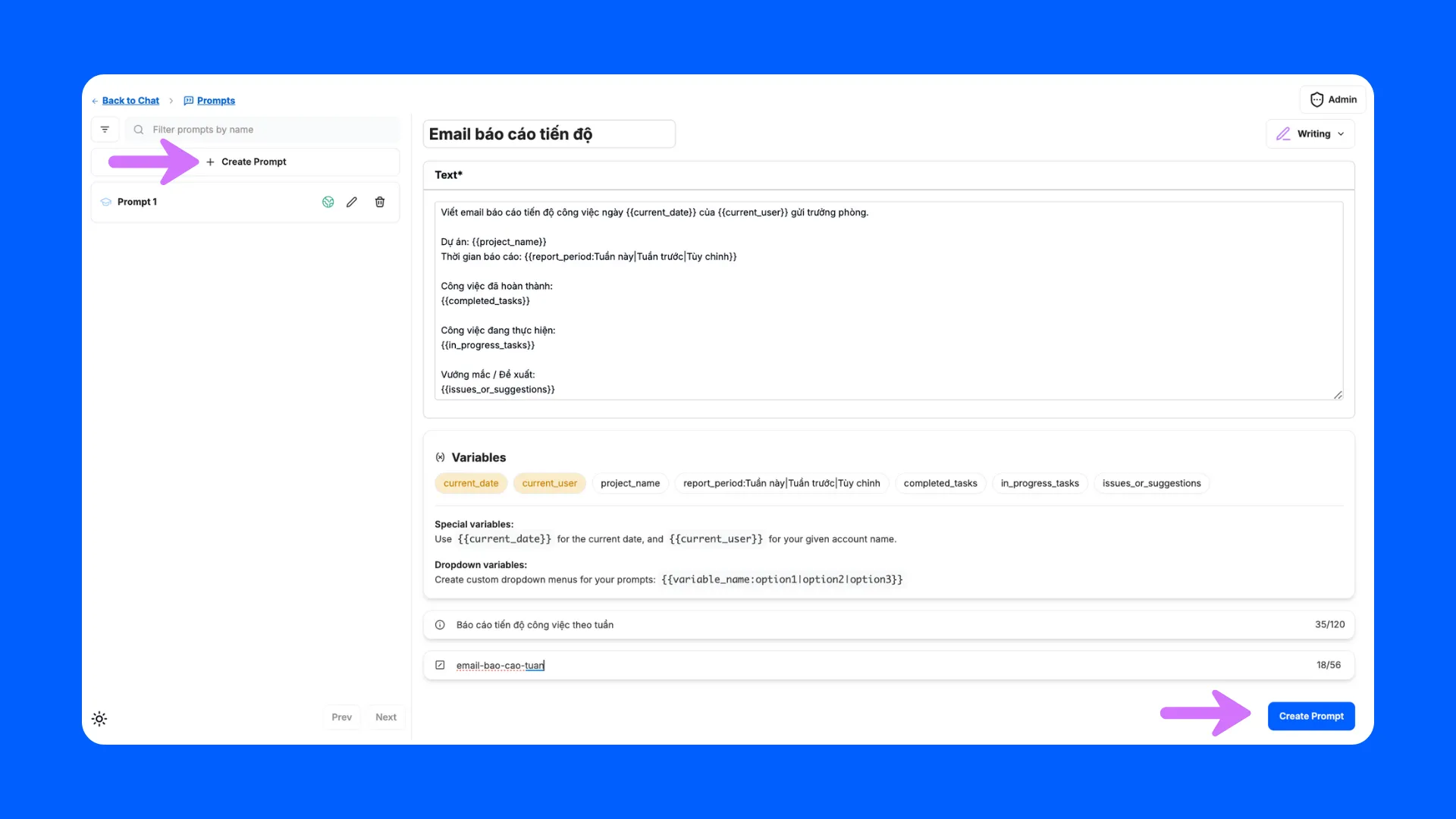
* **プロンプトを作成**をクリックすると、**プロンプト作成画面が表示されます**。以下を入力してください:
* **プロンプト名**
* **テキスト**:プロンプトの内容
ヒント:`{{variables}}`やコマンドを活用し、強力かつ動的なプロンプトを作成できます。
* **説明**(任意)
* クイックアクセス用の**コマンド**(任意)
2\. **画面右側のサイドパネルから:**画面右側のサイドパネル切り替えをクリックします。**プロンプト → 管理**に進みます。
## プロンプトライブラリの管理
### ▼ プロンプトのフィルタ
**プロンプト名**で検索し、必要なプロンプトをすばやく見つけられます。
### ➕ 再利用可能なプロンプトを作成
* **プロンプトを作成**をクリックすると、**プロンプト作成画面が表示されます**。以下を入力してください:
* **プロンプト名**
* **テキスト**:プロンプトの内容
ヒント:`{{variables}}`やコマンドを活用し、強力かつ動的なプロンプトを作成できます。
* **説明**(任意)
* クイックアクセス用の**コマンド**(任意)
 ### 🗂️ プロンプトの分類・共有・削除
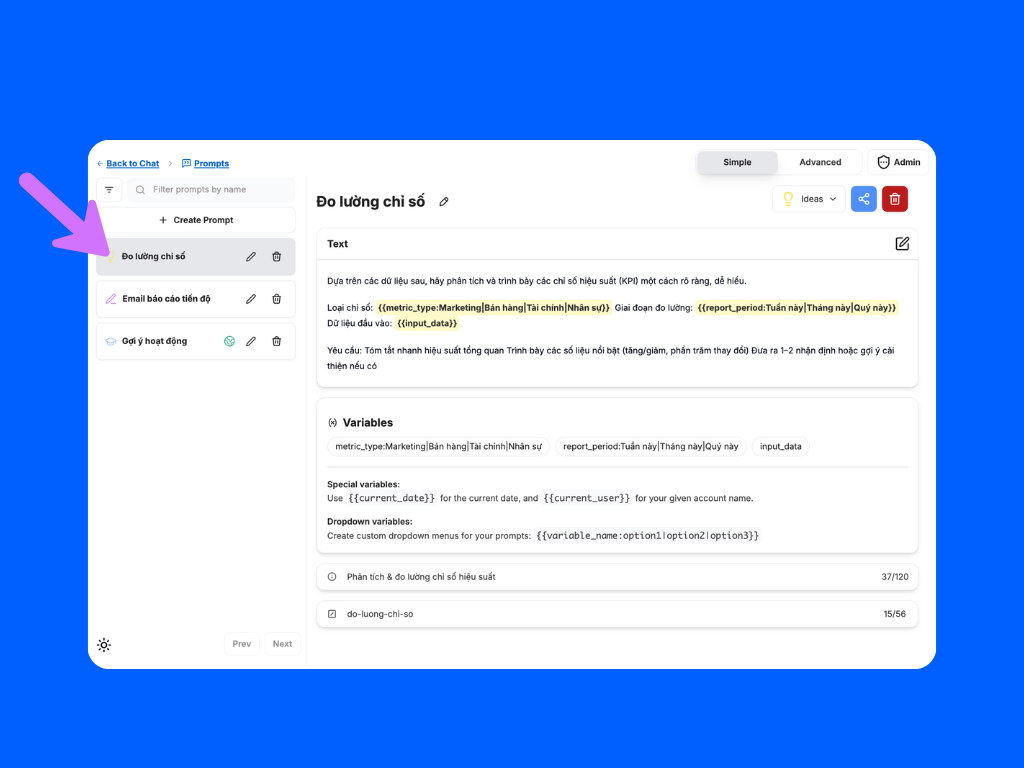
左側のパネルで任意のプロンプトをクリックして操作できます:
* **プロンプトの分類**:関連するカテゴリ(例:「アイデア」「ライティング」「学習」など)に割り当てて整理できます。
* **プロンプトの共有**:チームや他のユーザーとプロンプトを共有し、共同作業が可能です。
* **プロンプトの削除**:不要になったプロンプトを削除できます。
### 🗂️ プロンプトの分類・共有・削除
左側のパネルで任意のプロンプトをクリックして操作できます:
* **プロンプトの分類**:関連するカテゴリ(例:「アイデア」「ライティング」「学習」など)に割り当てて整理できます。
* **プロンプトの共有**:チームや他のユーザーとプロンプトを共有し、共同作業が可能です。
* **プロンプトの削除**:不要になったプロンプトを削除できます。